
A cable that fits can still be the wrong cable. A coax cable carries radio-frequency signals for television, antenna and wireless applications, with 75-ohm cable commonly used for video and 50-ohm cable for data and wireless systems. Its type and length affect signal loss, so matching the cable to the equipment and route matters.
Choosing coax cable by appearance alone can be misleading. Cable types differ in impedance, construction and attenuation, and longer runs can weaken a signal. This guide explains common uses, how RG types differ, and how to read specifications and plan a suitable cable run in Australia.
You’ll learn which details matter when comparing cable for a TV connection, an antenna feeder or an RF installation, including how to account for bends, terminations and the route. With these basics, you can choose more confidently based on the signal and the distance it must travel.
Key Takeaways
- Match cable impedance to the equipment: 75-ohm cable is commonly used for video, while 50-ohm cable suits data and wireless applications.
- Compare RG types by attenuation, diameter and flexibility, not just by their labels.
- Plan the full route, including vertical drops, terminations and detours; adding 15% to the measured run helps allow for these.
- Use standards and cable designations to understand a cable’s intended application, then check that it suits the operating frequency and installation environment.
- For longer antenna feeder runs, account for signal loss and choose cable accordingly; LMR-400 is a 50-ohm option for wireless communications and antenna feeders.
Coaxial cable construction and signal transmission
A coaxial cable has a central conductor, an insulating dielectric, a conductive shield and a protective outer jacket. The conductor carries the radio-frequency signal, while the surrounding shield provides a return path and helps limit external interference. In television and satellite connections, the cable’s impedance must match the connected equipment to help avoid reflections and degraded reception.
Dielectric material and conductor design affect how quickly signals travel and how much energy is lost. Solid polyethylene insulation has a velocity factor of about 0.66, meaning the signal travels more slowly than it would through a vacuum. Larger or specially constructed lines can suit different power, frequency and installation needs. For example, a 1+5⁄8-inch flexible coaxial line is 41 mm in diameter and uses mostly air dielectric, while semi-rigid cable has a solid copper outer sheath.
Shielding helps reduce interference, but it doesn’t remove every installation constraint. Quad-shield cable is described as providing around 90% more interference rejection than standard dual-shield cable. However, extra layers can make cable thicker and less flexible. Coaxial cable can carry digital and radio-frequency signals through a single, shielded path, but cable attenuation increases with frequency and distance. Ethernet carries network data over twisted pairs, while fibre carries light and avoids electrical interference along the fibre itself. The right medium depends on the equipment, route and signal requirements.
For digital audio, S/PDIF connections use a characteristic impedance of 75 ohms. A proper 75-ohm coaxial cable is the recommended choice between a digital audio source and a digital-to-analogue converter (DAC). An audio lead that merely has compatible-looking connectors may not have the impedance required for this connection.
How much does coax cable cost in Australia? The price depends on the cable type and length, shielding, connectors and any additional components needed. A short domestic television lead and a specialised RF feeder have different construction requirements, so compare the specification and complete cable run rather than judging by length alone.
How do I connect and install coax cable and F-type connectors? Choose cable and connectors that match the equipment, then cut the cable cleanly and prepare its layers for the connector design. Fit the F-type connector with the centre conductor straight and the shield in contact with the connector body. Secure it without crushing or loosening the cable, connect both ends firmly, and check the signal.
- Keep the centre conductor clear of stray shield strands, which can cause a short circuit.
- Maintain the cable’s shape at bends and avoid pulling hard on the connector.
- For a digital TV or satellite feed, check the connection at both the receiving equipment and the source.
Differences between RG cable types
RG labels identify different cable designs, but don’t determine suitability on their own. Compare impedance, diameter, attenuation, run length and connector compatibility before choosing.
RG-6, RG-11 and RG-59 cables
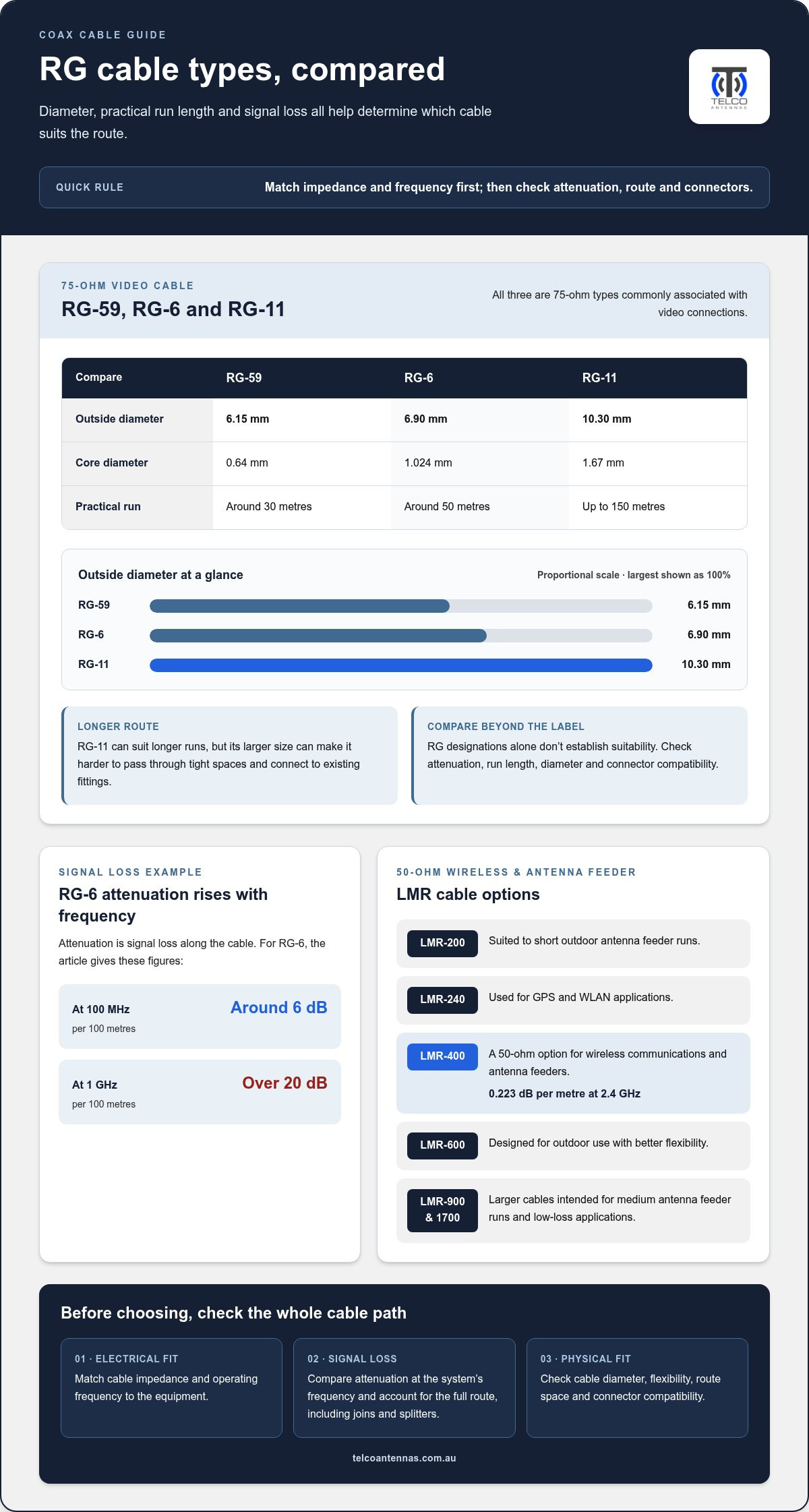
RG-59 is the narrowest of these types, with a 6.15 mm outside diameter and a 0.64 mm core. RG-6 measures 6.90 mm across, with a 1.024 mm core. RG-11 is thicker at 10.30 mm, and its core measures 1.67 mm. All three are 75-ohm types, commonly associated with video connections.
Typical practical runs are around 30 metres for RG-59, around 50 metres for RG-6, and up to 150 metres for RG-11. The thicker RG-11 can suit longer routes, but its size affects how easily it passes through tight spaces and connects to existing fittings.
Cable types and signal attenuation
Attenuation is signal loss along the cable, and it rises as frequency increases. RG-6 typically loses around 6 dB per 100 metres at 100 MHz, rising to over 20 dB per 100 metres at 1 GHz. This difference matters for higher-frequency signals, including satellite feeds, and for long routes.
Assess the operating frequency and total cable path, including joins and splitters. Thicker cable may reduce signal loss, but can be less flexible and need compatible connectors. Don’t choose by diameter alone: compare attenuation at the frequency your equipment uses.
LMR cable types and uses
LMR cables are 50-ohm designs used for wireless communications and antenna feeder runs. LMR-200 suits short outdoor antenna feeder runs, while LMR-240 is used for GPS and WLAN applications. For a concrete comparison, LMR-400 has an attenuation of 0.223 dB per metre at 2.4 GHz.
LMR-600 is designed for outdoor use with better flexibility. LMR-900 and LMR-1700 are larger cables intended for medium antenna feeder runs and low-loss applications. Check connector fit, route space and electrical requirements alongside attenuation, especially where antennas connect to radio equipment.
Choosing a coax cable
How do I choose the right coax cable for my needs? Start with the equipment’s impedance and frequency, then compare cable attenuation against the route length. For television or satellite video, the listed RG types are 75 ohms; wireless and antenna feeder systems commonly use 50-ohm cable.
Consider the physical installation too. Thicker cable can be harder to route around corners or through existing openings, while thinner cable may have greater signal loss over the same distance. Match connectors to the cable and equipment, and account for the entire route when assessing loss.
- Check impedance and frequency compatibility first.
- Compare attenuation at the system’s operating frequency.
- Choose a diameter and construction that suit the route and connectors.
For antenna feeder planning, use the cable’s frequency-specific attenuation and installation dimensions to compare RF cable specifications.
What is a coaxial cable used for?
A coax cable carries radio-frequency signals between equipment, including televisions, antennas, wireless radios and communications systems. Its central conductor carries the signal, while the surrounding shield provides a return path and helps limit external interference. Applications differ, so the cable’s impedance must suit the connected equipment. A 75-ohm design is commonly used for video, while 50-ohm cable is common in data and wireless systems.
Impedance describes how a cable resists alternating current at radio frequencies. If the cable and equipment have mismatched impedance, some signal energy reflects towards its source rather than reaching the load. That can disrupt transmission, so match the cable specification to both connected devices. For example, a 75-ohm television input calls for a 75-ohm feed, not a 50-ohm antenna lead.
Core size varies between cable designs, but it doesn’t define impedance by itself. RG-178/U has 50-ohm impedance and an outside diameter of 1.8 mm; RG-8/U is also 50 ohms, with a 10.3 mm outside diameter. For 75-ohm types, RG-59 has a 0.64 mm core, RG-6/U has a 1.024 mm core, and RG-11 has a 1.67 mm core. These dimensions describe different constructions, not interchangeable connections.
Use the application to narrow the choice. A 75-ohm RG-6 or RG-11 connection suits video equipment when its connectors and route match the installation. A 50-ohm line suits wireless communications, where radios and antennas are designed around that impedance. The required operating frequency and cable distance also affect signal loss, so compare attenuation at the frequency in use instead of selecting by core size alone.
Coaxial cable also carries broadband internet signals in Australian NBN hybrid fibre-coaxial areas. DOCSIS 3.1 technology supports multi-gigabit speeds over coaxial cable in those HFC areas. The cable is part of the physical transmission path; the service and equipment determine how the network operates. For an antenna system, the same principle applies: match radio, feeder and antenna impedance so the signal transfers through the series of connected components.
Before installation, check equipment labels or specifications for impedance, connector type and frequency range. Trace the full route, note any joins or splitters, and select cable suited to the distance and environment. A cable may fit physically but still be electrically unsuitable. Check impedance first, then assess attenuation, construction and connection points for the system.
Cable standards and designations
Standards and cable markings describe different things. A designation such as RG-58 identifies a cable type, while a technical standard sets requirements for a defined cable category or installation. Read the marking alongside the manufacturer’s specifications. That helps identify conductors, shielding, operating frequency and attenuation without assuming two cables are interchangeable.
RG designations originated under the U.S. military’s MIL-C-17 specifications. They remain widely used as cable type labels, but the letters and numbers alone don’t provide every performance detail. For example, RG-58 has an outside diameter of 4.95 mm, while RG-213 measures 10.30 mm. RG-12 measures 14.10 mm. These dimensions help with routing and connector selection, but don’t replace checks of impedance and frequency response.
Other standards describe cable characteristics and intended applications. EN 50117-1 is the generic specification for coaxial cables. EN 50117-9-3:2019 specifies indoor drop cables operating from 5 MHz to 6 000 MHz. EN 50117-10-2:2019 specifies outdoor drop cables operating from 5 MHz to 3 000 MHz. These ranges help installers compare a cable’s intended operating band with the signal being transmitted.
Fire performance has its own designation. EN 50575 identifies reaction-to-fire classes for cables under the Construction Products Regulation. That classification concerns how a cable reacts to fire, rather than its electrical performance or resistance to electromagnetic interference. For an installation, consider the route and environment as well as transmission requirements, then choose cable with specifications suited to those conditions.
Are there Australian standards or installation rules for coax cable? In Australia, keep coaxial cable runs separated from mains wiring and check the applicable installation requirements. Keep that route requirement separate from product standards, which describe cable construction, performance or fire classification.
Some designation systems use a letter to indicate an electrical characteristic. In the JIS designation system, D indicates 50-ohm coaxial cable. This can help identify a cable’s impedance, but other details still matter: frequency range, attenuation, shielding and connector compatibility affect whether it suits the equipment.
Use a practical reading sequence before installation:
- Identify the cable’s full designation and applicable standard, such as RG-58 or EN 50117-1.
- Compare its impedance and frequency range with the connected equipment.
- Check attenuation, shielding and fire classification against the signal and route.
- Plan the installation path, including separation from mains TPS cable.
A designation is a starting point, not a performance guarantee. Check the specification for the exact cable: products with similar labels can differ in construction, attenuation and suitability for indoor or outdoor use.
Cable lengths and product range
Measure the complete route, not just the straight-line distance between devices. Include vertical drops, connector tails and detours around walls or equipment. Add 15% to the measured run to allow for these installation details. A route that measures 10 metres therefore needs allowance for extra cable beyond that measurement. Planning the finished path first helps avoid a cable that’s too short or excessive coiled length.
For domestic applications, standard RG-6 dual-shield cable suits most runs under 20 metres. RG-6 quad-shield is recommended for runs between 20 and 50 metres, where additional shielding can help resist interference. These are practical selection guides, not a substitute for assessing frequency and attenuation. Higher-frequency signals lose more energy along a cable, so the equipment’s operating band matters alongside length.
As a run extends, calculate the complete signal path rather than considering cable alone. Connectors and coaxial splitters also affect the signal; splitters add 3 to 8 dB of loss per output. If a route exceeds 50 metres, consider RG-11 or an inline amplifier. The choice depends on the required signal level and cable attenuation at the operating frequency, not distance in isolation.
Installation conditions matter too. Outdoor coaxial cable uses a UV-stabilised jacket and lasts 15 to 20 years. Indoor PVC cable used outdoors can crack within 2 to 3 years. Secure outdoor runs with saddle clips at 600 mm spacing, and visually inspect the jacket every 5 years. Keep bends broad: the recommended bend is no tighter than 10 times the cable’s outer diameter.
- Measure along the planned route, then add the 15% allowance.
- Use the cable’s attenuation specification at the system frequency to assess longer runs.
- Choose an outdoor-rated jacket for exposed installations, rather than indoor PVC.
- Include connectors, splitters, bends and mounting points in the cable plan.
For a wireless antenna feeder, cable type also depends on impedance and attenuation at the operating frequency. LMR-400 is a 50-ohm cable for wireless communications and antenna feeder runs. Its attenuation is 0.223 dB per metre at 2.4 GHz. That specification helps compare signal loss across a planned route; it doesn’t make every length or connector suitable for every installation.
Bulk reels can suit installations with several runs or a continuous route, while pre-cut lengths can simplify a single connection. Select the cable construction first, then determine the reel or cut length from the measured path and termination needs. Review RF cable options for your installation to match the cable type to the frequency, route and application.
Telco Antennas: Cel-Fi GO Mobile Signal Boosters
Telco Antennas supplies Cel-Fi GO Mobile Signal Boosters for situations where mobile coverage needs attention. If your project also involves an antenna feeder, the cable’s impedance, frequency and route length remain important selection factors. Telco Antennas also supplies MIMO Antennas and LMR-400 Coaxial Cables for RF applications, plus Point-to-Point Wireless Bridges for wireless links between locations.
Telco Antennas supplies coaxial cables, antennas, mobile signal boosters and point-to-point wireless bridges for different requirements. Start with the system you’re building, then match the cable specification to the connected equipment and installation route. This helps narrow down the hardware needed for your application.
To discuss equipment for your RF application, contact Telco Antennas.
Plan your next RF connection
Before choosing coax cable, define what the connection needs to support and how the equipment will be used. A television feed, mobile signal system and wireless antenna link each need different components. Record the equipment specifications, installation environment and cable route to guide your choice of compatible hardware.
For mobile coverage and RF infrastructure needs, Telco Antennas supplies Cel-Fi GO Mobile Signal Boosters, MIMO Antennas and LMR-400 Coaxial Cables. These offerings address different parts of a system, so identify the outcome you’re working towards before deciding what equipment belongs in the setup. A clear application brief can make the next step more focused.
If you’re planning an antenna feeder or broader RF setup, contact Telco Antennas to discuss the equipment suited to your application. With the requirements set out, you can move forward with a considered connection plan.
Frequently Asked Questions
What Is a Coaxial Port?
A coaxial port is the socket that connects a cable to equipment such as a television, modem, receiver or camera. Its shape indicates the connector required: threaded F-type sockets are common on television equipment, while BNC connectors use a bayonet-style twist lock. Match the plug to the socket and don’t force it, as damaged threads or contacts can interrupt the connection.
What are the advantages and disadvantages of coax cables?
Coaxial cables combine a centre conductor with a surrounding shield, helping contain signals and resist electromagnetic interference. They’re commonly used with compatible television, antenna and RF equipment, and their connectors can provide a secure connection. They can be bulkier than twisted-pair Ethernet, less flexible than some alternatives and subject to signal loss over distance. A damaged shield or poor termination can also affect performance.
What is coaxial cable and how does it work?
A coaxial cable carries an electrical signal through a central conductor, with insulation separating it from the surrounding conductive shield. The shield provides a return path and helps reduce interference. For example, a receiver can use the cable to carry a broadcast signal from an antenna to its input. The cable’s impedance and connectors need to suit the connected equipment for the signal to transfer correctly.
What are the different types of coax cable, such as RG6 and RG59?
RG-6, RG-59 and RG-11 are common 75-ohm types used for video applications, but their diameters and practical run lengths differ. RG-59 is narrower and generally used for shorter routes; RG-6 is common in domestic television runs; thicker RG-11 can suit longer routes. RG labels alone don’t describe every performance detail, so compare the specification and connector compatibility for your equipment.
Which coax cable is best for Australian TV, NBN, and satellite installations?
For Australian television and satellite equipment, choose a 75-ohm cable that matches the device connectors and route. RG-6 is commonly suitable for domestic runs, while a longer route may call for a lower-loss option such as RG-11. NBN hybrid fibre-coaxial connections use the coaxial network provided for that service; a replacement lead should match the modem and connection requirements.
Can coax cable be used for internet, TV antennas, and CCTV?
Yes, coaxial cable can carry internet signals on hybrid fibre-coaxial networks, television signals from compatible antennas, and video in CCTV systems designed for coax. The equipment determines the connection type: analogue CCTV cameras may connect to a recorder through coax, while IP cameras commonly use Ethernet. When planning a surveillance setup, guidance from CCTVSecurityPros - Professional Security Cameras and Systems can help clarify which camera types and cabling standards suit your property. Check the camera, recorder or modem inputs before reusing an existing cable, since similar-looking connections can carry different signal formats.
How does coax cable compare with fibre-optic and Ethernet cable?
Coaxial cable carries electrical signals through a shielded conductor, Ethernet typically carries data over twisted copper pairs, and fibre-optic cable carries data as light. Ethernet is often used for local device and network connections, while fibre supports optical transmission. Coaxial remains useful when equipment has a matching input or a service uses that network. Choose a medium supported by both endpoints and suited to the application.
What are the common causes of coax signal loss and how can I troubleshoot them?
Signal loss can result from excessive cable length, higher operating frequency, loose connectors, damaged shielding, sharp bends or splitters. Check that each connector is seated firmly and the jacket is free of crushing or cracks. Temporarily remove splitters and test the equipment directly. If reception returns, inspect the removed connections and components; if not, compare the coax cable and device specifications.


