
The place to start when deciding where to buy Poynting antennas in Australia is the brand’s Australian distributor network. Distributor partners can provide technical advice to help match an antenna to its intended use. Local availability is best approached by identifying the model and application you need, then checking which products are supplied through distribution.
Finding a product name is only the first step. The antenna must also suit the network technology, equipment connections and installation environment, so compare specifications as well as sellers.
This guide explains how to find Australian distribution, assess which Poynting products may suit your setup, and check availability through local channels. It also outlines the practical details to compare, including frequency range, MIMO configuration, connectors and cable requirements, so you can narrow the options before taking the next step.
Key Takeaways
- Start with Poynting’s Australian distributor network and identify the model you need to check local product availability.
- Compare an antenna’s frequency range, MIMO configuration and connectors with your router or communications equipment before choosing.
- Plan installation around the mounting position, cable routing and requirements of the site and equipment.
- For a broader mobile connectivity setup, learn how Cel-Fi GO Mobile Signal Boosters, MIMO antennas and LMR-400 coaxial cables may fit the application.
- Use the article’s practical checks to narrow your options and understand when specialist RF support could help with a more complex deployment.
Australian Poynting distributor and product availability
When considering Poynting antennas in Australia, compare the model’s specifications with your equipment and installation needs. Telco Antennas supplies antennas and other telecommunications hardware, and can help with system design and engineering.
Australian distributors and stock
Australian distribution is the route to product information, technical guidance and local supply. A distributor partner can help match an antenna to its application, while product availability depends on the particular model and distribution channel. Start with the model name, then compare its frequency range, configuration and connectors against your system before arranging an order.
Poynting’s range covers antennas for wireless technologies including 3G, 4G, 5G, LTE, Wi-Fi, GPS and LoRa. The technology labels help narrow the search, but they aren’t enough on their own. For example, a 5G antenna’s frequency range and connector arrangement still need to match the router or radio being used.
Product categories include omni-directional, MIMO and directional antennas. An omni-directional design can suit applications requiring reception from multiple directions, while a directional antenna focuses on a particular direction. MIMO configuration matters when equipment uses multiple antenna paths. These categories describe different operating approaches, not interchangeable product names.
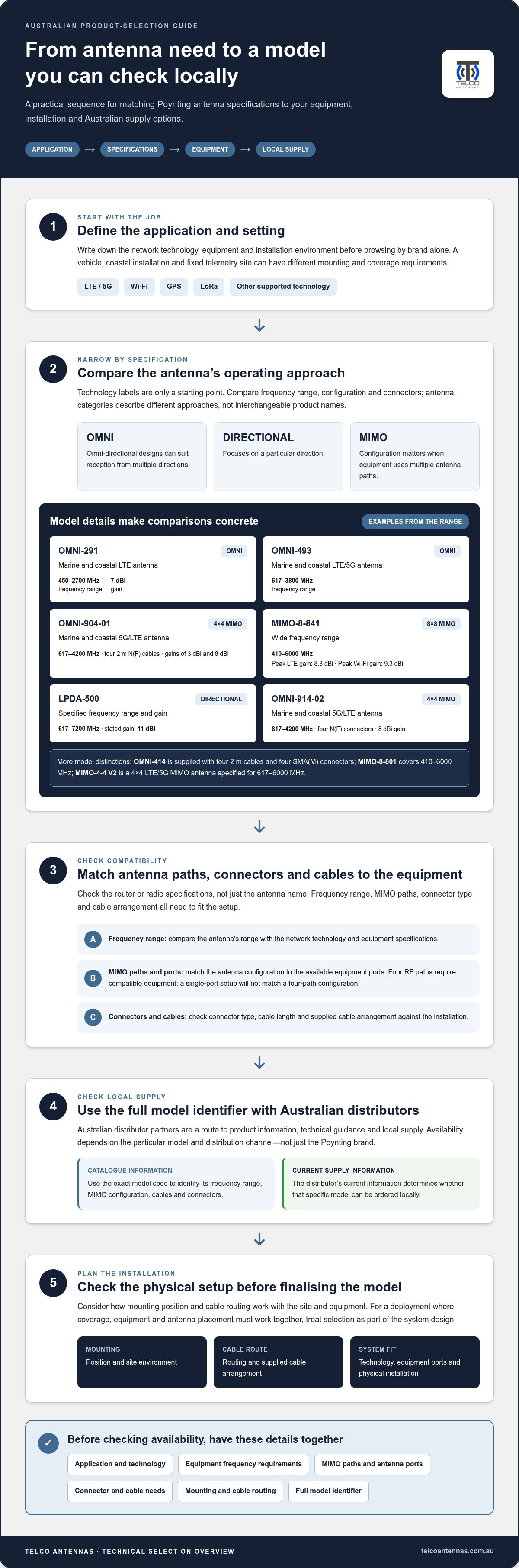
Use model specifications to distinguish similar-looking options. The OMNI-291 marine and coastal LTE antenna covers 450 - 2700 MHz and has a gain of 7 dBi. The OMNI-493 marine and coastal LTE/5G antenna covers 617-3800 MHz. The OMNI-904-01 is a 4x4 MIMO marine and coastal 5G/LTE antenna covering 617-4200 MHz, with four 2 m N(F) cables and gains of 3 dBi and 8 dBi.
Other models serve different configurations. The MIMO-4-15 is one option to consider when comparing antenna configurations with your system. The MIMO-8-841 covers 410-6000 MHz and uses an 8x8 MIMO configuration, with peak LTE gain of 8.3 dBi and peak Wi-Fi gain of 9.3 dBi. The LPDA-500 is specified for 617-7200 MHz, with a stated gain of 11 dBi.
These examples make model-level comparison more useful than searching by technology alone. Check whether the router has the required antenna ports, and whether the antenna’s connectors and cable arrangement fit the installation. For instance, an antenna with four RF paths requires compatible equipment; a single-port setup won’t match a four-path configuration.
Ordering and product availability
Availability relates to the selected model, not just the Poynting brand. Use the exact model identifier when reviewing a distributor’s product information, because antenna families can include different frequency ranges, MIMO configurations, cables and connectors. A catalogue entry helps identify the product; the distributor’s current supply information determines whether that specific model can be ordered locally.
Before placing an order, work through these checks:
- Identify the application: record whether the system needs LTE, 5G, Wi-Fi, GPS or another supported technology.
- Match the equipment: compare frequency range, MIMO paths and connector type with the router or radio specifications.
- Confirm the model: use the full identifier, such as OMNI-291 or MIMO-4-15, rather than a broad category.
- Review the installation: consider mounting position, cable routing and the supplied cable arrangement.
This sequence reduces the chance of selecting a product with the wrong interface or configuration. If the distributor lists several options, compare the model specifications first, then use the exact identifier when checking local ordering information. For a system with four 5G or LTE antenna ports, for example, compare it with a model designed for a four-path MIMO setup.
For a deployment where coverage, equipment and antenna placement must work together, treat product selection as part of the system design. A suitable Poynting model depends on the radio technology, the equipment ports and the physical installation, not simply the antenna category.
Where to buy Poynting antennas in Australia
If you’re deciding where to buy Poynting antennas in Australia, start with Poynting distributor partners serving the Australian market. These partners provide advice and technical expertise to help customers identify a suitable solution. Use the exact model name and your equipment requirements to focus the discussion on the antenna you need, rather than browsing by brand alone.
Before searching for a particular model, write down the connection type, network technology and installation environment. A vehicle, coastal installation and fixed telemetry site can have different mounting and coverage requirements. Those details help narrow the product category and give a distributor useful context for discussing product options and local availability.
Product information is most useful when it identifies the full model code and its technical configuration. For example, the OMNI-914-02 is a 4x4 MIMO marine and coastal 5G/LTE antenna covering 617-4200 MHz. Its four N(F) connectors and 8 dBi gain are details to compare with your equipment and system design, not just search terms.
Other product identifiers help distinguish antennas designed for different installations. The OMNI-414 is supplied with four 2 m cables and four SMA(M) connectors. The MIMO-8-801 covers 410-6000 MHz, while the MIMO-4-4 V2 is a 4×4 LTE/5G MIMO antenna specified for 617-6000 MHz. Use these details to identify a model that aligns with your setup.
- For multiple radio paths: compare the antenna’s MIMO configuration with the available ports on your equipment.
- For marine or coastal use: identify models described for that environment, then check their frequency range and connector details.
- For directional reception: compare directional models with omni-directional options, considering the signal direction and installation position.
- For several technologies: check each relevant frequency range rather than relying on a broad label such as 5G or LTE.
A distributor’s technical advice is especially useful when the equipment specification and antenna description use different terminology. For instance, a router may describe its ports by supported bands or connection type, while an antenna listing gives a frequency range and connector format. Bring both sets of details together before settling on a model.
Availability is model-specific. A product family can include several antenna designs, and the presence of one model in local distribution doesn’t establish the availability of another. Search or enquire using the full model identifier, then distinguish product information from current ordering availability. This keeps the conversation focused on the exact configuration your project requires.
To prepare for an availability discussion, gather the following information:
- Record the full Poynting model name, if you have already selected one.
- Note the router or radio model and its antenna-port configuration.
- Describe the application, such as mobile connectivity, coastal communications or telemetry.
- Identify mounting constraints and the cable route between antenna and equipment.
These steps can also show when the original model may not be the only suitable option. A different frequency range, connector or MIMO configuration can change compatibility, even when two antennas appear to serve the same broad technology. Distributor partners can help interpret those trade-offs using the equipment and site details you provide.
For a broader connectivity project, explore Australian antenna system options alongside the Poynting model selection. That context can help you consider how the antenna fits into the overall communications setup.
Are there Australian regulations or installation requirements for Poynting antennas?
Installation requirements depend on the site, mounting method and connected equipment. Separate practical installation checks from legal questions: the antenna model alone does not determine every requirement for a roof, vehicle, mast or marine installation.
Start by identifying the installation location and who controls it. A rooftop antenna on a rented building, a mast at a commercial site and an antenna fitted to a privately owned vehicle involve different access and mounting considerations. Get permission from the relevant owner or site manager before attaching equipment to property you do not control.
Next, assess the physical mounting point. The surface must suit the bracket, antenna and expected site conditions, while the cable route should avoid sharp edges, moving parts and unnecessary exposure. For a marine installation, salt and weather exposure make material selection and secure mounting especially relevant. The Poynting Heavy Duty Marine Mount Antenna Bracket uses a 1"-14T mount and 316 S/S construction.
Plan the mounting and cable route
Measure the route from the antenna position to the connected equipment before installation. Extra cable adds length to the signal path, so avoid extensions that exceed the installation’s actual needs. Poynting antenna cable extensions are available in standard lengths of 5 and 10 meters, and the product guidance recommends adding no more than 10 meters to the standard supplied cable.
Connector compatibility also affects installation. The antenna cable must connect correctly to the router or radio, and adapters add connection points. Map each antenna lead to the corresponding equipment port before securing cables or closing access panels. This is especially important with MIMO systems, where each RF path has a separate role.
Consider access, structure and site conditions
Roof and mast installations need a stable mounting surface and safe access to the work area. Vehicle installations add vibration, movement and cable protection to the planning. At a fixed telemetry site, the antenna position should suit the radio link and surrounding structures. These factors shape the installation method, regardless of frequency range.
Where installation involves structural changes, work at height or electrical equipment, plan the work with appropriately qualified people and follow the site’s applicable procedures. Requirements vary by installation: a roof-mounted antenna, marine bracket and vehicle-mounted unit each have distinct physical considerations.
For commercial or shared sites, document the proposed location, mounting method and cable entry before work begins. An installation plan can note the antenna position, cable route, equipment location and access constraints. A mast near existing infrastructure, for example, may require coordination with the site manager to avoid obstructing equipment or access.
Confirm that the radio equipment and antenna configuration are compatible before installation. A Poynting MIMO antenna uses multiple RF paths, so the connected device needs matching antenna ports and a suitable configuration. For a point-to-point wireless bridge, include link design and antenna alignment in the installation plan.
Use this sequence to prepare:
- Identify the site type, mounting surface and person responsible for site access.
- Match the antenna connectors and configuration to the radio or router.
- Measure the cable route and minimise unnecessary extensions.
- Plan secure mounting, cable protection and safe access before installation.
For help aligning antenna hardware with a broader communications setup, discuss your antenna system requirements.
Telco Antennas: Cel-Fi GO Mobile Signal Boosters
If you are also assessing mobile coverage, Telco Antennas supplies Cel-Fi GO Mobile Signal Boosters. A booster and an external antenna serve different roles, so consider the coverage issue, connected equipment and installation requirements together rather than assuming one component replaces another.
For systems using multiple antenna paths, Telco Antennas also supplies MIMO Antennas and LMR-400 Coaxial Cables. If the requirement is a site-to-site wireless link rather than mobile coverage, Point-to-Point Wireless Bridges may be more relevant. The right equipment depends on the network design and the connection the installation needs to support.
Contact Telco Antennas to discuss which of these communications options suits your application.
Make your next connectivity decision with confidence
Before choosing hardware, define what the installation needs to support. Note the network or equipment involved, site conditions, and any existing cabling or antenna connections. These details help determine whether you need an antenna component, a broader mobile signal setup or a link between sites.
If you’re weighing where to buy Poynting antennas in Australia, keep the system goal in view, not just the model name. Telco Antennas offers Cel-Fi GO Mobile Signal Boosters, MIMO Antennas and LMR-400 Coaxial Cables for different connectivity requirements. The relevant option depends on the equipment and application you’re planning for.
Prepare your equipment details and a short description of the installation before taking the next step. Contact Telco Antennas for help discussing a suitable communications setup, and move forward with a clearer plan.
Frequently Asked Questions
Looking for Antenna Solutions?
Telco Antennas offers several options for communications projects, including MIMO Antennas, Cel-Fi GO Mobile Signal Boosters and LMR-400 Coaxial Cables. The right category depends on the job: MIMO antennas connect to compatible multi-path equipment, while a signal booster addresses mobile coverage within its intended setup. For a point-to-point connection between sites, consider a Point-to-Point Wireless Bridge. Define the network and equipment first.
Which Australian retailers and distributors sell Poynting antennas?
People asking where to buy Poynting antennas in Australia can start with POYNTING distributor partners serving the Australian market. Those partners provide technical advice to help match products to applications. No specific retailer ranking is needed to narrow the search: use the antenna’s exact model identifier and intended use when viewing distributor product information. This helps distinguish Poynting models from antennas designed for similar technologies.
Where can I buy Poynting antennas online in Australia?
Look for Australian POYNTING distributor partners that offer online product information or ordering. Search by the full model code, not just terms such as “5G antenna”, then compare the listed frequency range and connection details with your equipment. Online listings can help identify the model and purchasing channel. For a multi-antenna setup, note the number of radio paths required before selecting a configuration.
Which Australian stores stock Poynting antennas for same-day or local pickup?
Same-day collection and local pickup depend on a distributor’s fulfilment arrangements and the particular model’s stock location. An online product listing does not, by itself, establish that a nearby collection option is available. Plan around the exact model code and your installation date, especially if a replacement antenna is needed to restore an existing system. Allow time to match connectors and configuration before fitting it.
Which Australian retailers offer the best prices and warranty on Poynting antennas?
Compare like with like: check the same model and configuration rather than different antenna types. Review what the package includes, such as cables or connectors, and the purchase terms. Also check technical compatibility: an antenna that does not match the equipment ports or required frequency range may not suit the installation.
How do I choose the right Poynting antenna for 4G, 5G, Wi-Fi, or satellite use?
Match the antenna’s supported technology and frequency range to the equipment and signal you need. For 4G or 5G, check the router’s bands, antenna ports and MIMO requirements. For Wi-Fi, confirm the radio’s connection type and intended coverage direction. Satellite internet equipment needs an antenna designed for that system; GPS support is not the same as a satellite internet antenna. Treat each use case separately.


