
A small inverter can run Starlink in a caravan, but it converts 12V to 240V and then back to 56V DC, with around 10-20% of energy typically lost in the inverter stage. A suitable DC converter can power a compatible system directly from the caravan’s 12V supply, avoiding that extra conversion. The right Starlink 12V conversion for a caravan depends on the dish model and the power system you’re connecting it to.
An inverter is a familiar way to power household-style equipment from a battery, but it can use extra power, even while idle. A direct DC setup may make better use of your available battery capacity.
This guide explains how to match a conversion kit to your Starlink model, protect and size its wiring, and avoid common installation mistakes. You’ll also see what to consider when choosing between an inverter and direct 12V power, so you can plan a setup that suits your caravan’s electrical system.
Key Takeaways
- Match the DC conversion kit to your Starlink model and its required input voltage before planning the installation.
- Use a fuse-protected circuit, and size wiring for the current draw and cable run rather than relying on a plug fitting.
- Plan cable routing and connections carefully to avoid common faults that can interrupt power or affect the installation.
- Account for your caravan’s battery capacity and Starlink’s changing power demand when deciding how to run the system off-grid.
What’s the Best DC Conversion Kit to Power Starlink on a 12V Battery?
Choose a DC kit that matches your Starlink model and caravan battery system. The output voltage must be suitable for your dish, as a kit designed for another model may not fit.
-
Compare the DC kit and standard power supply
Compare the Cosmo Mini unit’s specifications with the standard Starlink Mini power supply before connecting either to 12V power. Starlink Mini is supplied with a 240V power supply and uses less power than Gen 3 or Standard models. For light tasks, Mini typically uses 20-30W. Match the converter’s output and connections to your exact Starlink model; don’t assume a product name alone proves compatibility.
-
Assess boost converter reliability
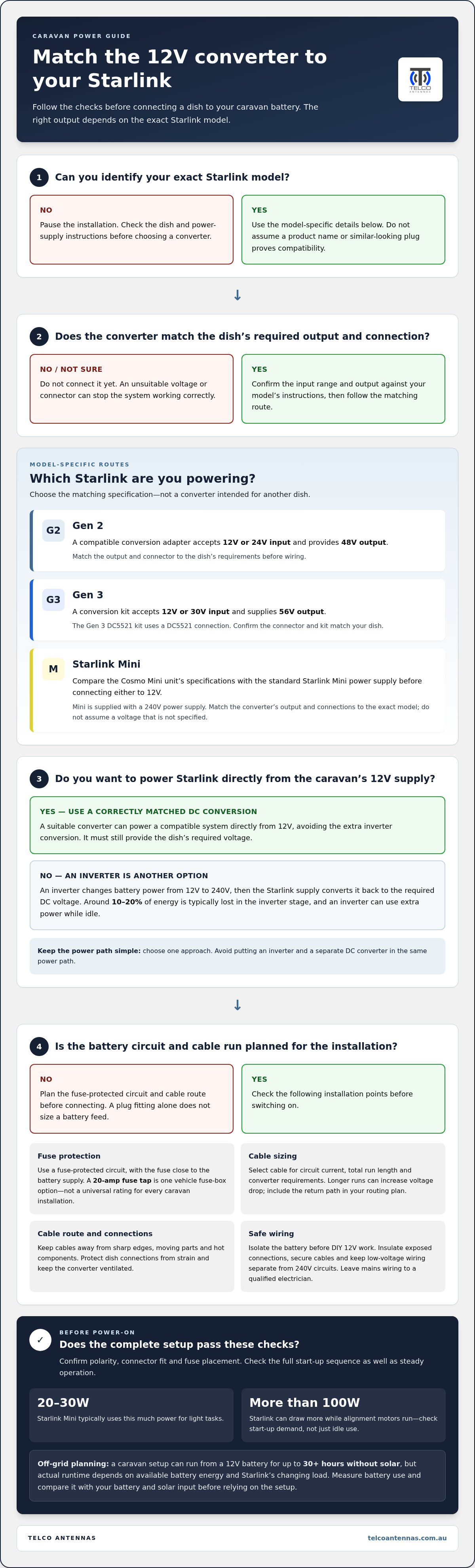
Choose a boost converter designed for your dish’s required input, rather than relying on a generic 12V-to-24V or 48V unit. A compatible Gen 2 conversion adapter accepts 12V or 24V input and provides 48V output. A Gen 3 conversion kit accepts 12V or 30V input and provides 56V output. These matched voltage specifications are the basis for reliable operation; an unsuitable output can prevent the system working correctly.
-
Check warranty, safety and performance
Keep the Starlink model and power supply instructions beside you when installing a conversion. Warranty treatment follows the applicable Starlink terms, while safe operation depends on correct voltage, polarity, connections and protected wiring. A DC converter avoids changing 12V to 240V and then back to 56V, but it must still provide the voltage required by the dish. Don’t substitute an inverter or converter output based only on its label.
-
Monitor power use and system stability
Measure battery use while Starlink is operating, and observe the system during start-up as well as steady use. A caravan setup can run from a 12V battery for up to 30+ hours without solar, but actual runtime depends on available battery energy and the Starlink model’s changing load. Mini typically uses 20-30W for light tasks, so compare measured consumption with your battery and solar input before relying on the setup off-grid.
Fuse protection and cable specifications
Plan the power path from the battery to the converter, then route the cables so the Starlink dish connections are protected from strain, heat and damage.
-
Check the voltage range and connector
Match the converter’s input, output and connector to your Starlink model before wiring. A Gen 3 conversion kit accepts 12V or 30V input and supplies 56V output; a Gen 2 adapter accepts 12V or 24V and supplies 48V. The Gen 3 DC5521 kit uses a DC5521 connection. Starlink Mini’s cigarette-lighter cable uses 18 AWG wire, but that does not size a separate battery feed.
-
Plan fuse protection and cable specifications
Connect the converter through a fuse-protected circuit, with the fuse close to the battery supply. A 20-amp fuse tap is one connection option for a vehicle fuse box, not a universal fuse rating for every caravan installation. Select cable for the circuit’s current, total run length and converter requirements; longer runs can increase voltage drop. Include the return path in your routing plan, and keep connectors accessible for inspection.
-
Follow Australian DIY wiring safety rules
For DIY 12V work, isolate the battery before cutting, crimping or securing conductors, then insulate exposed connections and prevent cable movement. Keep low-voltage wiring separate from 240V circuits, and don’t treat caravan 12V work as permission to alter mains wiring. Australian electrical requirements depend on the work and installation; avoid making unsupported assumptions about which rules apply. If the job involves mains wiring, leave that work to a qualified electrician.
Route the Starlink power cable away from sharp edges, moving parts and hot components, using suitable supports and grommets where it passes through panels. Measure the installed path before choosing a Cosmo Premium cable length, allowing enough slack for service access without leaving loops that can snag. Protect the starlink dish connector from tension, and keep the converter ventilated. Before switching on, confirm polarity, connector fit and fuse placement. A carefully planned Starlink power conversion avoids relying on a cigarette socket for a permanent battery feed.
Common 12V installation mistakes
Before switching on Starlink, check every connection and the full power path. A mismatch can interrupt internet access or overload a component.
- Don’t assume every Starlink model uses the same voltage. Gen 2 and Gen 3 conversion kits have different outputs: 48V and 56V respectively. Connecting a dish to a converter intended for another model can stop it working correctly. Match the converter output and connector to the dish and its power requirements, rather than relying on a similar-looking plug.
- Avoid using an inverter and DC converter in the same power path. An inverter changes 12V battery power to 240V power; the Starlink power supply then converts it to the dish’s required DC voltage. Adding a separate DC converter to that chain creates an unnecessary second route. Choose one approach, and keep the router’s power connection separate if its supplied 12V cigarette plug is part of the setup.
- Don’t mistake the router connection for the dish supply. The router and Starlink dish can have different power requirements and connections. Trace each cable from its device to its source before installation, label the connections, and avoid swapping router and dish leads. If using a weatherproof conversion option that requires cutting the dish cable, it involves fitting two RJ45 plugs, so the cable termination must be completed correctly.
- Test the full start-up sequence, not only an idle system. Starlink can draw more than 100W while alignment motors run, and a Gen 3 conversion kit can draw up to 200W at start-up, depending on the dish model. Observe the battery supply and connections during this period. A system that appears stable while idle may still falter under start-up load, so don’t judge the installation from a brief standby check.
Running Starlink from a caravan's 12V supply
Plan the supply around the dish, router and battery, then test the complete system under real operating conditions. For a Starlink 12V conversion in a caravan, the key is matching the equipment to the way you travel.
- Calculate the operating load. A caravan Starlink system typically uses 50-60W, drawing approximately 5-10A at 12V. Conversion-kit power use can vary with the dish model and operating conditions. Treat these as planning figures, not a fixed load: Starlink’s demand changes with the model and operating conditions. Record the battery monitor reading while the dish is online.
- Compare consumption with available supply. Check the battery capacity left after other caravan loads, such as lighting and refrigeration. Then consider the solar input available while you use Starlink. Solar charging may support use during the day, while overnight use or cloudy conditions can draw down battery reserves faster. Use battery monitor readings during a typical session to plan your usage.
- Use one conversion path. A direct DC converter supplies the dish from the caravan battery through the voltage conversion required by its model. An inverter instead supplies the standard power supply with 240V power, adding another conversion stage. Choose one route and keep the connections clear. Don’t feed the Starlink power supply from an inverter while also connecting a DC converter.
- Test the router and dish together. Power the Starlink dish and router as their respective specifications require, then confirm the internet connection stays active during normal use. Some conversion kits provide a WAN output for a separate router; others include a 12V router with a cigarette plug. Identify which hardware your setup uses, secure its connections, and test it before travelling.
A Starlink 12V conversion for a caravan should suit the dish, router and battery supply as one system. Plan your Starlink DC power setup around those requirements.
Telco Antennas: Cel-Fi GO Mobile Signal Boosters
Telco Antennas supplies Cel-Fi GO Mobile Signal Boosters for caravan travellers who need to address mobile reception separately from Starlink connectivity. Starlink connects through satellite hardware. A mobile signal booster can help with a weak mobile signal, but it does not resolve a Starlink power fault.
If your setup also needs antenna or cabling components, Telco Antennas supplies MIMO Antennas and LMR-400 Coaxial Cables. Point-to-Point Wireless Bridges serve a different purpose, linking separate network locations rather than converting caravan battery power. These options address distinct connectivity requirements, so identify whether the problem is mobile reception, network links or Starlink’s power supply before choosing equipment.
Contact Telco Antennas to discuss equipment for your connectivity requirements.
Plan your setup around the way you travel
Before finalising a 12V Starlink conversion for your caravan, map out how you’ll use the connection on the road and at camp. Consider when the dish and router will be running, what else draws from the battery, and how charging changes across your trips. That practical picture helps you decide whether your installation supports your travel habits, rather than simply powering up during a brief test. Keep the final equipment choices and wiring layout together as a reference for future maintenance or changes to your caravan’s electrical system.
If you want help matching the conversion approach to your Starlink setup, contact Telco Antennas for advice about its aftermarket power conversion. A considered setup makes it easier to head away with confidence and stay focused on the journey.
Frequently Asked Questions
Can’t you just use a small inverter?
Yes, an inverter can run Starlink if it can support the system’s power demand. It can be a practical choice if your caravan already uses 240V appliances and the inverter is part of your normal setup. If Starlink is the only load, a direct DC route avoids powering a mains supply through an inverter. Compare the options based on how you use your battery system.
Can Starlink run directly on 12V?
No, Starlink hardware that needs a higher DC input cannot connect straight to a caravan’s 12V battery. Use a conversion unit that suits the specific dish and its connections. Starlink Mini is supplied with a 240V power supply, so a 12V installation needs a compatible power conversion path. Treat the battery as the source, not as the dish’s required input voltage.
How much does it cost?
The total depends on your Starlink model and the components needed for your installation. A setup may involve a conversion kit, suitable cable, fuse protection and a router, depending on what you already have. Cable routing can also affect what you need to complete the job. Compare the components in your planned setup rather than assuming every 12V conversion uses the same configuration.
How much power can you save?
An observed comparison found consumption reduced by around 1-2 A with 12V conversion versus inverter operation. That result is specific to the observed setup, rather than a fixed saving for every caravan. Dish model, system load and inverter idle draw all affect the comparison. To assess your own setup, compare battery current during equivalent Starlink use with each power method.
Is it worth switching to 12V?
A DC conversion can be worthwhile if Starlink is a regular load and conserving battery power matters during off-grid stays. It may be less useful if you rarely use Starlink away from mains power or already run other equipment through an inverter. Consider your travel pattern, charging opportunities and existing electrical setup before changing how you power Starlink.
Looking for a simple 12V solution?
Start by identifying your Starlink dish model, router and caravan battery supply, then choose conversion equipment designed for that combination. Telco Antennas supplies Starlink aftermarket power conversion for caravan setups. A clear list of your existing hardware and installation requirements helps focus the discussion on a suitable configuration. Contact Telco Antennas to discuss a 12V Starlink setup.


