

A faster plan isn’t always the answer to slow internet: to improve internet speed in regional Australia, first identify whether the limit is your broadband connection, router or Wi-Fi coverage. For customers relying on Telco Antennas solutions, households with multiple users or devices may benefit from plans with download speeds of 50Mbps or higher, while regularly sending data makes upload speed important too. A router that doesn’t support your connection’s speed can also hold performance back.
If your connection drops out or slows down in certain rooms, the broadband plan may not be the cause. Start by separating internet speed from Wi-Fi performance. That helps you focus on the part that needs attention instead of upgrading equipment or your plan unnecessarily.
This guide explains how to assess your connection, improve router placement and settings, and decide whether an older router or faster plan may help. It also covers Australian broadband speeds and Wi-Fi generations, so you can make an informed choice based on how your household uses the connection.
Key Takeaways
- Separate broadband speed limits from Wi-Fi problems before deciding what to change.
- Use your household’s download and upload needs to judge whether a faster plan could help.
- Compare the connection types available at your address, as fixed-line, fixed wireless and satellite options perform differently.
- Assess router age, Wi-Fi capability and mobile coverage before choosing an upgrade path.
When Is It Worth Upgrading?
To work out how to improve internet speed in regional Australia, identify whether the limit is your plan, network or home equipment. Check the technology available at your address and compare actual performance with household demand before upgrading.
-
Check technology availability and upgrade eligibility
Check the NBN technology available at your address, then compare it with your current connection. The speed plans available to you may depend on the NBN technology at your address. From September 2025, nbn wholesale download and upload speeds are scheduled to increase for three residential speed products on FTTP and HFC. Fibre upgrade eligibility depends on the address and network pathway.
According to the Federal Register of Legislation, Australia’s Statutory Infrastructure Provider regime is set out in Part 19 of Australia’s Telecommunications Act 1997.
-
Check 4G and 5G coverage
Check mobile network coverage maps for your exact address and compare 4G with 5G. A map can indicate outdoor coverage, but hills, trees and building materials affect reception inside a home. Test the intended modem position and compare results from different rooms before choosing a mobile plan.
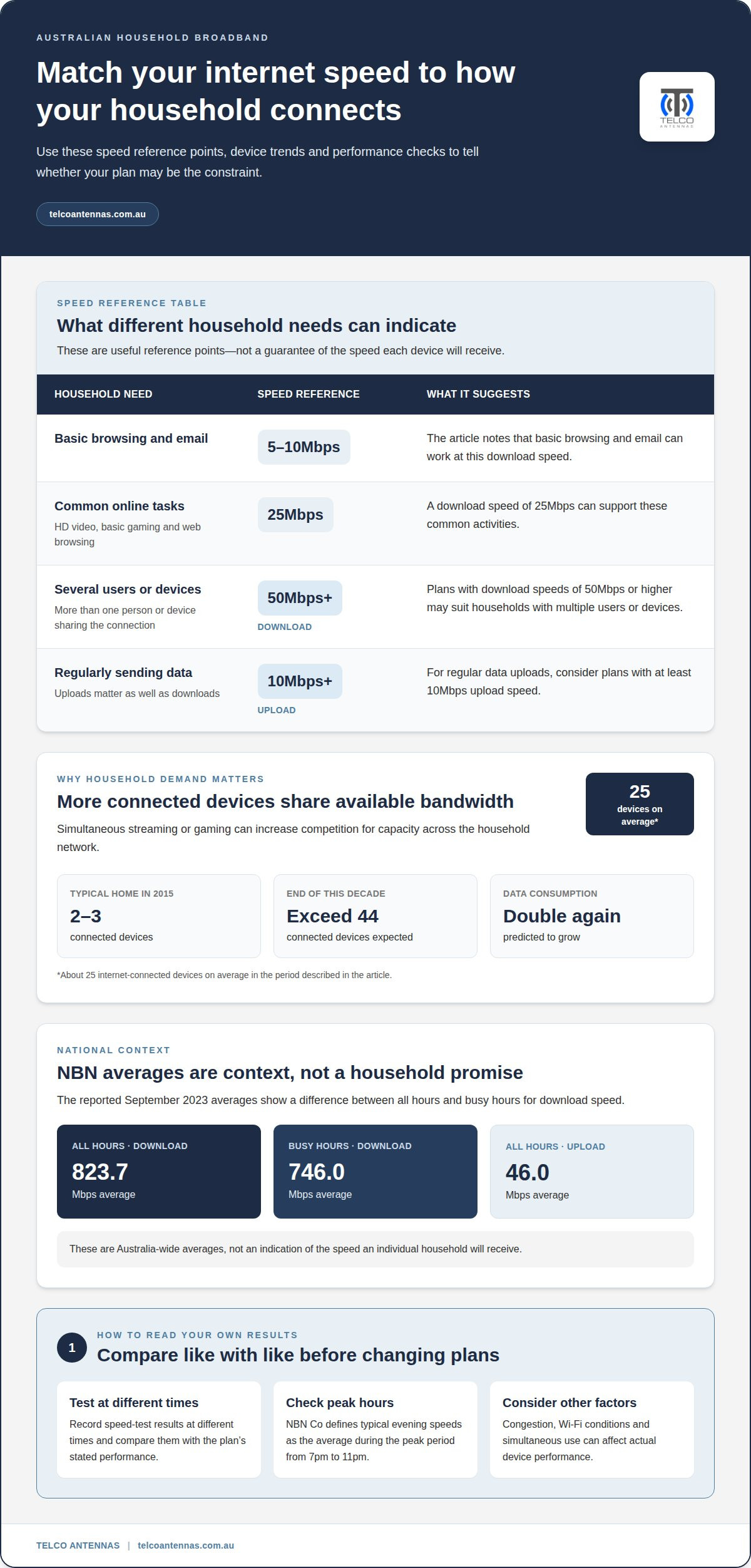
- Match the plan to household demand. Consider an upgrade if streaming, gaming or several devices regularly compete for bandwidth. Plans with download speeds of 50Mbps or higher may suit households with multiple users or devices. For regular data uploads, consider plans with at least 10Mbps upload speed. Check your plan’s maximum speed before changing tiers.
- Raise a speed shortfall with your provider. Record speed-test results at different times and compare them with the plan’s stated performance. Submit the results through the provider’s complaints process and ask them to investigate the connection, plan and equipment.
- Check regional program eligibility. For NBN Sky Muster Plus and other regional programs, eligibility depends on your address and the applicable service criteria. Compare the program rules with your location and current service before applying. Assess access and eligibility before choosing a plan or technology.
Australian internet usage and broadband speeds
- Map what uses your connection. Count the devices sharing your household network, including televisions, phones, computers and smart equipment. Australian homes had about 25 internet-connected devices on average in the period described, compared with two or three in a typical home in 2015. More devices can mean greater competition for available bandwidth, especially during simultaneous streaming or gaming.
- Match speed to the activity. A download speed of 25Mbps can support common tasks such as HD video streaming, basic online gaming and web browsing. Basic browsing and email can work at 5-10Mbps. These are useful reference points, not a guarantee of each device’s actual performance: congestion, Wi-Fi conditions and simultaneous use affect results.
- Compare measured performance with the plan. Run speed tests at different times and record the results beside your plan’s stated speed. NBN Co defines typical evening speeds as the average during the peak period from 7pm to 11pm. Compare results from that period with daytime readings to see whether evening congestion may be affecting your connection.
- Consider the household’s changing demand. The number of connected devices in Australian homes is expected to exceed 44 by the end of this decade, while data consumption is predicted to double again. If video calls, streaming and gaming overlap, identify which activities slow first. That pattern helps distinguish limited broadband capacity from a local Wi-Fi issue.
- Extend connectivity only where needed. If a remote room or separate building has weak coverage but the main connection performs well, the problem may be the link between locations rather than the broadband plan. A point-to-point wireless bridge can connect separate buildings; explore point-to-point wireless bridges for that specific network layout.
People in Australia average more than six and a half hours online per day, and as of February 2025, approximately 97.1% of Australians, or 26.1 million people, were active internet users. In a 2024 Australian survey, 62 per cent of respondents had not changed their home internet setup in the previous two years.
During all hours in September 2023, the average NBN download speed in Australia was 823.7 Mbps and average upload speed was 46.0 Mbps. During busy hours, the average NBN download speed was 746.0 Mbps. These averages provide context, but do not indicate the speed an individual household will receive.
How do NBN fixed wireless and satellite speeds compare with fibre and fixed line?
- Identify the NBN technology at your address. Check whether your connection is fixed wireless, satellite, fibre or another fixed-line type. These technologies deliver broadband differently, so a speed tier available on one network may not be available on another. Start by finding out which connection types your household can access.
NBN fixed wireless uses a radio link between a local transmission tower and an outdoor antenna at the premises. Satellite broadband communicates through satellite infrastructure. Fibre carries data over fibre-optic cable, while other fixed-line connections use wired infrastructure. Distance, signal conditions and network capacity affect performance.
- Compare the maximum speed tiers, not just the technology names. NBN FTTP can support full gigabit and multi-gigabit speeds. HFC connections can support speeds of up to 2000Mbps. Those figures describe network capability, not the speed every household receives; the available plan and connection conditions matter.
- Match the connection to your main use. For large downloads or several people streaming at once, compare available download speeds with your household’s demand. For video calls, cloud backups or sending work files, consider upload speeds too. Satellite can provide a useful connection where fixed-line infrastructure is unavailable, while fixed wireless can serve premises within tower coverage.
- Test the connection before changing plans. Run speed tests over Ethernet where possible, then compare the results with Wi-Fi performance. If the wired test is faster, the issue may be local wireless coverage rather than the NBN access network. If both are slow, compare the results with your plan’s expected performance and the technology available at your address.
If a separate building needs access to an existing connection, a point-to-point wireless bridge can link the locations without becoming a new broadband service. Compare this option with the available NBN connection and the physical layout between buildings.
Australian NBN Fibre to the Premises connections can support full gigabit and multi-gigabit speeds. Use this capability as a reference when comparing the options at your address, but remember it does not determine which connection is suitable. Compare the available speed tiers with your household’s needs.
Can 4G/5G home internet improve regional connectivity?
- Check coverage at the property, not just the nearest town. Enter your address into mobile network coverage maps and compare both 4G and 5G results. A nearby coverage area doesn’t show how well signal reaches your house. Hills, trees, building materials and distance from a mobile tower can affect reception at the modem location.
- Check signal where the modem will operate. Use a phone that supports the relevant network and test reception in the room where you plan to place a home modem. Repeat the test in other parts of the house, including near a window. Strong outdoor reception may not translate into reliable indoor service, particularly where walls or terrain obstruct the radio path.
- Compare plan limits with your household’s use. Australian 4G home internet and mobile broadband plans can typically reach download speeds of up to 25Mbps. 5G home internet and mobile broadband can provide 300Mbps to 500Mbps, while some plans cap downloads at 50Mbps or 100Mbps. Compare the plan’s stated limit with your needs for streaming, video calls and simultaneous users.
- Test the connection at different times. Record download and upload performance during ordinary use and busy household periods. Mobile network congestion can affect performance even when signal strength is steady. Compare results from the modem’s intended position with tests taken elsewhere, then distinguish weak reception from a plan cap or network congestion.
- Choose mobile broadband for the right connection problem. It can be a practical alternative where fixed-line options are limited and 4G or 5G coverage reaches the premises. It won’t fix poor Wi-Fi distribution between a house and separate building. For that layout, a point-to-point wireless bridge can link the two locations using an existing internet connection.
Telco Antennas
Telco Antennas helps regional households and sites address connectivity challenges with communications hardware suited to different network layouts. If mobile reception is limiting a connection, Cel-Fi GO Mobile Signal Boosters and MIMO Antennas may be relevant options. Where internet needs to reach a separate building, a Point-to-Point Wireless Bridge can link locations using an existing connection. LMR-400 Coaxial Cables support antenna and communications setups where suitable coaxial cabling is needed.
The right equipment depends on the signal available, the distance between buildings and how the connection will be used. Contact Telco Antennas to discuss which hardware may suit your regional connectivity setup.
Make your next connectivity change with confidence
Before changing equipment or plans, define the problem you want to solve: slow performance throughout the property, weak reception in one location, or a connection that doesn’t reach another building. That distinction helps keep the next step focused. To learn how to improve internet speed in regional Australia, treat each change as a controlled test: record the existing setup, adjust one factor, then compare the result under similar conditions.
If the issue involves signal coverage or a physical link between locations, Telco Antennas supplies communications hardware such as antennas, signal boosters and point-to-point wireless bridges. The right approach depends on the network, site layout and equipment involved. Contact Telco Antennas to discuss your setup and the next step.
Contact Telco Antennas for advice about your regional connectivity needs. A practical next step can make the connection easier to assess and improve.
Frequently Asked Questions
What internet speeds are available in regional Australia by technology and location?
Available speeds depend on the network technology serving your address and the plans offered for it. NBN tiers include 25Mbps, 50Mbps, 100Mbps, 1000Mbps and, on eligible connections, 2000Mbps download speeds. FTTP and HFC can support higher tiers, while fixed wireless and satellite options depend on their network and service limits. Check address-level availability, then compare the plan’s download and upload speeds with your household’s requirements.


