
The highest-gain antenna isn’t automatically the best fix for rural 4G. A high gain 4G antenna for rural internet should match the frequency bands available at your property and the modem’s MIMO requirements, then be positioned towards the strongest signal. A second antenna helps when it’s part of a suitable MIMO setup, not simply because more hardware must mean better reception.
If you’re wondering whether you can simply add another antenna, the answer depends on how your modem uses its antenna connections and where reception is strongest. A directional antenna can improve reception when correctly aimed, but placement, cable routing and local conditions all affect the result.
This guide explains how to assess antenna gain and band compatibility, choose a suitable MIMO arrangement and plan an installation for a rural Australian property. You’ll also learn how an RF site survey can help identify suitable placement and hardware before you commit to a setup.
Key Takeaways
- A directional antenna works best when aimed towards the signal source, so assess the site and likely tower direction before choosing a mounting position.
- Match antenna frequency coverage to the network available locally; band 28 is important in very rural parts of Australia.
- For a 4G modem that supports MIMO, use a suitable two-antenna arrangement rather than adding an unmatched antenna.
- A site survey can reveal where reception is strongest and help plan antenna placement, gain and cabling for the property.
Is Your Antenna Holding Back Your Rural Broadband Speeds?
Match antenna direction to the usable 4G signal at your property before replacing hardware. Yagi antennas use elements along a boom, LPDAs use elements of different lengths across frequencies, and panel antennas have a flat directional face.
-
Compare directional and omni-directional antennas
Choose a directional antenna when you can identify a useful signal direction, such as towards a network tower. It focuses reception forwards and does little at the rear, which can help where a signal arrives from a defined direction. An omni-directional antenna receives from multiple directions, which can suit sites where signal sources vary or their direction is unclear. A high gain 4G antenna for rural internet is most useful when its direction and frequency coverage suit the connection.
-
Compare Yagi, LPDA and panel antennas
Compare the antenna’s construction and operating frequencies before selecting a model. A Yagi’s elements sit along a boom; an LPDA uses elements of different lengths to cover a range of frequencies; a panel antenna presents a flat directional face. For booster use where signals may arrive on different frequencies, an LPDA can be a practical option. Don’t assume similar-looking directional models have the same coverage. A high gain 4G antenna for rural internet must suit the network signal, not just the property’s distance from a tower.
-
Align the directional antenna
Aim the antenna towards the strongest usable signal, then adjust its direction in small increments. Check the modem’s readings after each adjustment and allow them to settle before comparing positions. Directional reception matters over long distances because the antenna focuses towards its front rather than collecting equally from every direction. If a turn worsens the readings, return to the previous position and test another direction. Secure the mount after comparing positions. This alignment step helps a high gain 4G antenna for rural internet make use of the signal available at the site.
- Assess reception at the modem before replacing hardware. Record readings in a consistent location, then repeat the check after moving or turning the antenna. For example, compare an indoor window with an outdoor mounting point. If readings improve but browsing remains slow, antenna direction may not be the only factor affecting performance.
Antenna gain, MIMO and frequency-band compatibility
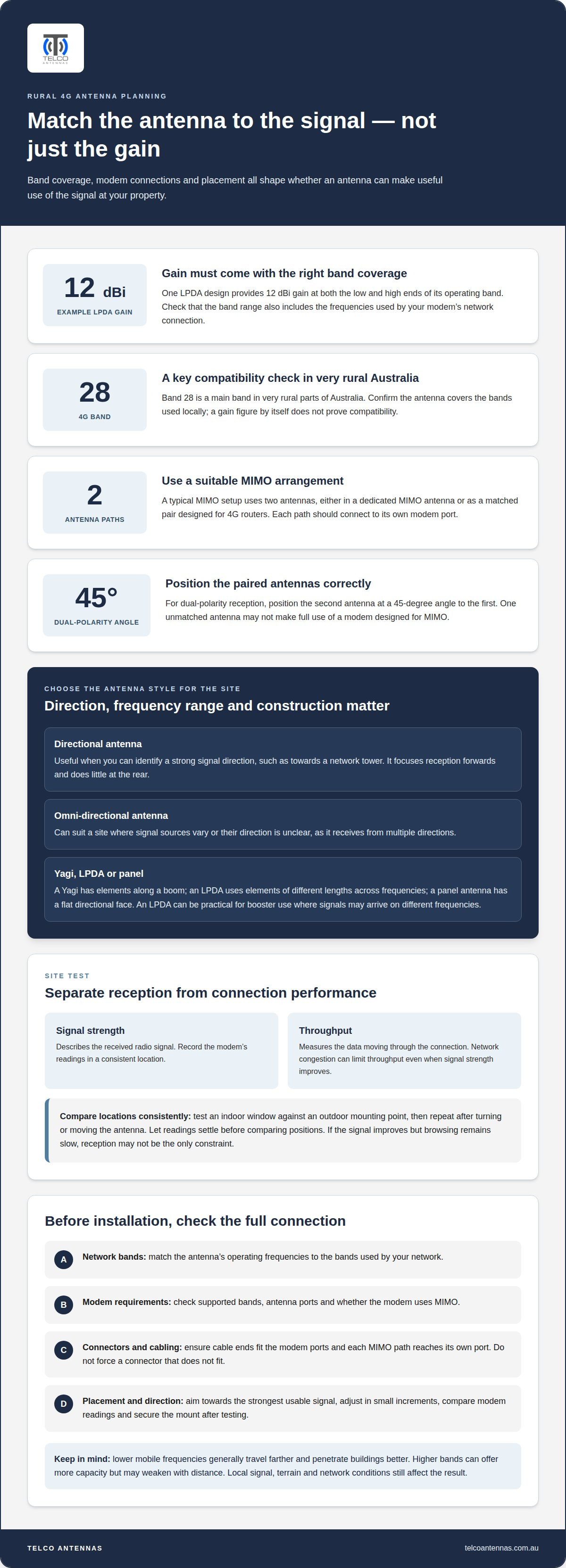
Match the antenna’s frequency coverage and MIMO arrangement to your modem before selecting gain. For compatibility, check the router’s supported bands, antenna ports and connector type; the antenna cable ends must fit those ports.
-
Check frequency-band compatibility
Match the antenna’s operating frequencies to the 4G bands used by your network. In very rural Australia, band 28 is a main band, so coverage of that band can matter. Lower mobile frequencies generally travel farther and penetrate buildings better; higher bands can offer more capacity but may weaken with distance. Don’t treat a gain figure alone as proof of band compatibility.
For example, an LPDA designed to provide 12 dBi gain at both the low and high ends of its operating band offers gain across that range. Confirm that the band range also includes the frequencies used by your modem’s network connection.
-
Plan the MIMO antenna setup
Choose a MIMO arrangement that matches the modem’s antenna ports. A typical setup uses 2 antennas, either in a dedicated MIMO antenna or as a matched pair designed for 4G routers. MIMO uses separate antenna paths to support multiple data streams, so one antenna may not make full use of a modem designed for MIMO.
For dual-polarity reception, position the second antenna at a 45-degree angle to the first. Older single-polarity Yagi antennas may support only one data stream, while a network may offer two or more. Telco Antennas’ MIMO antenna options are relevant when your router needs a matched antenna arrangement.
- Check the physical connections before installation. Compare the modem’s port type with the antenna cable’s connector ends, and ensure each MIMO path reaches its own port. Don’t force a connector that doesn’t fit. A mismatch can prevent a secure connection, even when the antenna covers the correct band.
Designing for challenging environments and signal interference
Test reception around the property before changing equipment. A stronger reading at an outdoor wall or high mounting point can indicate a better antenna location.
-
Compare signal strength and throughput
Record the modem’s signal readings and data performance separately. Signal strength describes the received radio signal; throughput measures the data moving through the connection. A stronger reading doesn’t automatically mean faster downloads, because network congestion can limit throughput. Compare results at the same time from an indoor room and an outdoor position. If signal readings improve but throughput doesn’t, reception may not be the main constraint.
-
Choose a high-gain antenna
Choose an antenna that suits the available network signal and installation position. A directional LPDA can be useful where signals arrive across different frequencies; one design provides 12 dBi gain at both the low and high ends of its operating band. Check that its frequency coverage suits the network and modem. In Australia, the main band in very rural areas is band 28, so include that requirement when assessing compatibility.
There’s no single best antenna for every property. Match band coverage, direction and modem requirements to the local signal.
-
Consider signal improvement and limitations
Assess line of sight and network conditions before expecting better performance. A directional antenna needs a useful signal path, and terrain, buildings or vegetation can obstruct it. Better reception may support upload speed, latency and reliability, but it can’t remove congestion at the network tower. An antenna improves the radio link, not the network’s available capacity.
In Australia, don’t assume external antennas and signal boosters follow identical ACMA requirements. An antenna connects to a modem; a booster receives and retransmits mobile signals. Identify the equipment type before installation.
-
Account for coaxial cable loss
Keep the coaxial cable run as short as the installation allows. Signal loss increases along the cable, reducing some of the benefit of mounting an antenna higher. A long run to an indoor modem may therefore perform worse than a carefully planned, shorter route. Choose cable suited to the installation and avoid unnecessary length, sharp bends and loose connectors.
Where the modem can operate in a stronger-signal location, placing it near the antenna may reduce coaxial run length. Ethernet can then carry the local connection indoors, avoiding the need for a long coaxial run.
Using a site survey to plan antenna placement and hardware
Use a site survey to connect local coverage, measured reception and installation choices. In Australia, compare network coverage information with on-site readings; together, these help identify a useful network and signal direction.
- Map reception across the property before choosing equipment. Record where a 4G connection works, where it drops out, and how performance changes between rooms. For example, one room may have usable reception, another none, and an outside gable wall a stronger signal. These differences show why one indoor test may not represent the whole site.
- Compare available networks at practical test locations. Coverage information helps identify networks to assess, while on-site readings show how terrain, buildings and antenna position affect reception. To determine tower direction, compare readings as the antenna or modem moves between positions. A high gain 4G antenna for rural internet needs a useful signal path, not just a tower that appears nearby on a map.
- Use the results to choose antenna placement and gain. Test suitable outdoor positions, then compare signal readings and connection performance at each location. A survey can help identify an appropriate antenna location and gain for the conditions. If an outside gable wall performs better than an indoor shelf, use that evidence to guide the mounting plan. The findings can also help match the proposed antenna to the network and modem.
- Plan the complete hardware route before fixing the antenna. Account for the mounting point, cable path and modem location, then consider whether the measured connection makes 4G suitable for the property. A survey-based plan for a high gain 4G antenna for rural internet links these decisions to actual site conditions. It can also show when changing antenna position is more relevant than selecting different hardware.
If reception varies across your property, plan an RF site survey to assess network choice, placement and suitable hardware.
Telco Antennas
Telco Antennas is a practical next step when your survey points to specific hardware needs. If your modem requires a paired setup, MIMO antennas can suit the planned arrangement, while LMR-400 coaxial cables provide a cable option for connecting antenna equipment. A Cel-Fi GO Mobile Signal Booster may be relevant when the problem is mobile signal coverage rather than the modem’s external antenna connection. For linking separate buildings across a property, a point-to-point wireless bridge addresses a different connection task from improving 4G reception.
Use your survey findings, modem requirements and proposed cable route to guide the equipment choice. Contact Telco Antennas to discuss the setup that fits your rural property.
Turn your measurements into a practical installation plan
Before committing to equipment, turn your site observations into a clear installation brief. Note where the modem will sit, where the antenna could be mounted and how the cable will reach the router. This gives each design choice a practical purpose and helps align the installation with the property’s conditions.
A high gain 4G antenna for rural internet is one part of a complete connection. Keep a baseline of your current modem performance, then compare it with the installed setup under similar conditions. That makes it easier to identify whether the change has improved the outcome you need, rather than relying on a single signal reading.
If you want help translating your property’s requirements into a suitable setup, contact Telco Antennas for advice. A considered plan is a solid starting point for a more dependable rural connection.
Frequently Asked Questions
Can’t You Just Add Another Antenna?
Only add another antenna if your modem can use it as part of a suitable MIMO arrangement. An extra antenna connected without regard to the modem’s ports or antenna design may not improve the connection. For example, a router with two external antenna ports needs an arrangement that uses both paths correctly. Check the modem’s setup requirements before changing its antenna connections.
What Is “Polarisation” and Why Does It Matter?
Polarisation describes the orientation of an antenna’s radio waves, and matching antenna orientation helps the two MIMO paths work as intended. For a dual-polarity arrangement, position the second antenna at 45 degrees to the first. This gives the modem differently oriented signals to work with. Keep the antenna positions stable while assessing performance, so movement doesn’t complicate comparisons.
How much antenna gain (dBi) is suitable for a rural 4G signal?
Choose gain based on the signal direction, frequency coverage and mounting position, rather than treating one dBi figure as suitable everywhere. An LPDA design can provide 12 dBi at both the low and high ends of its operating band. That figure describes antenna gain across that range, not a guaranteed internet speed. Check the antenna’s frequency range against the local network and modem.
How to install and align a directional 4G antenna for best signal?
Mount the antenna where it has a clear path towards the useful signal, but secure it only after testing its direction. Turn it in small increments and compare the modem’s readings after each adjustment. Note the positions that perform best, then return to the strongest result before finalising the mount. Recheck the readings after securing it, as movement during fixing can change the alignment.
What coax cable length and type minimise 4G signal loss?
Use the shortest practical coaxial run, because signal loss accumulates along the cable. Choose cable appropriate to the installation and the antenna’s connection requirements; LMR-400 is one coaxial cable option. Avoid adding length for convenience if the modem can be positioned nearer the antenna and connected indoors using Ethernet. Keep connectors secure and avoid unnecessary bends that complicate the cable route.
What are the best outdoor 4G antennas for rural internet in Australia and their prices?
There is no single best antenna for every property. A directional LPDA can suit signals arriving on different frequencies; check that it covers the local network bands, including band 28 in very rural Australia, and matches your modem’s MIMO requirements.


