

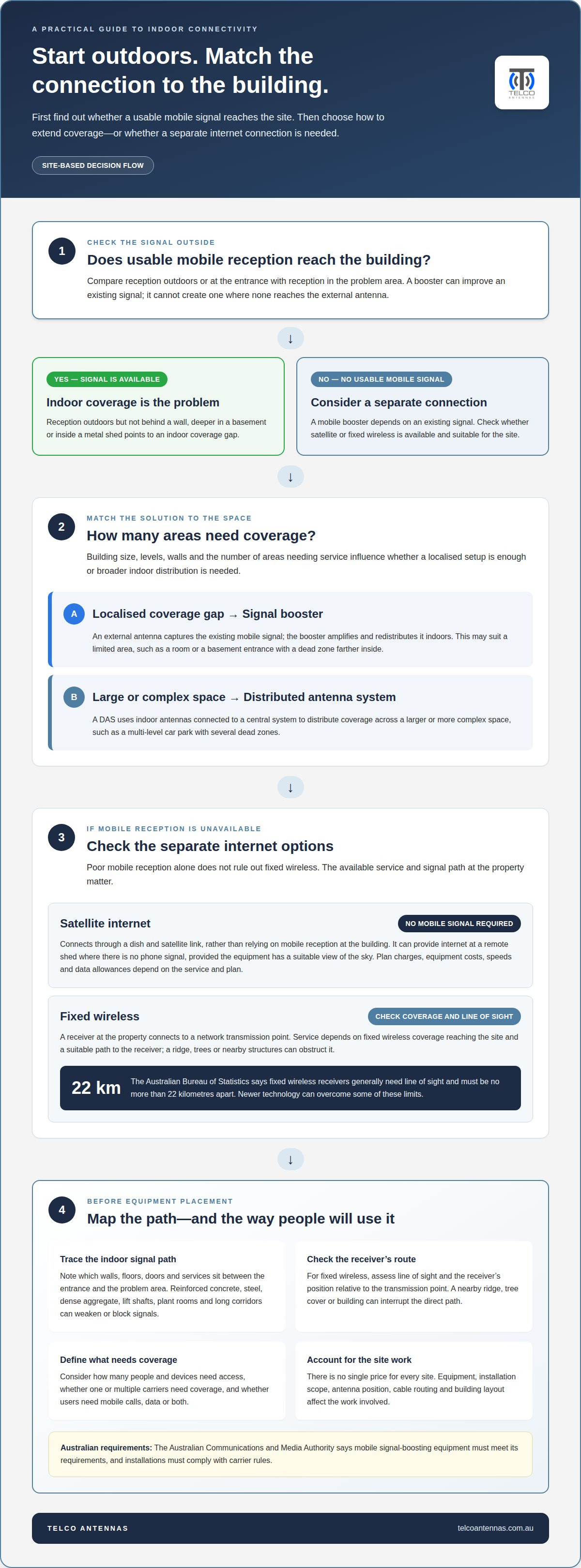
The right way to get internet in a building with no reception depends first on whether a usable mobile signal reaches outdoors. If it does, a signal booster can extend coverage into a defined area. A larger basement or complex layout may need a distributed antenna system (DAS), which distributes coverage through indoor antennas. A booster can improve an existing signal, but it can’t create one where none is available.
It’s frustrating when a phone or connection works outdoors but drops out inside a basement, metal shed or rural building. Building materials, distance from a signal source and the shape of the space all affect which option is practical.
This guide explains how building size and layout influence your options, why outdoor signal availability matters, and how distance and obstructions affect connectivity. You’ll learn to distinguish between extending mobile coverage indoors and setting up a separate internet connection, so you can focus on what suits the site.
Key Takeaways
- Match the solution to the space: a localised coverage gap differs from a large basement with multiple levels or a complex layout.
- A signal booster extends an existing mobile signal; it won’t create coverage where no usable signal reaches the external antenna.
- Fixed wireless receivers generally need line of sight and must be no more than 22 kilometres apart, although newer technology can overcome some of these limits, according to the Australian Bureau of Statistics.
- For a metal shed or rural building, compare extending an available mobile signal with using a separate internet connection, based on the site and how the connection will be used.
Choosing a solution based on building size and signal availability
Start by distinguishing between two problems: no usable mobile signal reaches the building, or an outdoor signal fails to cover its interior. This determines whether extending mobile coverage is practical. If reception reaches one basement entrance but not a back room, a localised solution may be enough. A multi-level car park with several dead zones needs broader indoor coverage.
A signal booster captures an existing mobile signal through an external antenna, then amplifies and redistributes it indoors. It improves a signal, but doesn’t create one. A Distributed Antenna System (DAS) uses indoor antennas connected to a central system to distribute coverage across a larger or more complex space. Building size, levels, walls and the number of areas needing service all affect which setup makes sense.
Next, identify where signal is available and what the connection needs to support. A small office needing mobile data in one room has different requirements from an underground site requiring coverage across several areas. Consider whether one or multiple carriers need coverage, and whether people need mobile calls, data or both. In Australia, the Australian Communications and Media Authority says mobile signal-boosting equipment must meet its requirements, and installations must comply with carrier rules.
How much do external antennas, signal boosters and installation cost in Australia? There’s no single price for every site. Costs depend on the equipment and installation scope, while antenna position, cable routing and building layout affect the work involved.
How do I improve Wi-Fi coverage once internet is connected? Place the router near the centre of the area needing coverage, raised off the floor and away from thick walls where possible. Put an extender between the router and the dead zone, where it can still receive a good signal.
What should I check before choosing internet for a remote Australian property? Check the available connection types, outdoor signal, building layout and line of sight to a fixed wireless receiver. Consider how many people and devices need access, and whether the connection must serve a separate shed or office.
Signal loss from distance and internal obstructions
Signal strength can fall as the path between a transmitter and receiver gets longer. In a basement, reinforced concrete, steel and dense aggregate can absorb radio frequency signals. A connection that works beside an entrance may drop out behind a concrete wall or deeper inside the building. Lift shafts, plant rooms and long corridors can create further dead zones by blocking or weakening signals between devices.
Fixed wireless depends on the path between its receiver and transmission point. According to the Australian Bureau of Statistics, fixed wireless receivers generally need line of sight and must be no more than 22 kilometres apart, although newer technology can overcome some of these limits. The Australian Bureau of Statistics also defines fixed wireless as requiring line of sight and a distance of no more than 22 kilometres, though newer generations may overcome some of these obstacles.
Distance isn’t the only factor. A receiver may face a nearby ridge, tree cover or building that interrupts the direct path. In a metal-frame shed, the outer structure can weaken mobile and Wi-Fi signals, while a metal door or plant room can divide the interior into separate coverage zones. The network path matters at both ends: from transmitter to receiver, then from receiver or router to device.
To identify the cause, compare reception at the building entrance with reception in the problem area. Note which walls, floors, doors or services lie between those points. If a phone connects outdoors but loses service behind a reinforced-concrete wall, for example, the building is likely affecting the indoor signal path. If you’re considering fixed wireless, assess the receiver’s line of sight and its position relative to the transmission point.
Where distance and building materials combine, a site-specific signal assessment can help map the path and identify likely obstructions before equipment placement is planned.
Internet options for metal sheds and rural areas
Metal walls can weaken mobile and Wi-Fi signals, so a connection that works outside may fail indoors. In rural Australia, the practical choice depends on which networks reach the property and how the building will be used.
Satellite internet without mobile reception
Satellite internet connects through a dish and satellite link rather than relying on mobile reception at the building. It can therefore provide internet where a phone has no mobile signal, including in a remote shed, provided the equipment has a suitable view of the sky. Satellite plan charges, equipment costs, speeds and data allowances depend on the service and plan. Assess these against your usage and the devices that need access.
Fixed wireless in poor coverage areas
Fixed wireless connects a receiver at the property to a network transmission point, so poor mobile reception alone doesn’t rule it out. The service depends on fixed wireless coverage reaching the site and a suitable signal path to the receiver. A ridge, trees or nearby structures can obstruct that path, even where mobile coverage is available outdoors.
For a metal shed, an external antenna connected to a 4G modem can help capture available mobile signal outside the building. A signal booster also relies on an existing signal: it amplifies and redistributes reception, rather than creating coverage where none reaches the external antenna. If there’s no usable mobile signal at the site, satellite or fixed wireless may be a better connection type to assess.
Let the building’s purpose guide your choice. A shed used as an office may need its own connection to provide bandwidth for work devices, rather than relying on a distant router inside the house. A device used only occasionally may have different coverage and data needs.
Before settling on an option, consider the outdoor signal, obstructions around the property, the shed’s metal construction and equipment locations. The right fit is a connection type that can reach the site and serve devices where they’ll be used.
Internet options for buildings with no mobile reception
No mobile signal doesn’t automatically mean no internet. Depending on what reaches the property, a fixed-line connection, satellite service or fixed wireless network can provide internet independently of mobile reception. If you’re deciding how to get internet in a building with no reception, first identify which connection types are available at the site.
Check whether fixed-line broadband can connect at the address. If the building has a suitable connection point, a modem can provide internet without relying on a mobile signal. You may then need to distribute Wi-Fi indoors: a router outside a metal shed, for example, may not reliably serve devices through its walls. A wired Ethernet connection to an access point inside can carry the connection into the space.
Fixed wireless uses a dedicated receiver and network, not the mobile signal on a phone. Poor mobile reception alone doesn’t rule it out. The receiver’s connection depends on coverage reaching the site and a clear path to the transmission point. A ridge, trees or nearby structures can interfere with that path, so the property’s position matters.
Satellite internet connects through satellite equipment, so it doesn’t depend on mobile reception reaching the building. It can suit a remote site where fixed-line access or fixed wireless isn’t practical. The dish needs an appropriate position, and a router or other network equipment is still needed to serve devices inside. If you’re considering how to get internet in a building with no reception, compare the available connection types with how you’ll use the space.
If another building on the property already has internet, a network link between buildings may carry that connection to a separate shed. This depends on having a usable source connection and a suitable route between structures. Compare fixed-line access, fixed wireless, satellite and an on-site network link before choosing equipment.
Need help assessing how a connection could reach your site? Discuss a site-specific connectivity solution.
Telco Antennas: Cel-Fi GO Mobile Signal Boosters
Telco Antennas supplies Cel-Fi GO Mobile Signal Boosters for sites where a usable mobile signal reaches an external antenna but indoor coverage is poor. The booster amplifies the existing signal and redistributes it inside, making it relevant for a shed, basement or work area with a localised coverage problem. It won’t create a mobile signal where none reaches the site, so satellite or fixed wireless may suit better when there’s no usable outdoor signal.
MIMO antennas can support mobile connectivity setups, while LMR-400 coaxial cables are available for antenna connections. Where a separate building needs a network link from a connected site, point-to-point wireless bridges may be relevant. The right option depends on the signal available and the connection required.
Discuss the connectivity equipment suited to your site with Telco Antennas, or visit telcoantennas.com.au.
Plan the connection around the site
Deciding how to get internet in a building with no reception starts with defining what the connection needs to do. List the rooms, equipment and daily tasks that depend on connectivity, then use that brief to guide your choice of network and hardware. This keeps the design focused on the actual work, rather than adding equipment that doesn’t address the site’s constraints.
For a mobile coverage project, Telco Antennas offers Cel-Fi GO Mobile Signal Boosters, MIMO Antennas and LMR-400 Coaxial Cables. The right combination depends on the signal path and the equipment needed at the site. If you’re ready to assess a practical setup for your building, contact Telco Antennas for advice. A clear site brief is a useful starting point for your next step.
Frequently Asked Questions
How do I know which solution is right for my building's basement?
Match the solution to the coverage area and how people use the space. A small basement office needing mobile access in one room, for example, has different requirements from a multi-level car park serving staff across several zones. Note which carriers and services need coverage, such as calls, mobile data or both. These details help distinguish a localised coverage need from a building-wide network design.
Why is there no cell signal in my basement?
A basement’s position and construction can weaken radio signals before they reach your phone. Soil, concrete floors and structural elements sit between the device and outdoor network coverage, while enclosed areas can restrict the signal path further. Check whether reception also fails outside: if it works outdoors but not downstairs, the building is likely contributing to the problem. If reception fails in both places, the cause may lie beyond the basement.
Can a mobile phone or 4G/5G modem get reception using an external antenna?
A compatible 4G modem can use an external antenna to access mobile signal available outside a building, then provide an internet connection to devices over Wi-Fi or Ethernet. This can suit a metal shed where the modem’s internal antennas struggle indoors. A phone can then connect to the modem’s Wi-Fi, but an external antenna won’t create mobile coverage where no usable signal reaches the antenna position.


