

Extending a cable isn’t automatically the simpler option. A point-to-point wireless bridge connects two sites and can be a practical alternative when a cable route would require difficult trenching, provided there is a clear line of sight between the antennas. Justifying investment in a point-to-point wireless link means weighing that installation advantage against the capacity and reliability your sites need.
When comparing a wireless bridge with extending cabling, look beyond equipment costs. Distance, obstacles, traffic requirements and the work involved in creating a cable route all matter. A link that suits one pair of buildings may not suit another.
This article explains how point-to-point wireless works, when it can make sense in Australia, and how to compare its cost, reliability, speed, capacity and range with cabling. It also explains why line of sight and the traffic crossing the link are central to a sound investment decision.
Key Takeaways
- A point-to-point bridge links two sites; point-to-multipoint connects several remote sites to a central location.
- Compare the full cable route, including trenching and reinstatement, with the wireless option, and factor in line of sight.
- Business reliability depends on suitable equipment, secure mounting, weatherproofing and protection from electrical surges.
- Match link capacity to the traffic that needs to cross between sites, then explore how Telco Antennas’ wireless bridges fit your setup.
How does point-to-point wireless work?
The bridge design determines how access points exchange network traffic and which remote devices can use the connection. Understanding the configuration helps distinguish a dedicated site link from a shared distribution network.
Comparing point-to-point and multipoint setups
In a point-to-multipoint arrangement, Access Point A uses point-to-multipoint bridge mode, while Access Points B and C use point-to-point bridge mode to connect back to A. This centralised arrangement can serve multiple endpoints, and many multipoint access points can handle hundreds of endpoint connections.
Some bridges support only a single point-to-point connection to another access point. Wireless Distribution System (WDS) configurations add another consideration: connected access points must use the same wireless standard, such as 802.11a, 802.11b or 802.11g, and operate on the same frequency. WDS passes packets between access points like ports on a wired Ethernet switch, and can let users move between access points without disconnecting. A useful test for justifying investment in a point-to-point wireless link is whether the network needs a dedicated connection or shared access for endpoints.
Installation and site requirements
Installation timing depends on access to mounting locations, the route between endpoints and site-specific work. Wireless-link installations are described as taking days, while trenched fibre can take weeks, subject to permits. In Australia, fixed cabling work, including outdoor runs into a building, is subject to ACMA cabling provider rules. Permissions for other work depend on the property and installation.
A site survey can document mounting positions, the radio path and nearby conditions that may affect the design. Separate equipment and installation expenditure from any site or civil work, then compare the project total with the feasible cable alternative. To estimate return, assess the value of the connectivity delivered against those costs over the period relevant to the business. For justifying investment in a point-to-point wireless link, make these assumptions explicit rather than relying on a hardware figure alone.
Wireless bridges as an alternative to trenching fibre or extending copper
For Australian sites, a wireless bridge can connect buildings without a cable route between them. The choice depends on distance, existing conduit, line of sight and the work required for trenching.
Replacing cable runs with wireless bridges
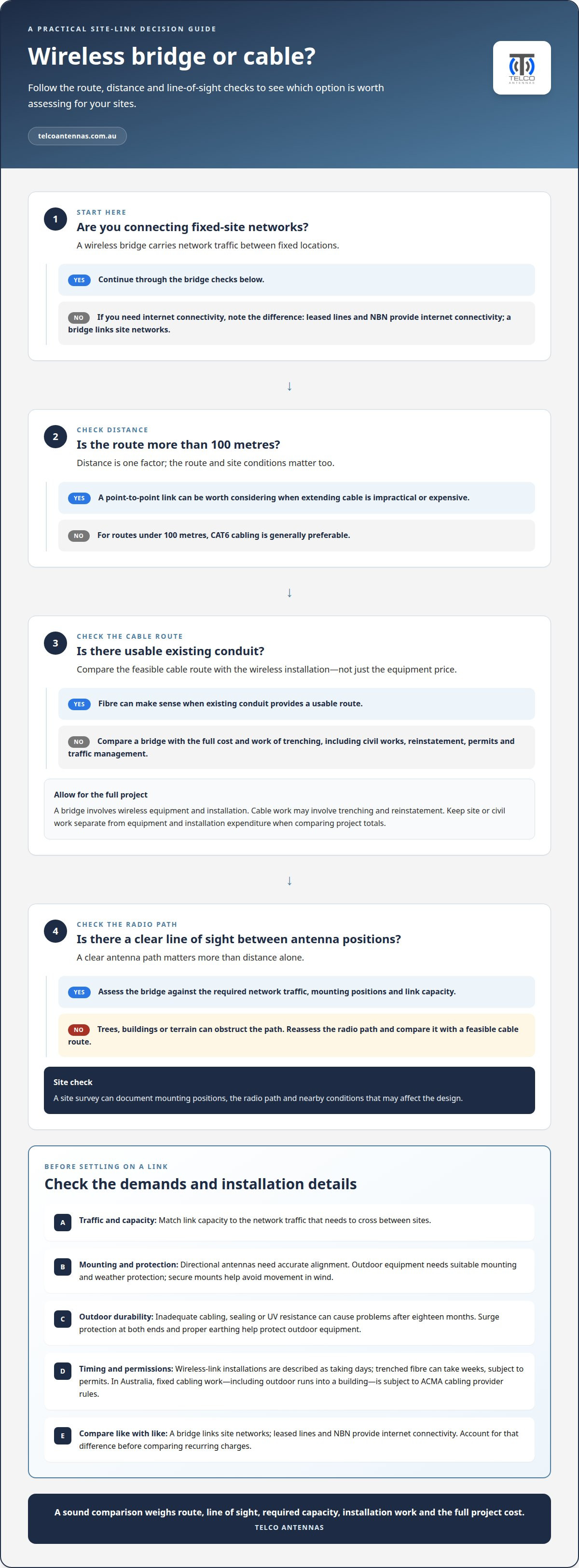
A wireless bridge carries network traffic between fixed locations, avoiding a physical cable across the gap. For buildings more than 100 metres apart, a point-to-point link can be worth considering when extending cable becomes impractical or expensive. Under 100 metres, CAT6 cabling is generally preferable; fibre also makes sense when existing conduit provides a usable route.
Compare the full cost of a bridge with trenching fibre, leased lines or NBN services. Trenching can involve civil works, reinstatement, permits and traffic management, while a bridge requires wireless equipment and installation. Leased lines and NBN provide internet connectivity, whereas a bridge links site networks. Account for this difference before comparing recurring charges.
Campus, farm and venue applications
Wireless links can connect buildings across education and corporate campuses where separate facilities need shared network resources. On farms, a bridge can link a main building with barns, storage facilities or other outbuildings. These connections carry network traffic across roads, car parks or property boundaries without trenching through the intervening ground.
Outdoor venues can use the same approach to extend a site network between fixed facilities. A clear antenna path matters more than distance alone: a shorter route through trees may perform worse than a longer, unobstructed one. Match each link to the buildings’ actual network needs.
Bridging locations and enabling access points
Bridge mode lets two or more wireless access points communicate, joining local area networks at separate locations. A point-to-point link connects two endpoints; a point-to-multipoint design serves several remote sites from one central location. For example, a business can link a remote office to its main network instead of relying on a separate internet connection.
When access point mode is enabled alongside bridge mode, an access point can also serve nearby wireless clients. This allows a remote building to receive a bridged connection and provide local Wi-Fi, rather than using the bridge only for wired devices.
Outdoor bridge product options
Outdoor wireless bridge equipment is designed for fixed links between buildings, but each model’s capabilities determine whether it suits a particular route. Compare its supported operating modes, capacity and stated range with the site’s distance, network traffic and mounting locations.
Directional antennas need accurate alignment, and outdoor equipment needs suitable mounting and weather protection. A clear line of sight is central to the link design. For a site-specific assessment, point-to-point wireless bridges can be considered alongside the cable route and required network capacity.
Is a wireless bridge reliable enough for business use?
Business reliability depends on the radio path, channel, mounting and required capacity. A fixed link can carry important site traffic, but its design needs to account for signal conditions and the consequences of an outage.
A clear line of sight between directional antennas helps maintain a stable signal. Trees, buildings and terrain can obstruct the path, while wind can move poorly secured mounts. Outdoor installation quality matters too: inadequate cabling, sealing or UV resistance can cause problems after eighteen months. Surge protection at both ends and proper earthing help protect outdoor equipment.
Channel selection affects interference. A 5 GHz band is commonly used for point-to-point links spanning a few hundred metres to several kilometres. By contrast, 2.4 GHz can be unreliable for these links because many devices use it. A 900 MHz device may suit a non-line-of-sight connection, while the actual route and equipment determine the right design.
For a business investment decision, compare the link’s required availability with the impact of losing connectivity. A wireless bridge can be designed for 99.999% availability, equivalent to 26 seconds of downtime per month. That is a design target, not a default for every installation. Redundant paths and link monitoring can help detect degraded performance and maintain service through another route.
In Australia, ACMA requirements and spectrum licensing depend on the operating frequency, radio equipment and transmission settings. No single licensing condition applies to every link. Compare the selected channel, expected capacity, outage impact and resilience options with the business requirement, rather than judging reliability by advertised range alone.
Link capacity, speed and distance trade-offs
Wireless capacity depends on radio equipment, channel conditions, distance and the amount of traffic crossing the link. A well-built point-to-point link can carry several hundred megabits per second, while enterprise long-range links can provide throughput over 1 Gbps. These are different design outcomes, not a speed guarantee for every site.
Start with the traffic that must cross between locations. A remote building sending business files and camera footage, for example, may need more capacity than one used for basic network access. Capacity is shared across connected devices, so estimate concurrent demand rather than relying on a single speed test. Ethernet connections at each end also need to support the required throughput.
Distance and line conditions shape the design. A well-built 5 GHz link can span a few hundred metres to several kilometres with a clear line of sight. A 60 GHz link suits shorter hops of a few hundred metres. Trees, structures and antenna alignment can affect signal quality, so a longer clear route may outperform a shorter obstructed one.
Bandwidth, latency and uptime answer different questions. Bandwidth is the data capacity available; latency is affected by radio processing, network load and the number of intermediate links. Uptime depends on the design and operating conditions. A wireless bridge can be designed for 99.999% availability, equivalent to 26 seconds of downtime per month, but that is a design target rather than an automatic result.
For temporary sites, a wireless link may avoid building a permanent cable route, while fixed links suit ongoing traffic between buildings. Compare expected traffic, distance, clear-line conditions and the cost of interruption before selecting equipment. Then match the required capacity to real workloads, including remote access and cameras, rather than headline speeds alone. Explore point-to-point wireless bridges for links between fixed sites.
Telco Antennas: Cel-Fi GO Mobile Signal Boosters
Telco Antennas supplies point-to-point wireless bridges for connecting separate buildings, as well as Cel-Fi GO Mobile Signal Boosters for mobile coverage needs. These address different problems: a bridge carries network traffic between fixed sites, while a booster addresses mobile signal coverage. Identifying the actual connectivity gap helps focus the investment on the right equipment.
If your priority is linking remote buildings, consider the site layout, required capacity and line of sight when assessing a wireless bridge. If mobile reception is the issue, Cel-Fi GO Mobile Signal Boosters are the relevant offering. MIMO antennas and LMR-400 coaxial cables are also available for RF setups where those components fit the design.
Contact Telco Antennas to discuss connectivity equipment for your site requirements.
Turn the comparison into a site decision
The next step is to turn the business requirement into a practical link brief. Identify which applications must cross between locations, what a disruption would affect, and how the network may need to change as operations grow. This gives the design work a clear purpose and keeps technical choices tied to business priorities.
Justifying investment in a point-to-point wireless link is easier when the assumptions are visible. Document the intended traffic, endpoint locations, existing infrastructure and consequences of downtime. An RF site survey can help assess the site conditions that shape a suitable design. If the route or requirements change, revisit the comparison instead of relying on an earlier estimate.
For a discussion focused on your link and site requirements, contact Telco Antennas. A clear brief is a useful starting point for deciding what to investigate next.
Frequently Asked Questions
When does a point-to-point link make sense?
A wireless link makes sense when two fixed sites need to share network access and a physical cable route is difficult to create. A business might need to connect a workshop across a car park, or a farm might need connectivity at a remote storage building. A clear radio path and suitable capacity are central considerations. If the second site only needs internet access, a separate internet service may be simpler.
Can you connect two buildings without running cable?
Yes. A wireless bridge uses radios at each building to carry network traffic between the sites, avoiding a cable run across the gap. At each end, the radio connects to the building’s local network, commonly through an Ethernet connection. For example, an office can link a detached warehouse without trenching between them, provided the antennas have a workable radio path.
Does weather affect a wireless link?
Weather can affect radio performance, depending on the frequency and installation. Heavy rain mainly affects higher-frequency links such as 60 GHz, while wind can disrupt a link if antennas or mounts move out of alignment. Outdoor equipment also needs appropriate cabling and sealing. A well-secured mount and correctly protected installation help address these environmental factors, but they don’t remove the need to consider local conditions.
How far can a point-to-point bridge reach?
The client says a well-built 5 GHz point-to-point link can run from a few hundred metres to several kilometres with clear line of sight. Treat range as a design condition, not a stand-alone measure: antenna alignment, obstructions and the required signal quality affect whether a particular route is practical.
How fast and how far?
A well-built point-to-point link can carry several hundred megabits per second, and enterprise long-range links can provide throughput over 1 Gbps. Distance depends on the radio design and path: 5 GHz links can cover a few hundred metres to several kilometres with clear line of sight. A speed rating alone doesn’t establish real throughput, so compare capacity against the applications using the link.
How much capacity should the link carry?
Size the link for the traffic expected to cross between sites at the same time. Include business applications, file transfers, voice traffic and security-camera feeds, then consider whether demand may grow. A remote building sending continuous camera footage, for example, needs more headroom than one used occasionally to access shared documents. Because connected traffic shares link capacity, plan for concurrent use, not one device’s peak requirement.


