

The carrier with the broader footprint on a map may not be the one that works best at your site. Choosing an optus network cellular repeater vs telstra coverage repeater setup starts with a practical question: which network has usable outdoor signal where the antenna could go? If that signal is weak or varies around the property, the wrong equipment or antenna position may leave indoor reception much the same.
A booster can help with poor indoor reception, but its performance depends on the signal available outside, network compatibility and installation design. In Australia, cellular repeaters also require written permission from a mobile carrier, so checking equipment approval is part of choosing a suitable setup.
This guide explains how to compare Optus and Telstra coverage at your site, what to check about repeater compatibility and antenna placement, and why cabling and installation conditions matter. You’ll also learn when an RF site survey can help assess the available signal and inform a suitable design, including where a Cel-Fi GO system may fit.
Key Takeaways
- Compare Optus and Telstra signal at the property itself. Coverage shown nearby may not reflect reception at the building or proposed antenna location.
- The optus network cellular repeater vs telstra coverage repeater setup choice depends on usable outdoor signal, network compatibility and site conditions, not carrier preference alone.
- Check that the repeater supports the intended network and meets current Australian requirements before selecting equipment.
- Antenna position, cable routing and separation can affect performance. Follow the equipment documentation during installation and commissioning.
- If coverage evidence or installation conditions are unclear, an RF site survey can help inform equipment selection and design, including the use of Cel-Fi GO boosters and MIMO antennas.
Optus and Telstra coverage repeaters: what the terms mean
A cellular signal booster or repeater receives an available mobile signal through an external antenna, processes or amplifies it, then redistributes it indoors through an internal antenna. It can help carry an existing mobile service into areas where a building weakens reception. It doesn’t create a mobile network, supply an internet plan or generate signal where there is none outside.
The terms “booster” and “repeater” are often used loosely, so the name alone doesn’t tell you whether a device is suitable or approved for use. A Wi-Fi booster is different: it extends a local Wi-Fi network, while a cellular repeater relays mobile network signal. For a technical overview of the components and basic process, see Cellular repeater.
Coverage is site-specific. Terrain, distance and obstructions between a property and the serving network infrastructure can affect outdoor signal. Indoors, concrete, metal roofing and energy-efficient glazing may weaken reception further. Network conditions also matter: usable signal and data performance can vary with location and demand. A repeater can’t add capacity to a congested network, and stronger signal alone doesn’t guarantee a particular data speed or call quality.
What does a cellular repeater or signal booster do?
The external antenna captures mobile signal, and the repeater unit processes it before an internal antenna rebroadcasts it in the intended area. The system relies on usable signal at the external antenna location. If reception is inconsistent, assess both the signal available there and the antenna position. Voice coverage, data performance and network capacity are related but distinct: a setup may improve indoor signal without changing network capacity or guaranteeing data performance.
Why Optus and Telstra setups are not automatically interchangeable
Equipment must match the intended carrier and the network bands it uses. Check the repeater’s specifications against current carrier and manufacturer information rather than relying on a general label such as “4G” or “5G”. Don’t assume an Optus setup will work on Telstra, or vice versa: compatibility depends on the specific equipment. The optus network cellular repeater vs telstra coverage repeater setup decision should start with the site and device specifications, not a blanket claim that one carrier is better across Australia.
Also distinguish a generic repeater from equipment permitted under current Australian requirements. Before operating a device, check the relevant ACMA requirements and carrier approval conditions. A product being sold or described as a booster doesn’t establish that it can be lawfully used. For network coverage, consult Optus and Telstra’s current coverage tools for the property and routes you regularly travel. Treat map results as an initial check, then assess actual outdoor reception and indoor conditions before settling on a setup.
Compare Optus and Telstra coverage before choosing a setup
Compare both networks at the property rather than relying on a national coverage ranking or reports of reception nearby. Start with the current Optus and Telstra coverage maps, then check what phones on each network actually receive at the site. A road may have mapped coverage while a building set back from it, behind a rise or inside a metal-roofed structure gets a different result.
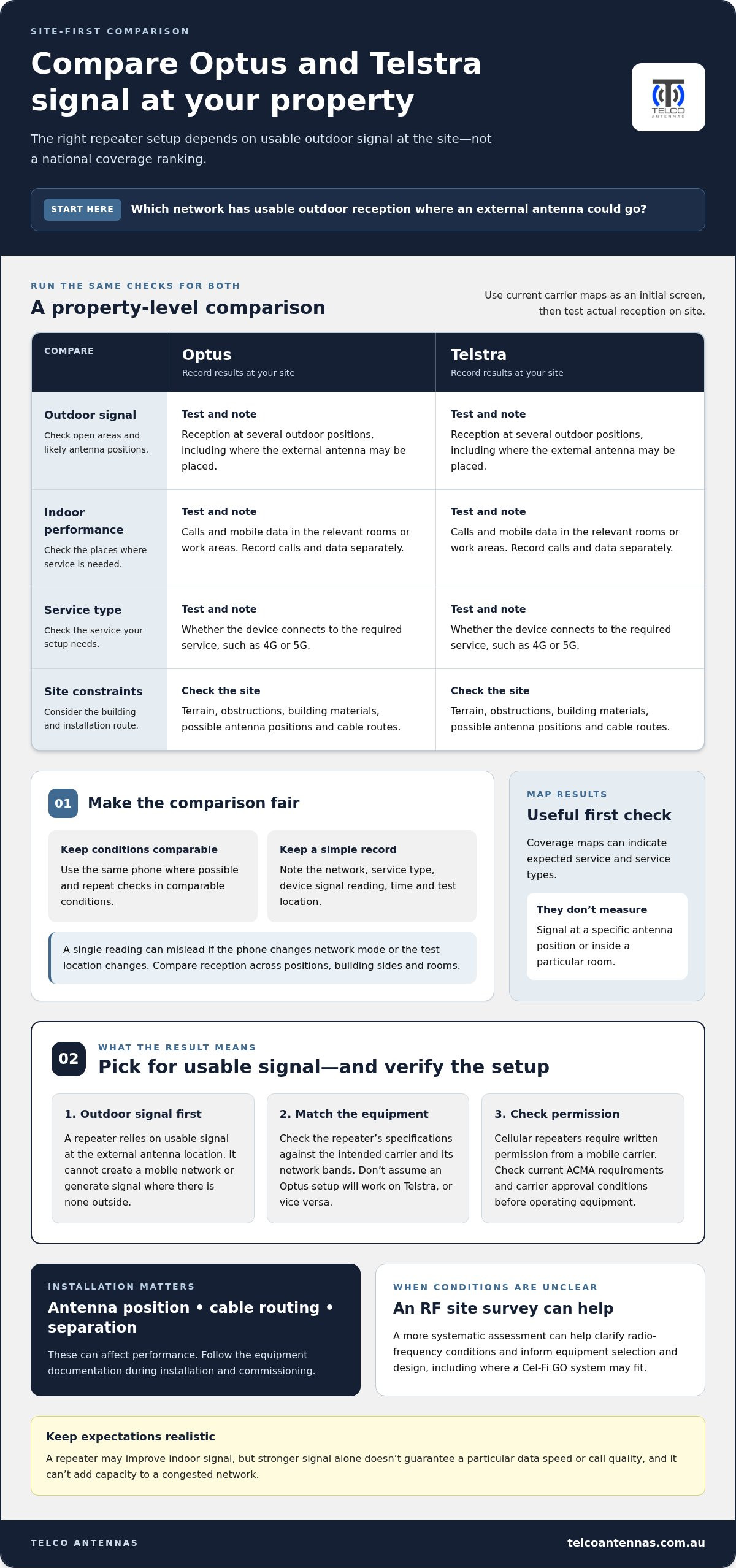
Site-level testing matters more than a national ranking because the best setup depends on the usable signal at your property, not the carrier’s overall footprint.
| Comparison point | What to check for each network |
|---|---|
| Outdoor signal | Reception in open areas and at likely external antenna positions. |
| Indoor performance | Calls and mobile data where people need to use them. |
| Service type | Whether the device connects to the service you need, such as 4G or 5G. |
| Site constraints | Terrain, building materials, practical antenna locations and cable routes. |
How to assess Optus and Telstra signal at your site
Test each carrier outdoors at several positions, including open areas and likely external antenna locations. Then repeat the checks indoors where service matters. Use the same phone where possible, and record the network, service type, signal reading shown by the device, time and test location. If you’re comparing calls with data, note those separately rather than treating a signal indicator as a complete measure of performance.
Repeat observations under comparable conditions. A single reading can mislead if the phone changes network mode or you test in a different location. Keep a simple site plan or notes to compare reception between elevations, sides of the building and rooms. If readings fluctuate or the best antenna position is unclear, an RF site survey can provide a more systematic assessment of radio-frequency conditions.
What coverage maps can and cannot tell you
Carrier maps are useful for an initial screen. They can indicate whether a network is expected to serve an area and which service types may be available, but they don’t measure signal at a particular external antenna position or inside a specific room. Terrain, nearby obstructions, construction materials and network load can affect reception and performance. Devices can also show different results.
Map coverage isn’t a promise of indoor reception, call quality or data speeds. If a map suggests service but your tests show weak or inconsistent signal, investigate the site conditions rather than assuming a repeater will resolve the problem. The optus network cellular repeater vs telstra coverage repeater setup decision should follow evidence from the locations you need to serve. Where readings or installation constraints are unclear, a professional RF site survey can help inform the next step.
Repeater compatibility, bands and Australian approval requirements
A repeater must suit the mobile network you intend to use and be permitted to operate in Australia. These are separate checks: a device may support a network’s frequency bands but still not meet applicable approval conditions. Approval also doesn’t mean it will suit every carrier, service type or site.
This matters when choosing an optus network cellular repeater vs telstra coverage repeater setup. Don’t select equipment from its product name or a general “4G” or “5G” label alone. Confirm the exact model, intended carrier and supported network bands against current manufacturer specifications and carrier information.
How network bands affect booster selection
A frequency band is a defined range of radio frequencies used to carry mobile signals. Optus and Telstra use particular bands for their services, and the combination can vary by technology and location. A repeater only works with signals it is designed to support, so a mismatch can make it unsuitable even where the network is available.
Check the specific model’s documentation for supported bands and carrier compatibility, then compare those details with current information from Optus or Telstra. A “5G” label alone doesn’t establish compatibility: the equipment needs to support the relevant frequencies and service configuration. Don’t assume a unit selected for one carrier will operate on the other, or that one model supports both.
What to know about approved signal boosters in Australia
In Australia, ACMA requirements and carrier conditions govern which cellular repeaters may be operated. Don’t treat an unapproved consumer repeater as a permitted alternative simply because it’s sold online or described as a signal booster. Check current ACMA requirements and the intended carrier’s conditions for the specific equipment and use.
Cel-Fi smart repeaters are identified in current Australian guidance as ACMA class-licensed and carrier-approved equipment, but you still need to confirm model compatibility with the intended network. Approval status and technical fit are separate checks. Check both before purchase or installation, and follow the equipment documentation for its permitted configuration. The professional Cel-Fi GO signal booster guide provides further context on selecting and deploying these systems.
For a practical check, record the carrier you need, the service you’re targeting and the exact repeater model. Match its band specifications to current carrier information, then verify approval status and operating conditions. If compatibility or site requirements are unclear, an RF site survey can assess conditions relevant to equipment selection. This avoids treating a generic device label as proof that a setup is suitable or permitted.
Set up an Optus or Telstra signal booster: a site-led workflow
A reliable setup starts with evidence about the site, then moves through equipment checks, installation and testing. Don’t mount hardware based only on a coverage map or the carrier name on a box. Record the service you need and where reception is poor, then use the selected equipment’s instructions to guide installation. The process applies to both Optus and Telstra, but compatible devices and configurations may differ.
Before installation: gather the information that matters
Before choosing an antenna position, record the intended carrier and service, indoor problem areas, and outdoor signal readings at several possible antenna locations. Note building materials, roof access, mounting options and likely cable routes. These details help distinguish a coverage issue from an installation constraint and give you a baseline for later testing.
- Check coverage and observe the site. Review current carrier coverage information, then compare it with actual reception at the property. Record the device, location, time, service type and signal readings so you can compare results consistently.
- Define the areas to serve. Mark the rooms or work areas where calls or mobile data are needed. A defined coverage area helps guide internal antenna placement and avoids assuming one position will suit every part of a building.
- Confirm compatibility and operating requirements. Match the exact repeater model and supported bands to the intended network. Check current ACMA requirements, carrier conditions and manufacturer documentation before installing or operating the equipment.
- Plan antenna positions and cable routes. Identify an external antenna location with usable signal and a practical route to the repeater unit and internal antenna. Consider access, obstructions and cable length limits specified by the manufacturer. Follow the selected equipment’s instructions for antenna separation and placement rather than applying a universal spacing rule.
- Install components as specified. Use the antenna, connectors and RF cabling suited to the system design. Route and secure cable as directed, without exceeding manufacturer limits or compromising connectors. Telco Antennas supplies RF components including LMR-400 coaxial cable; suitability depends on the installation design.
- Commission and test the result. Follow the equipment’s commissioning procedure, then test calls and data in the intended indoor areas. Record any remaining dead zones and compare results with your initial observations. A change in signal indication alone may not show whether the service meets the site’s needs.
During setup: position, connect and test methodically
Keep the installation traceable: note antenna locations, cable routing, equipment configuration and test results. If reception varies significantly between outdoor positions, roof access is difficult, building materials are challenging or the cable route limits antenna placement, an RF site survey can assess the conditions before the design is fixed. This is useful when a basic coverage check doesn’t explain inconsistent results.
For an optus network cellular repeater vs telstra coverage repeater setup, base each decision on site evidence and equipment documentation rather than assuming both networks share a suitable configuration. An RF site survey can assess readings and installation conditions in more detail.
Choose a Telco Antennas setup around your coverage requirements
The right next step depends on what your site evidence shows. If coverage information is incomplete, measure the available signal first. If you know which network you need but aren’t sure which equipment matches it, compare device specifications with current carrier information. If the building, antenna positions or cable routes make the design hard to assess, an RF site survey can establish relevant conditions before equipment is selected.
Telco Antennas supplies Cel-Fi GO mobile signal boosters, MIMO antennas and RF hardware, and provides RF site surveys. Each supports a different part of the setup: a booster is network-specific equipment, antennas form part of the radio-frequency design, and a survey assesses the site. Select equipment based on the evidence rather than assuming one configuration will suit every property or both Optus and Telstra.
When a signal booster may suit the site
A booster may be worth considering if usable signal is available at an external antenna location but reception is weak indoors where service is needed. The assessment can be more involved for a large building, remote site or installation with a long or obstructed antenna route, because both outdoor signal and physical layout affect the design.
A booster won’t fix every connectivity problem. If there’s little or no usable mobile signal at the site, or the issue is network capacity rather than indoor reception, boosting may not address the underlying cause. Establish what service is available and what the site requires before settling on a mobile signal solution.
When specialist RF assessment adds value
An RF site survey can assess signal conditions across relevant locations and identify practical constraints, including antenna mounting options, obstructions and cable routes. The findings can inform a suitable design and help determine whether a booster, antenna changes or another approach warrants consideration. A survey doesn’t guarantee a particular coverage result: outcomes still depend on measured conditions, selected equipment and installation.
Antenna choice matters too. A MIMO antenna uses multiple antenna elements for compatible systems, but suitability depends on the equipment and how it will be deployed. The MIMO antenna technical guide explains considerations relevant to antenna planning and data throughput.
For an optus network cellular repeater vs telstra coverage repeater setup, use coverage evidence and site requirements to choose the next step, then match equipment to the intended carrier. Telco Antennas supplies Cel-Fi GO boosters and antennas, and provides RF assessment. Explore signal boosters and RF engineering support for equipment and expertise relevant to your project.
Use your site findings to plan the next step
Your coverage notes can guide more than a carrier choice. Use them to identify where signal is usable, which indoor areas matter, and what the building allows for antenna placement and cabling. This gives equipment selection a clear purpose and helps avoid treating a repeater as the answer before understanding site conditions.
If the optus network cellular repeater vs telstra coverage repeater setup decision is still uncertain, focus on the unanswered question. Is the outdoor signal unclear? Is the equipment’s network compatibility uncertain? Or do installation constraints call for an engineering assessment? Defining the issue helps identify whether product specifications or a more detailed RF assessment is the useful next step.
Telco Antennas brings together signal enhancement equipment and RF engineering support for site-specific requirements. A measured, site-led plan is a sound starting point for making an informed decision.
Frequently Asked Questions
Can one signal booster work with both Optus and Telstra?
Sometimes, but only if the exact unit is designed and configured for both networks. Don’t infer this from a “4G” or “5G” label. Check the manufacturer’s current compatibility information, supported frequency bands and any carrier-specific settings for the model. Some equipment may be carrier-specific or require a supported network selection. Confirm whether you need Optus or Telstra service before purchase, and don’t assume one unit can serve both carriers at once.
Do I need an outdoor signal for a cellular repeater to work?
Generally, yes: the external antenna needs mobile signal to receive. If your phone connects outdoors but loses service inside, the difference between those locations can help show whether indoor signal loss is the main issue. Test more than one potential antenna position, as reception can vary around a building. Weak or fluctuating outdoor reception can limit what the system relays, so indoor results can’t be guaranteed.
How do I check whether Optus or Telstra has better coverage at my property?
For an optus network cellular repeater vs telstra coverage repeater setup, compare both carriers’ current coverage maps, then test each network at the property. Use phones or SIMs on the relevant networks and check outdoor positions as well as the rooms where service is needed. Record call and data performance separately, since a signal indicator doesn’t show the whole experience. Repeat tests under similar conditions; map results don’t promise reception inside a particular building.
Is it legal to use a mobile phone repeater in Australia?
Don’t operate a repeater unless it meets applicable ACMA requirements and the carrier’s conditions, including any required written permission. Australian rules provide for certain exempt equipment only when strict technical requirements are met; don’t assume a generic consumer repeater qualifies. Before installation, check current ACMA guidance and the relevant carrier’s requirements for the exact device. Sale or advertising of equipment doesn’t, by itself, establish that it can legally be operated.
Can a signal booster improve 5G coverage?
It can relay 5G service only if the specific equipment supports the relevant 5G network bands and is suitable for the carrier and site. A “5G” label on a device isn’t enough to confirm that it matches the signal available at your property. Check current manufacturer and carrier specifications, then assess whether usable 5G signal reaches the proposed external antenna position. If only another service type is available there, a 5G-capable unit won’t create 5G coverage.
What should I check before installing a signal booster?
Start with the intended carrier and service, then confirm the exact equipment supports the required bands and meets current operating requirements. Record signal readings at possible antenna locations and identify the indoor areas you need to serve. Check the building layout, mounting options, cable route and equipment instructions before fixing anything in place. If readings are inconsistent or the installation route is complex, an RF site survey can help clarify the design requirements.
Will a signal booster fix slow mobile internet?
Not necessarily. A booster may help if weak reception is limiting indoor service, but slow data can also stem from network congestion, capacity or backhaul constraints, or the phone itself. Compare performance in the same location at different times and, where possible, test another compatible device on the same network. If the signal is already strong but data remains slow, investigate those other causes rather than assuming a repeater will resolve the issue.


