
Could an attenuator clear the warning, or leave you with even weaker coverage? If you’re looking for a telstra go repeater input signal too strong attenuator fix, the answer depends on what the repeater is detecting. Reducing the donor signal can also reduce the signal available for indoor coverage, so check the evidence before changing the RF path.
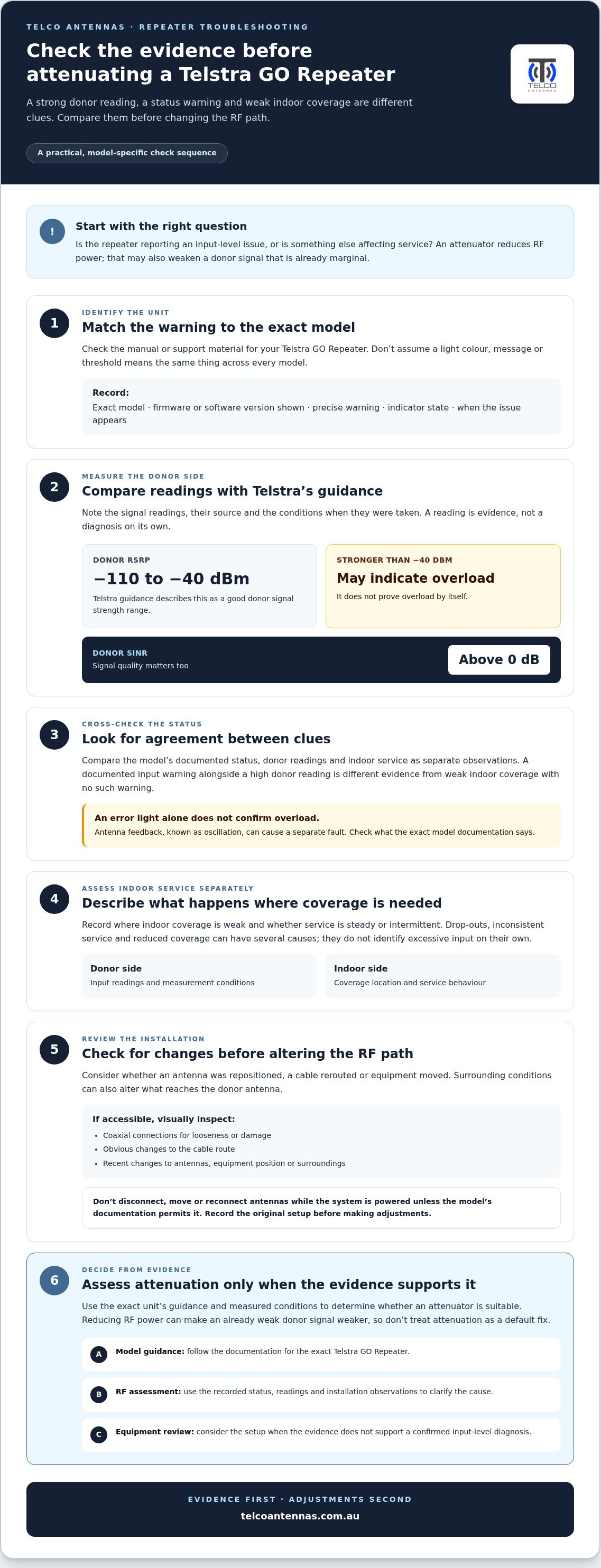
Telstra’s guidance for Telstra GO Repeaters puts a good donor signal strength (RSRP) between -40 dBm and -110 dBm. A reading stronger than -40 dBm may indicate overload. Signal quality matters too: donor SINR should be above 0 dB. An error light alone doesn’t confirm overload, as antenna feedback, known as oscillation, can cause a separate fault.
This guide explains how to compare readings with the unit’s status, why repositioning the external antenna may be a better first step, and when attenuation may be worth assessing. You’ll also learn what model details, signal readings and antenna configuration to record before changing the RF installation, so any adjustment is based on evidence and the correct Telstra GO documentation.
Key Takeaways
- Match the warning to the exact Telstra GO model and its documentation before treating it as an overload fault.
- Compare donor readings with indoor coverage and service behaviour to narrow down the cause.
- Learn when a telstra go repeater input signal too strong attenuator fix may be worth assessing, and why it can worsen an already weak donor signal.
- Record the warning, status lights and operating conditions before adjusting the antenna setup or RF path.
- Use the evidence to decide whether to follow model-specific guidance, review the equipment or arrange an RF assessment.
Telstra GO Repeater input signal too strong: what the warning may mean
Excessive input is one possible RF condition: the signal arriving at a repeater’s donor input may be outside the level that its particular model is designed to handle. That possibility is not a diagnosis. Interpret a warning, status indicator or change in service using the documentation for the exact Telstra GO Repeater. Don’t assume that a colour, message or threshold applies to every model.
A strong donor reading is useful evidence, but it doesn’t prove on its own that the repeater is overloaded. Look for agreement between the measured input, the unit’s reported status and the manufacturer’s guidance. This matters before considering a telstra go repeater input signal too strong attenuator fix: reducing RF power without establishing the cause could weaken a signal path that was already marginal.
What does a strong input signal mean on a repeater?
The external, or donor, antenna receives a mobile signal and delivers it to the repeater through the connected RF path. Input level describes the signal received at that point. It is different from indoor coverage, which depends on the signal delivered inside and its performance where it’s being used.
A high donor reading doesn’t automatically mean indoor coverage is good or that the unit is overloaded. Antenna position, direction and the installation’s RF path can all affect what reaches the repeater. Use the limit and interpretation given for your exact unit rather than applying a threshold to every GO model. An Attenuator (electronics) reduces signal power, but whether it belongs in an installation depends on the equipment guidance and measured conditions.
Which symptoms can point to an input-level problem?
Start with the evidence the manufacturer defines, not a symptom that merely seems consistent with overload. Check the model’s manual or support material for the exact warning text, status indicator or operating state. If it specifies an input-level warning, record what the unit shows and the conditions when it appears. Don’t assume a light or message means overload unless the documentation says so.
Drop-outs, inconsistent service or reduced indoor coverage can have several causes. These experiences don’t identify an excessive input on their own. A strong signal reading is also not the same as a documented overload alert. Keep the observations separate:
- Documented indication: the message or status described for the exact model.
- Measured condition: the donor reading, including the measurement source and when it was taken.
- Observed behaviour: what happens to indoor service and whether the issue is steady or intermittent.
This gives troubleshooting a sound starting point. Until the model-specific guidance and readings support an input-level diagnosis, treat overload as a possibility, not a conclusion.
How to distinguish repeater overload from other signal faults
Check the evidence before adding attenuation or changing the antenna arrangement. A repeater status, donor signal reading and indoor service report describe different parts of the system. Consider each separately, then compare them. The search phrase “telstra go repeater input signal too strong attenuator fix” describes a possible remedy, not a diagnosis. An input-level warning and weak indoor coverage are not interchangeable: one concerns the signal arriving at the repeater, the other concerns service where it’s needed.
Check the repeater’s status and installation evidence
Record the exact model, any firmware or software version shown, the precise warning and the indicator state. Note when the issue appears and whether it persists. Compare those observations with the manual for that model, rather than applying thresholds or light meanings from generic online advice.
Next, compare the status with donor readings and indoor performance as separate observations. For example, a documented input warning alongside a high donor reading is different evidence from poor indoor coverage with no such warning. Neither is conclusive in isolation. The IEEE’s explanation of RF attenuators describes their role in controlling signal levels. The Telstra GO model documentation and your measured conditions are what determine whether an attenuator is suitable for your installation.
Rule out antenna, cable and environment changes
Consider what changed when the issue began. Has an antenna been repositioned, a cable rerouted or equipment moved? Changes in the surrounding environment can alter the RF conditions reaching the donor antenna. A fault or unexpected change in the cable path can also affect performance, so don’t assume a strong input is the only explanation.
If accessible, visually inspect coaxial connections for looseness or damage, and look for obvious changes to the cable route. Don’t disconnect, move or reconnect antennas while the system is powered unless the model’s documentation permits it. Record what you find before making adjustments, so you can compare the original setup with any later changes.
- Status: Exact warning, indicator state and software version, if displayed.
- Donor side: Available signal readings and the conditions when they were taken.
- Indoor side: Where coverage is weak, and whether service is steady or intermittent.
- Installation: Recent changes to antennas, cables, equipment position or surroundings.
Multiple transmitters, reflected signals and installation faults are possibilities to investigate, not causes to assume. Their relevance depends on the site and the evidence. If the issue persists across the system and the cause remains unclear, an RF site survey from Telco Antennas can help assess the signal path and antenna conditions as part of a broader technical investigation.
When an RF attenuator may help, and when it can make things worse
An RF attenuator is a component that reduces signal power by a specified amount. In a repeater system, it may be considered if model-specific documentation and measured conditions support an excessive donor input. It isn’t a general-purpose remedy for poor coverage: attenuation reduces the wanted signal as well as any excessive level. An uncertain diagnosis or weak donor signal can therefore make performance worse.
Think of attenuation as a measured adjustment to the RF path, not a trial fix. The right amount and whether a component is suitable depend on the actual signal conditions and the repeater’s requirements. The phrase telstra go repeater input signal too strong attenuator fix shouldn’t be taken as a recommendation to fit one before checking those factors.
How attenuation changes the repeater’s input
Attenuation is commonly described in decibels (dB), which express how much the RF signal level is reduced. A suitable reduction may bring an excessive input within the equipment’s operating requirements. The same reduction also lowers useful donor signal and could leave the repeater with too little input to operate as intended. Assess both the measured conditions and the exact model’s guidance. Don’t guess a dB value.
| Evidence | What it may mean | Sensible approach |
|---|---|---|
| Documented overload warning, supported by relevant readings | An excessive input may be affecting operation. | Follow the exact model’s instructions. Assess attenuation only if the documentation and RF evidence support it. |
| Unclear warning or symptoms without a confirmed input issue | The cause remains uncertain; other system or installation faults may be involved. | Gather status and signal evidence before changing the RF path. |
| Weak donor signal or poor signal quality | Reducing input further could worsen the available signal. | Don’t add attenuation as a first response. Investigate the signal path and follow model guidance. |
What must be checked before fitting an attenuator?
Start with the exact Telstra GO Repeater model’s documentation. Verify whether an attenuator is an approved accessory and follow its installation instructions. Component suitability also depends on the system’s RF band, impedance, connector type and power handling. Don’t infer compatibility from a connector that appears to fit: physical fit alone doesn’t establish electrical suitability.
Avoid stacking attenuators or using an improvised component to see whether the warning disappears. Either approach introduces an unmeasured change and can make the signal path harder to diagnose. If the model documentation doesn’t support the proposed component or method, pause rather than experiment.
- Documented overload: assess a controlled reduction only against model instructions and measured conditions.
- Uncertain cause: investigate the warning and installation before altering signal level.
- Weak donor input: avoid reducing it further without evidence that supports the change.
An attenuator may help in a specific, verified overload condition, but it isn’t automatically the right fix. Preserve the existing setup and readings so you can assess any change against the system’s original behaviour.
A safe troubleshooting sequence for a Telstra GO Repeater
Before changing an antenna position, configuration or RF path, build a clear record of what the unit is doing. This helps distinguish a documented fault from an assumption and gives a later assessment useful context. Keep initial checks non-invasive. Don’t make powered RF changes unless the exact device instructions allow them and the work is being carried out by someone competent to do so.
Record the model, warning and operating conditions
Photograph or transcribe the model label, exact warning and indicator pattern. Include the software or firmware version if it’s displayed. Record whether the problem affects calls, data, one room or all indoor areas, when it began, and any changes made to the system around that time. Specific observations are more useful than a general note such as “coverage is bad”.
Inspect the signal path without guessing at settings
Look over accessible cables and connectors for visible damage or an obvious change in routing, without opening the repeater or altering connections. Check whether the external antenna has shifted or become obstructed. Before resetting, reconfiguring or adding an RF component, consult the manual for the exact model. Don’t assume settings or procedures from another GO Repeater apply.
- Identify the equipment. Record the full model name and any version information shown by the unit or its interface.
- Capture the current status. Photograph or transcribe the warning, lights and any displayed readings before resetting or switching anything off.
- Describe the service impact. Note whether calls, data or both are affected, and whether the issue is limited to one area or present throughout the indoor coverage area.
- Set out the timeline. Record when the behaviour started and whether antenna placement, cabling, equipment location or configuration changed beforehand.
- Make a visual check. Observe accessible cable condition and antenna position. Don’t disconnect, move or adjust RF components while powered unless the model documentation permits it.
- Document the decision. Compare observations with the exact model instructions. Note whether those instructions support a specific next step, or whether the cause remains uncertain and needs further assessment.
Keep a short record to hand before arranging technical assistance:
- Model and displayed software or firmware version
- Exact warning, indicator pattern and any available readings
- Indoor locations and services affected
- When the issue began and changes made to the setup
- Visible cable condition and any antenna movement or obstruction
This evidence is a safer starting point than an unverified telstra go repeater input signal too strong attenuator fix. If the fault persists or the signal path remains unclear, Telco Antennas can carry out an RF site survey to assess the installation and its operating conditions.
Choosing the next step: model guidance, RF assessment or equipment review
The right next step depends on what your records show. If the exact Telstra GO Repeater documentation identifies the warning and gives a procedure, follow that model-specific guidance. If the warning’s meaning is unclear, or readings and service behaviour don’t point to the same cause, pause before changing the RF path. A persistent issue affecting the whole system may also justify reviewing the installation and equipment rather than treating attenuation as the default fix.
When to rely on the exact model documentation
Use the manufacturer’s instructions to interpret indicator states, understand configuration limits and identify approved components or adjustments. Don’t transfer settings or warning meanings between different GO Repeater models just because their names or functions are similar. If the warning remains unexplained, hold off on attenuation, resets or configuration changes until the evidence is clearer.
This is especially relevant to the search for a telstra go repeater input signal too strong attenuator fix. The phrase describes a possible remedy, but the exact model’s documentation and observed conditions should determine whether it’s appropriate. Keep the model number, warning, available donor readings and installation notes together so the next decision is based on the same set of evidence.
When an RF site assessment can add useful evidence
An RF site survey can examine signal conditions and antenna placement as part of the wider signal path. This can help clarify whether the issue relates to donor signal, antenna configuration or another installation condition, particularly when the status information doesn’t explain inconsistent or system-wide performance. The purpose is to understand the site and equipment together, not to apply a generic setting.
Telco Antennas’ Cel-Fi GO professional deployment guide offers related technical context on Cel-Fi GO systems. It doesn’t establish that a Telstra GO Repeater has the same settings, accessories or troubleshooting steps, so use the documentation for your exact unit when diagnosing it.
Antenna configuration can also affect the RF path. Where the installation uses MIMO antennas, the MIMO antenna technical guide provides background on their configuration and role. Treat it as general antenna reading, not model-specific advice for a Telstra GO Repeater.
In practical terms, follow the manual when it clearly addresses the observed warning; arrange an RF assessment when the cause remains uncertain or performance problems persist across the system; and review the equipment when the documented setup and observed behaviour don’t align. Telco Antennas supplies Cel-Fi GO mobile signal boosters and provides RF site surveys, which can help with a separate mobile signal system or an assessment of the RF installation.
If you’re reviewing options for a separate mobile signal system, you can explore Telco Antennas’ mobile signal solutions alongside the evidence you’ve gathered.
Take the next RF step with confidence
Before acting on a telstra go repeater input signal too strong attenuator fix, make the next move one you can assess: preserve your observations, follow the instructions for your exact model and avoid adding components on a guess. If the fault remains unclear, an assessment of the signal path can help shape a more considered decision. A measured adjustment is more useful than a change that makes the warning disappear but leaves the underlying cause unresolved.
Telco Antennas supplies Cel-Fi GO mobile signal boosters and provides RF site surveys and communication tower design. These services and products are distinct from a Telstra GO Repeater and don’t make Cel-Fi GO equipment interchangeable with it. For help assessing an unclear RF installation, arrange an RF site survey with Telco Antennas.
With clear evidence and model-specific guidance, you can make the next decision calmly and keep your RF installation on a sound footing.
Frequently Asked Questions
Can an attenuator fix a Telstra GO Repeater input signal that is too strong?
It may help if the exact model’s documentation and measured conditions support an excessive input as the cause. An attenuator isn’t a guaranteed fix, and an unsuitable reduction could weaken the wanted donor signal. Before considering one, compare the unit’s status and available readings under consistent conditions, then check the manufacturer’s instructions for approved components and procedures. If the evidence doesn’t point clearly to overload, investigate further rather than trialling attenuation.
How do I know if my Telstra GO Repeater input signal is too strong?
Look for a model-specific input warning and check it against the unit’s documentation and available donor readings. Don’t rely on a red light, dropped call or poor coverage alone unless the manual identifies it as an overload indication. If you can view signal readings, record them with the time and measurement location. Comparing readings taken consistently can help show whether input level is relevant, but the manufacturer’s guidance remains the reference.
What dB attenuator should I use with a Telstra GO Repeater?
There isn’t a dB value that can safely be recommended for every Telstra GO Repeater installation. The appropriate reduction depends on the measured input and the specific unit’s operating requirements. Check the manual for guidance on compatible components and acceptable signal conditions; don’t copy a value from a different model or a general online example. If the documentation doesn’t specify an approach, an RF assessment can help establish what the signal path requires.
Where should an attenuator go on a repeater antenna cable?
Don’t choose a position by guesswork. The correct placement depends on the repeater’s design and installation instructions. Check the exact model documentation before inserting any component into the RF path, and verify that the proposed part suits the system’s RF requirements. Avoid disconnecting or modifying antenna cabling while powered unless the manufacturer’s instructions explicitly allow it.
Can a strong Telstra signal cause a GO Repeater to stop working?
A sufficiently strong donor input may lead a repeater to limit operation or enter a protective state, if that behaviour is specified for the model. A strong mobile signal by itself doesn’t prove that this has happened. Check whether the unit reports a documented input warning and compare its status with the manual. If service has stopped without a matching indication, consider other system faults rather than assuming the Telstra signal is responsible.
Will reducing the input signal make indoor coverage worse?
It can. An attenuator lowers the signal entering the repeater, including useful donor signal, so indoor service may suffer if the input is already weak or marginal. For example, if the warning is absent and coverage is poor in only one part of a building, reducing the donor signal may not address the local coverage problem. Confirm the cause and follow model-specific guidance before changing the RF path.
Should I reset my Telstra GO Repeater if it shows a strong-input warning?
Don’t reset it as your first response unless the exact model’s instructions recommend that step. A reset may change the unit’s state without correcting an RF condition, and it can make the original fault harder to assess if you haven’t recorded the warning. First note the displayed status and any readings, then consult the manufacturer’s troubleshooting procedure. If the warning remains, avoid repeated resets or configuration changes based on guesswork.
What information should I record before troubleshooting a Telstra GO Repeater?
Record the full model name, any displayed software version, the exact warning and indicator pattern, plus any donor readings the system provides. Note whether calls, data or both are affected, where the problem occurs, and whether it is constant or intermittent. Include when it began and any changes to antenna placement, cabling or equipment location. These details help distinguish a change in service from a documented input fault.


