

What if the trailer is ready to deploy, but crews still lose internet across the worksite? A search for “construction site communications trailer Australia” is really a search for a dependable, site-specific network, not just a trailer.
Mobile coverage and internet performance can vary across a large or remote site, and permanent infrastructure may not be available when the first crews arrive. The challenge is to work out whether mobile broadband, satellite or a wireless link best suits the location, then match that connection with the right mast, antenna and power arrangements.
This guide explains how to assess connectivity needs and site constraints before selecting equipment. Compare backhaul options, trailer configurations and deployment requirements, including how antenna placement and changing site conditions affect the setup. RF site surveys and engineering can inform those decisions and help you plan a communications system that can be repositioned or adapted as construction progresses.
Key Takeaways
- For a construction site communications trailer Australia project, distinguish internet backhaul from on-site Wi-Fi, mobile coverage and two-way communications before choosing equipment.
- Trace the connection from its source through routers and distribution equipment to users. A mast can improve antenna position, but it cannot create a usable signal.
- Compare mobile, satellite and point-to-point wireless backhaul against site conditions, then match the trailer, mast, equipment space and power approach to the job.
- Plan deployment by mapping users, work zones, equipment locations and construction phases so the setup can adapt as the site changes.
- Use RF site surveys, communication tower design and suitable Telco Antennas hardware to inform a project-specific configuration.
What does a construction site communications trailer need to deliver?
A construction site communications trailer Australia project should start with the work the system needs to support, not the trailer’s physical features. A communications trailer is a mobile platform for positioning network and radio equipment at a temporary site. It can help place antennas and other hardware where they’re useful, but it’s only one part of the system. Equipment placement, network design and the available connection all affect performance.
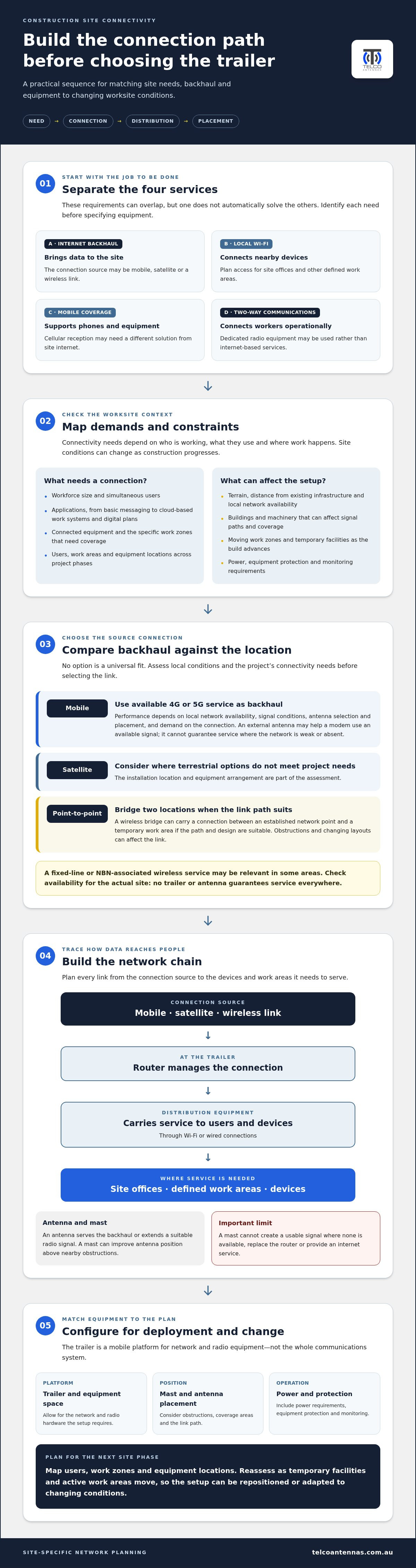
Separate these four requirements before choosing a configuration:
- Internet backhaul: the connection bringing data to the site, such as a mobile, satellite or wireless link.
- Local Wi-Fi: access for devices within site offices or other defined work areas.
- Mobile coverage: cellular reception for phones and equipment, which may need a different solution from site internet.
- Two-way site communications: operational communication between workers, which may use dedicated radio equipment rather than internet-based services.
These needs can overlap, but one doesn’t automatically solve the others. A trailer may provide a backhaul connection while Wi-Fi coverage remains limited to nearby areas. Capacity needs also depend on workforce size, simultaneous users and the applications in use. Cloud-based work systems and digital plans create different demands from basic messaging, while connected equipment may need coverage in specific work zones.
The right setup depends on coverage, capacity, power and how the site changes. A mast can improve antenna position, but it can’t create a usable signal where none is available. The trailer alone also doesn’t determine how well a network reaches site offices or active work areas.
Which construction activities depend on reliable site connectivity?
Site offices may rely on business internet for project coordination, cloud-based work systems, document access and digital plans. Workers’ phones need mobile coverage, while radios or other dedicated systems support operational communication across the site. Connected equipment can add further requirements, depending on the project. Treat these as separate services when planning: internet access, public mobile reception and private site communications each have distinct coverage and equipment needs.
What makes an Australian construction site difficult to connect?
Work zones and temporary facilities move as construction progresses, so a position that suits the initial setup may not serve later phases. Buildings, machinery, terrain and distance from existing infrastructure can affect signal paths and coverage. Network availability also varies across Australia. A fixed-line or wireless service associated with the National Broadband Network (NBN) may be relevant in some areas, but no trailer or antenna guarantees service at every site. The connection and equipment placement need to suit local conditions.
How do internet and communications systems work from a site trailer?
A site network works as a chain: a backhaul connection brings data to the trailer, a router manages that connection, and distribution equipment carries it to users and devices through Wi-Fi or wired connections. Antennas serve the backhaul or extend a suitable radio signal; they don’t replace the router or create an internet service. For a construction site communications trailer Australia setup, plan each part of this path around the location and the areas that need service.
A mast can raise an antenna above nearby obstructions and provide a useful mounting position. It can’t create cellular coverage where no usable network signal reaches, or provide a clear wireless link through a blocked path. Include power requirements, equipment protection and monitoring in the design. The right arrangements depend on the hardware, site conditions and how the system will be used.
When can mobile networks provide the site internet connection?
A mobile modem can use available 4G or 5G service as the site’s internet backhaul. Performance depends on local network availability, signal conditions, antenna selection and placement, and demand on the connection. A correctly selected external antenna may help the modem use an available signal, but a mast and antenna don’t guarantee service where the network is weak or absent. For background on booster applications, read this professional guide to Cel-Fi GO signal boosters.
When do satellite or point-to-point links suit a worksite?
Satellite backhaul can be considered where terrestrial options don’t meet the project’s connectivity needs. The installation location and equipment arrangement are part of the assessment. A point-to-point wireless bridge can carry a connection between two locations, such as an established network point and a temporary work area, if the link path and design are suitable. Obstructions and changing site layouts can affect that path, so plan the bridge around the actual locations. This guide to long-range wireless bridges explains the link-design considerations.
These backhaul options solve different problems, and none is a universal fit. A project may combine a connection source with local Wi-Fi or separate radio communications, depending on operational needs. Record where the connection enters the system, how it reaches users and devices, and what needs power or protection. A project-specific RF site survey can help inform antenna placement and link design. Review RF site survey and communications hardware options when planning the deployment.
How should you compare construction site communications trailer options?
Compare backhaul options against actual site conditions, then assess whether the trailer can safely and practically support the equipment. Keep internet availability, local Wi-Fi coverage and radio communications as separate design questions. No option guarantees a particular speed or coverage across every worksite; performance depends on the connection, equipment, placement and environment.
| Backhaul | Prerequisites | Trade-offs to consider |
|---|---|---|
| Mobile | Usable cellular service at the antenna location and a compatible modem. | Can be straightforward where coverage is suitable, but availability and performance vary by location and network conditions. |
| Satellite | A suitable installation position and a clear view for the satellite equipment. | Can provide an alternative where terrestrial links don’t meet project needs, but requires appropriate equipment placement and power. |
| Point-to-point wireless | A suitable path between link locations and a designed bridge system. | Can connect separated locations, but obstructions or changes to the site can affect the link path. |
Next, compare trailer configurations. Consider how easily the trailer can be transported and repositioned, whether the mast suits the antenna arrangement, and whether there’s enough space for routers, cabling and other equipment. Account for the power approach and whether the setup can be adapted as project requirements change. A mobile internet connection doesn’t automatically provide Wi-Fi throughout the worksite, and neither service replaces dedicated radio communications where required.
What should the trailer and mast design accommodate?
Assess transport access, the deployment location and ground conditions, including whether the trailer may need to move as work areas shift. Plan for antenna mounting, practical cable routes, equipment access and protection from the site environment. Telco Antennas’ telescopic mast trailer deployment guide provides further detail on trailer considerations.
Which antenna and cabling factors affect connectivity?
A directional antenna focuses on a particular signal source or link, while an omnidirectional antenna is used where signals may come from different directions. Selection depends on the coverage objective and available sources. MIMO is relevant when compatible cellular equipment uses multiple antenna paths, so the modem, antenna and cabling need to work as a system. See the MIMO antenna technical guide for more context.
Suitability is project-specific. An RF site survey can help inform antenna placement and link design. Telco Antennas’ communications hardware and RF engineering can support a configuration shaped around the site.
What should you assess before deploying a communications trailer on site?
Plan deployment around how the site will operate, not just the conditions on day one. For a construction site communications trailer Australia setup, document who needs connectivity, where they work, what services are available and how the layout is expected to change. Include power availability, vehicle access, likely trailer locations, physical obstructions and how often equipment may need to move.
- Define users and demand. Record the groups, devices and applications that need service, including expected simultaneous use and any operational communications requirements.
- Map work zones. Mark site offices, work fronts, equipment areas and temporary facilities. Note which locations need internet, Wi-Fi, mobile reception or radio communications.
- Assess connectivity. Identify available backhaul options and document signal conditions, obstructions and potential antenna positions.
- Select the architecture. Match the connection, antennas, distribution equipment and power approach to the coverage areas and expected demand.
- Plan deployment and change. Consider transport access, suitable placement, cable routes, equipment protection and how the setup could be repositioned or expanded through construction phases.
Keep the site layout and equipment plan together, and update them as offices, machinery and work areas shift. This record helps identify which parts of the system may need adjustment, rather than assuming the original placement will remain suitable throughout the project.
How does a site survey inform equipment selection?
An RF site survey can assess available signals, obstructions and potential antenna positions across relevant areas. Those findings help inform backhaul selection, antenna orientation and proposed equipment placement. A survey describes conditions observed during the assessment; it doesn’t guarantee future network performance, particularly if the site layout or surrounding environment changes.
How should connectivity adapt as construction progresses?
Plan for site offices to move, new work fronts to open, and machinery or temporary structures to alter signal paths. Depending on the design, the trailer, mast or network components may need repositioning, or the system may be expanded in stages. This is planned flexibility, not automatic or uninterrupted service. Build review points into the project schedule so coverage needs are reconsidered as the site develops.
Before deployment, verify applicable Australian regulatory, electrical and worksite safety requirements for the equipment and installation. Requirements can depend on the specific setup and site conditions, so don’t assume a configuration suitable for one project will suit another. Plan your construction-site RF survey and equipment layout with Telco Antennas.
How can Telco Antennas support a construction site communications setup?
A communications trailer works best as part of a planned RF system, with the trailer, mast, antennas, cabling and backhaul selected to suit the site. Telco Antennas supplies telescopic mast trailers and skids alongside communications hardware and RF engineering services. These are practical components to consider when planning a temporary deployment. The right combination depends on the project’s connectivity requirements, physical layout and how these may change over time.
Which Telco Antennas capabilities are relevant to construction sites?
Telescopic mast trailers and skids provide a mobile platform for temporary RF infrastructure. RF site surveys can inform antenna placement by assessing signal conditions and potential obstructions, while communication tower design supports infrastructure planning. If the project needs a link between separate locations, point-to-point wireless bridges may form part of the design, subject to suitable site conditions and link paths.
Antennas, signal boosters and LMR-400 coaxial cabling each serve specific roles. Antenna selection depends on the signal source and coverage objective; a booster may be relevant where usable mobile service is available, and coaxial cable connects compatible RF equipment. Select and position these components as part of a compatible system. A trailer or mast alone doesn’t guarantee internet access or coverage across the site.
What information helps shape a project-specific solution?
Useful planning inputs include a site plan showing offices, work zones and likely equipment locations, along with project phases and anticipated user needs. Note known connectivity constraints, available power, access for positioning the trailer and how often it may need to be relocated. These details help relate hardware and RF engineering to the actual deployment, rather than choosing components in isolation.
For a construction site communications trailer Australia project, early planning can also identify where the system may need to expand or shift as construction progresses. Telco Antennas’ telescopic mast trailers, skids, antennas, cabling, wireless bridges, RF site surveys and tower design can inform a project-specific approach. No single component guarantees service.
Discuss your construction site connectivity requirements with Telco Antennas to explore the equipment and RF planning relevant to your site.
Plan a communications setup that can move with your project
A dependable construction site communications trailer Australia setup starts with the site’s requirements, not a standard equipment package. Compare backhaul options against local conditions, separate internet access from Wi-Fi and radio needs, and plan for changes to work zones, power and equipment locations. Antenna placement, cabling and network design all contribute to system performance.
Telco Antennas supplies telescopic mast trailers and skids alongside RF infrastructure hardware. RF site surveys, communication tower design and point-to-point wireless bridge solutions can inform a project-specific approach, from assessing signal conditions to planning links between locations. The aim is a considered setup, not an assumption that a trailer alone guarantees coverage.
Bring your site plan, project phases, expected users and known connectivity constraints into the planning conversation. Discuss your construction site connectivity requirements with Telco Antennas and take the next step towards a setup suited to your site.
Frequently Asked Questions
What is a construction site communications trailer?
A construction site communications trailer is a mobile platform for positioning network and radio equipment at a temporary worksite. It may carry or support antennas, a mast, cabling and equipment that distributes a connection to site users. The trailer itself doesn’t provide internet: the system also needs a suitable backhaul, compatible network equipment and power. For a construction site communications trailer Australia project, configure the system to suit the site layout and services crews need.
How do construction site trailers get internet in remote areas of Australia?
Trailers can receive internet through available mobile broadband, satellite or a point-to-point wireless link, depending on local conditions and project needs. Mobile broadband requires usable cellular service at the antenna location. Satellite can be an option where terrestrial connectivity doesn’t meet requirements, while a wireless bridge needs a suitable path between connection points. A site survey can help assess signal conditions and placement, but no option guarantees service at every location.
Is satellite internet or mobile broadband better for a construction site?
Neither is universally better. Mobile broadband may suit a site with usable 4G or 5G service and compatible modem and antenna equipment. Satellite may be worth considering where terrestrial connections don’t meet the project’s needs, provided the equipment can be positioned appropriately. Compare availability, expected user demand, site conditions, power needs and how the connection will be distributed. A site-specific assessment is more useful than assuming either option will perform the same everywhere.
Can a communications trailer improve mobile phone coverage across a worksite?
It may support improved mobile coverage when usable cellular service is available and the system is designed with suitable antennas or signal-boosting equipment. A mast can provide a better antenna position, but it can’t create a mobile signal where none reaches the site. Coverage also depends on site layout, obstructions and where workers need reception. Assess cellular conditions across relevant work zones rather than assuming that internet access from the trailer will improve phone reception across the whole site.
What equipment is typically needed for a site communications trailer?
Equipment depends on the chosen backhaul and services required. A setup may include a mobile modem, satellite equipment or wireless bridge, a router, antennas, cabling and equipment for distributing internet locally. A mast or trailer can position RF equipment, while separate radio hardware may be needed for dedicated site communications. Consider power and equipment protection as well. Select components as a compatible system based on the location, user demand and intended coverage areas.
How do you choose an antenna for a temporary construction site?
Start by identifying the signal source and coverage objective. A directional antenna focuses towards a particular source or link, while an omnidirectional antenna can suit signals arriving from different directions. For cellular data, check that the antenna configuration matches the modem, including any MIMO requirements. Mounting position, obstructions and cable routing also affect the design. An RF site survey can help inform antenna selection and placement for the actual site conditions.
Can a communications trailer be moved as construction work progresses?
Yes, a trailer can be repositioned if its design and deployment plan allow for it. Before moving it, consider the new location, access, ground conditions, power, cable routes and antenna or wireless-link paths. Work fronts, offices and temporary structures may change, so record planned phases and review equipment placement as the site develops. Repositioning can help the system adapt, but it doesn’t automatically preserve coverage or provide uninterrupted service; reassess the connection after changes.


