

A higher-gain antenna can still leave your 4G router with a weak connection. If you’re searching for an “external antenna for 4g router australia” setup, start by checking your router’s antenna ports and supported LTE bands. Then match the antenna and cable to those requirements and the signal conditions at the installation site.
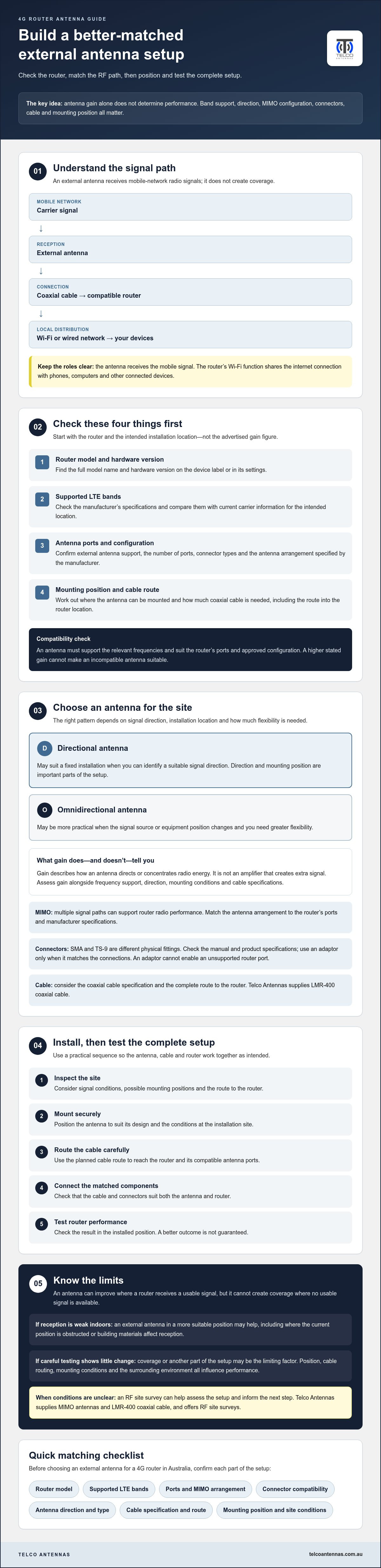
It’s understandable to focus on antenna gain when reception is unreliable, but gain alone doesn’t determine performance. Antenna direction, MIMO configuration, connector compatibility and coaxial cable length all affect the complete RF path. A directional antenna may suit a fixed installation where you can identify a suitable signal direction. An omnidirectional design may be more practical if the signal source or equipment position changes.
This guide explains how to check your router specifications and carrier band information, compare antenna types, and choose compatible connectors and cable. You’ll also learn how to position and test a setup, and why an antenna can’t guarantee a better connection if coverage or network conditions are the limiting factor. If those conditions are unclear, an RF site survey can help inform your next step.
Key Takeaways
- Before choosing an external antenna for 4g router australia, check your router model, supported LTE bands, antenna ports and cable connection requirements.
- Choose between directional and omnidirectional designs based on signal direction, installation location and how much flexibility you need.
- Assess antenna gain alongside frequency support, mounting position and cable specifications. Gain alone is not a performance guarantee.
- Use a practical installation sequence: inspect the site, mount the antenna securely, route the cable carefully, connect it and test router performance.
- If signal conditions are uncertain, Telco Antennas supplies MIMO antennas and LMR-400 coaxial cable, and offers RF site surveys to help assess the setup.
What does an external antenna for a 4G router actually do?
An external antenna receives mobile-network radio signals and feeds them to a compatible 4G router. It doesn’t generate a signal or create coverage where no usable signal is available. Instead, it gives the router a way to receive the signal from a different, potentially better-positioned location.
An external antenna receives the mobile-network signal; the router’s Wi-Fi function distributes an internet connection locally to phones, computers and other connected devices. The full path runs from the carrier network to the antenna, through coaxial cable to the router, then over Wi-Fi or a wired network to your devices. Each part matters: a suitable antenna can be undermined by incompatible ports, a poor cable connection or an unsuitable mounting position.
Antenna gain describes how an antenna directs or concentrates radio energy. It doesn’t mean the antenna acts as an amplifier that creates extra signal. The concept of antenna gain is useful when comparing options, but a higher figure alone won’t tell you whether an antenna will work well at your site. Direction, frequency support and mounting conditions matter too. Choosing an external antenna for 4g router australia use starts with understanding the router and the signal path, not just the headline gain.
How an external antenna connects to a 4G router
Routers vary in whether they have external antenna ports, how many ports they provide and which connector types they use. The antenna connects to the router’s mobile-network radio through these ports, usually via coaxial cable. This is separate from Wi-Fi, which connects the router to devices inside a home, vehicle or workplace.
Check the router manual or manufacturer specifications before buying an antenna, cable or adaptor. Confirm that external antennas are supported and that the connector arrangement matches. An adaptor can join compatible components, but it can’t make an unsupported router port function as an antenna input.
When an external antenna may help
An external antenna may help when the router receives a weak or inconsistent signal indoors, perhaps because its current position is obstructed or building materials affect reception. Moving the antenna to a more suitable position may improve the signal reaching the router, provided a usable signal is available there.
Results depend on the site. Antenna position, cable routing, mounting conditions and the surrounding environment all influence performance, so improvement isn’t guaranteed. If a careful test shows little change, coverage or another part of the setup may be the limiting factor. For solution providers and integrators seeking resilient multi-carrier cellular connectivity, check out Choice IoT for dedicated fixed wireless options.
Check your 4G router before choosing an external antenna
Start with the router, not the antenna’s advertised gain. A suitable match depends on what the router supports and which mobile-network bands are available where you’ll use it. Before choosing an external antenna for 4g router australia, work through these four checks:
- Router model: Find the full model name and hardware version on the device label or in its settings.
- Supported LTE bands: Check the manufacturer’s specifications, then compare them with current information from your mobile carrier for the intended location.
- Antenna ports: Confirm that external antennas are supported, how many ports are available, and which connector types and antenna arrangements the manufacturer specifies.
- Installation route: Decide where the antenna can be mounted and how much coaxial cable is needed to reach the router. Include the cable entry and route in your measurement.
Before purchase, confirm the router model, supported bands, port count, connector type, approved antenna arrangement and practical cable route. Check band compatibility before comparing gain figures. An antenna that doesn’t cover the relevant frequencies won’t become suitable simply because its stated gain is higher.
Match the antenna ports, connectors and MIMO requirements
Connector names such as SMA and TS-9 refer to different physical fittings. They aren’t interchangeable without a suitable adaptor. Check the router manual and antenna specifications rather than relying on a product photo or broad compatibility claim. An adaptor must match the connections, and it won’t change the router’s supported antenna configuration.
MIMO uses multiple signal paths to support the router’s radio performance. If the router has more than one external antenna port, check whether the manufacturer specifies a particular number or arrangement of antennas. Don’t assume one antenna, or any MIMO setup, will suit every router.
Confirm Australian 4G band compatibility
Australian 4G networks use multiple frequency bands, and the bands available to you can vary by carrier and location. Examples used for mobile services include 700 MHz, 850 MHz, 900 MHz, 1800 MHz, 2100 MHz, 2300 MHz and 2600 MHz. Verify current carrier band information rather than relying on these examples. The ACMA’s Australia's radiofrequency spectrum plan provides official context on spectrum allocation. For network use in your area, check the carrier’s current documentation.
If the router specifications or local band information are unclear, compare them with the antenna’s documented frequency range before ordering. Telco Antennas supplies MIMO antennas and coaxial cable; its antenna and RF guidance may help you assess the components for your router setup.
Choose the right external antenna setup for your signal conditions
The right antenna depends on where the router will be used, whether a usable signal is available and how the antenna can be mounted. For an external antenna for 4g router australia setup, compare the antenna pattern, frequency support, MIMO arrangement and coaxial cable as one system. A high gain figure on its own doesn’t show how the complete setup will perform.
Coverage maps can help you understand conditions around your location. The official ACMA coverage standards explain the coverage categories used on mobile network maps. Treat a map as an indication, not a measurement at your antenna position. Terrain, buildings and mounting location can affect the signal received in practice.
| Antenna type | May suit | Consider |
|---|---|---|
| Directional | A fixed installation where a suitable signal source can be identified | It needs careful orientation; changes to the setup may require realignment |
| Omnidirectional | Mobile use or a site where signal direction may change | It receives from a wider range of directions, but that doesn’t guarantee stronger reception |
Directional or omnidirectional: which suits your installation?
A directional antenna focuses reception towards a particular direction. It may suit a fixed installation where you can identify and aim towards a suitable signal source. An omnidirectional antenna receives across a wider horizontal area, which can be more practical if the equipment moves or the useful signal direction is uncertain. Neither pattern is universally best. Choose according to the site and how fixed the installation will be.
Consider gain in context. Compare the antenna’s supported frequencies and radiation pattern, as well as its intended mounting position. A directional antenna’s gain is associated with a narrower direction of reception, while the surrounding environment and installation can affect the result.
Account for MIMO and cable length
MIMO uses multiple antenna paths, but the setup must match the router’s supported ports and manufacturer-approved arrangement. If the router supports multiple external antenna connections, check whether the antenna configuration is designed to use them. A single antenna connected to one port may not provide the same operation as a complete MIMO setup.
Coaxial cable introduces loss, and a longer run can reduce the signal reaching the router. Telco Antennas supplies LMR-400 coaxial cable. Check its connector options and suitability for your equipment and installation. Plan the shortest practical route without compromising reception or safe mounting.
Install and test an external antenna for a 4G router
A careful installation makes it easier to tell whether the antenna is helping. Before you begin, check the antenna and router manufacturers’ instructions, confirm the mounting location and cable route, and record how the router performs without the external antenna. Then work through the setup in order: inspect, position, mount, route, connect and test.
Position the antenna and route the coaxial cable
Inspect the site for practical mounting positions that give the antenna a suitable location. If possible, test potential positions before fixing the final mount. For a directional antenna, compare orientations methodically. For any design, note the router’s signal readings at each position so you can identify a useful change rather than relying on guesswork.
Once you’ve chosen a position, mount the antenna securely and route the coaxial cable along the shortest practical path to the router. Avoid unnecessary cable length, but don’t compromise the antenna’s position just to shorten the run. Protect connectors and cable entry points from environmental exposure, and avoid sharp bends or strain on the cable. Follow the manufacturers’ instructions for mounting, connection and weather protection.
Check performance and troubleshoot methodically
Before connecting the antenna, record the router’s available signal indicators and connection performance. Depending on the router, these may include signal quality readings such as RSRP, RSRQ or SINR, as well as connection type and measured download or upload performance. Your router may not display every measure, so use what it provides and keep the test method consistent.
After connecting the antenna, compare results under similar conditions: use the same router, device and test location, and repeat observations rather than relying on one reading. Network load and changing conditions can affect performance, so a single speed test isn’t conclusive. If the result is weaker or unclear, check the connections and change one variable at a time, such as antenna position or orientation. This makes it easier to identify which adjustment, if any, affects the result.
- Inspect: Check the site, mounting options and cable route.
- Mount and connect: Secure the antenna, route the cable carefully and connect it to the correct router ports.
- Test: Compare signal readings and connection performance across repeated, consistent observations.
If testing doesn’t clarify what’s limiting the connection, an RF site survey can help assess signal conditions and installation factors. Discuss an RF site survey with Telco Antennas if a more informed site assessment may help with your setup.
Build a matched 4G router antenna setup with specialist guidance
A reliable setup is a matched system, not simply an antenna with a high gain figure. For an external antenna for 4g router australia installation, bring together the router’s supported LTE bands and ports, the signal conditions at the site, the antenna pattern, the MIMO configuration and the coaxial cable. If one component is incompatible or poorly suited to the installation, it can limit the rest of the setup.
Telco Antennas supplies MIMO antennas and LMR-400 coaxial cable, and provides RF site survey services. For more detail on how MIMO relates to throughput, consult the MIMO antennas technical guide. The right configuration still depends on your router specifications and site, so treat general guidance as a starting point, not a promised coverage or speed result.
When to seek an RF assessment
A site survey may be useful if you can’t establish where the usable signal is strongest, which direction to aim a directional antenna, or where it can be mounted effectively. An RF assessment can help inform equipment selection and antenna placement by considering the actual site conditions. It can’t guarantee a particular connection speed or coverage outcome, since performance also depends on the network and other factors outside the antenna setup.
A pre-purchase checklist for Australian router users
Before ordering, gather the router model and manufacturer specifications. Check the external antenna ports, supported LTE bands and required MIMO arrangement, then verify current band information with the relevant carrier documentation for the intended location. Compare the antenna’s frequency range, connector type and cable specifications with the exact products you plan to use.
- Router: Confirm the model, supported bands, antenna-port count and manufacturer-approved configuration.
- Site: Identify a practical mounting position and whether the antenna can be oriented towards a suitable signal source.
- Cable: Measure the route to the router, allowing for cable entry and connection points without adding unnecessary length.
- Specifications: Check antenna pattern, MIMO configuration, connectors and frequency support before purchase.
If any part of the match remains uncertain, request technical guidance before selecting equipment. Telco Antennas can help with relevant antenna and cable options, while an RF site survey may assist if the signal environment or mounting position is unclear. This measured approach helps you specify a setup around the router and site, rather than relying on a headline claim.
Choose your next antenna setup with confidence
A suitable external antenna for 4g router australia use starts with compatibility. Check the router’s supported LTE bands, antenna ports and MIMO configuration before comparing antenna gain. Then match the antenna pattern and coaxial cable to the signal conditions and mounting position at your site. Test the completed setup under consistent conditions, bearing in mind that results depend on the available signal and the installation.
If you’re unsure about the signal environment or equipment match, an RF site survey may help inform antenna selection and placement. Telco Antennas is an Australian telecommunications hardware supplier operating since 2008, supplying MIMO antennas and LMR-400 coaxial cable, with RF site survey services.
Explore antenna and RF solutions from Telco Antennas to review relevant equipment and assessment options for your setup. Gather your router specifications and site details, then contact Telco Antennas to discuss suitable antenna, cable or RF survey options.
Frequently Asked Questions
Can I connect an external antenna to any 4G router?
No. Your router needs compatible external antenna ports, and its specifications determine the connector type and supported antenna arrangement. Check the documentation for the exact model before ordering. Some routers use multiple ports for MIMO, while others have a different configuration. An adaptor may resolve a connector mismatch, but it can’t make an unsupported antenna configuration compatible. Confirm the port count and manufacturer requirements first.
Will an external antenna make my 4G router faster?
It may improve reception if the router can access a usable mobile signal, but faster speeds aren’t guaranteed. Performance also depends on carrier coverage, network congestion, supported bands, router capability and antenna placement. To assess an external antenna for 4g router australia use, compare the router’s signal readings and connection performance before and after installation under similar conditions. Repeat the checks, as one reading or speed test may not reflect typical performance.
Should I choose a directional or omnidirectional antenna for a 4G router?
Choose according to the site and signal conditions. A directional antenna needs to be aimed towards a suitable signal source, so it may suit a fixed installation where that direction can be identified. An omnidirectional pattern may be more practical if the equipment moves or signal direction varies. Neither is automatically better. Check the router’s requirements, mounting options and the antenna’s specifications before selecting a design.
Do I need a MIMO antenna for my 4G router?
Only if your router supports the relevant MIMO arrangement and the antenna is designed for it. MIMO uses multiple signal paths to support data performance, but the router’s ports, antenna connections and network conditions all matter. Check the manufacturer’s documentation for the required port and antenna configuration. Don’t assume that connecting multiple antenna leads will improve every setup, particularly if the router doesn’t support that arrangement.
Does a longer coaxial cable reduce 4G antenna performance?
It can. Coaxial cable introduces signal loss, and the amount depends on the cable type, frequency and run length. A longer run can reduce the signal reaching the router. Keep the route practical, choose cable that suits the installation, and check its specifications rather than judging by appearance. Avoid unnecessary length while still positioning the antenna where it can receive a suitable signal and be mounted securely.
How do I know which 4G bands my external antenna needs to support?
Start with your router’s specifications and the relevant mobile carrier’s current network information for the intended location. Supported bands vary by router model and carrier, so a generic list may not identify what your setup needs. Check that the antenna’s documented frequency range covers the required bands. If you’re unsure about a band-specific recommendation, verify it against the carrier information and exact antenna specifications before purchasing.
Can I install an external antenna for my 4G router myself?
Possibly, depending on the antenna, mounting position, cable route and whether you can work safely at the installation point. Follow the router and antenna manufacturers’ instructions, and consider secure mounting, weather exposure and cable entry before starting. If the best position or signal source is unclear, an RF site assessment may help inform the setup. Installation alone doesn’t guarantee improved service, so compare performance under consistent conditions.


