
Simply knowing the location of your nearest telstra tower is often only twenty per cent of the technical challenge when addressing a failing mobile connection. While most users assume that being within a predicted coverage zone ensures reliability, the reality of radio frequency propagation is far more complex. You might find yourself frustrated by persistent drop-outs during essential work calls or stagnant data speeds despite having a clear line of sight to local infrastructure. It's a common scenario where environmental variables and signal attenuation render standard mobile devices ineffective, leaving you with hardware that cannot maintain a stable link.
We understand that achieving a stable, high-performing network requires more than just a basic map. This guide will teach you how to master the technical methods for identifying specific tower locations and leveraging that data to achieve superior connectivity. We will explore how to identify the most effective frequency bands for your specific site and how to select professional-grade hardware, such as MIMO antennas and low-loss LMR-400 cabling. By the end of this article, you will have the technical knowledge to configure an ACMA-approved Cel-Fi system or a high-gain antenna array that turns a marginal signal into a dependable communication link.
Key Takeaways
- Learn to navigate professional databases like the RFNSA to pinpoint the exact location of your nearest telstra tower for more accurate antenna alignment.
- Identify the specific 4G and 5G frequency bands in your area to ensure your hardware is optimised for the correct transmission standards.
- Master the technical requirements for establishing a clean line of sight, including how to mitigate signal clipping caused by the Fresnel zone.
- Evaluate the necessity of active signal enhancement systems, such as the Cel-Fi GO, versus traditional passive high-gain antenna installations.
- Understand the role of low-loss LMR-400 coaxial cabling in preserving signal strength across complex cable runs from the roof to your device.
Understanding the Telstra Tower Network in Australia
To effectively optimise your mobile reception, you must first define what a telstra tower actually represents in the current Australian infrastructure landscape. It's not merely a single steel mast. It's a complex radio frequency (RF) site that houses sophisticated transceivers operating across multiple spectrum bands. Understanding Telstra's history and network development helps explain why their infrastructure varies so significantly between coastal cities and the outback. While a tower might support 4G and 5G simultaneously, the physical hardware and its placement determine the effective range and data capacity available to your device.
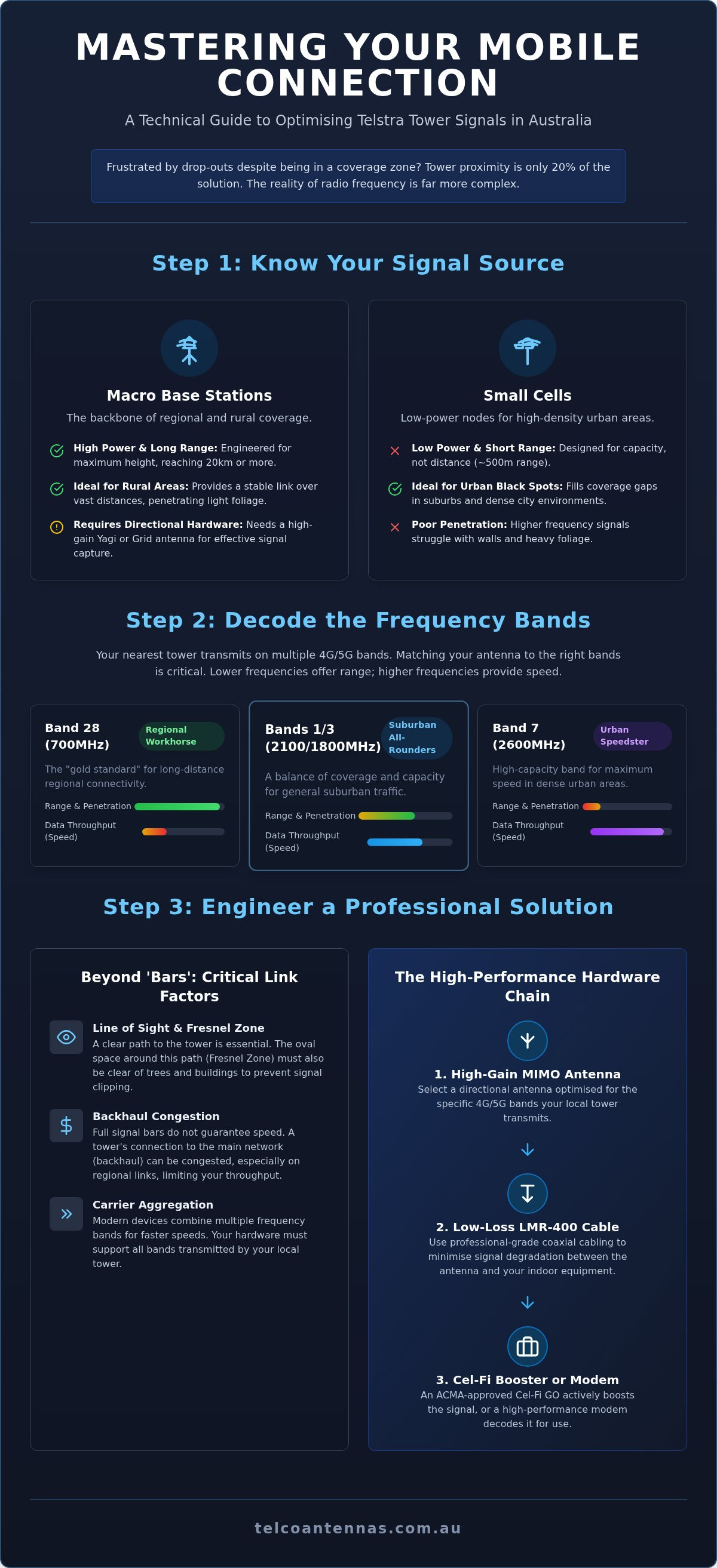
Macro base stations serve as the primary pillars of regional coverage. These sites are engineered for maximum height to extend the signal horizon, allowing transmissions to travel over long distances before being obstructed by the Earth's curvature. In contrast, small cells are low-power nodes typically found on utility poles or buildings in high-density areas. Their purpose is capacity densification rather than range. If you're situated in a rural environment, a macro telstra tower located 20 kilometres away will often provide a more stable link than a small cell situated just 500 metres away, provided you utilise the correct high-gain antenna and low-loss cabling.
Macro Towers vs. Small Cells
The physical footprint of a macro site allows for the installation of large, high-gain sector antennas and heavy-duty cooling systems for high-power electronics. This enables the site to punch through atmospheric interference and light vegetation. Small cells, while useful for filling "black spots" in suburbs, often operate on higher frequency bands that have poor penetration through walls and foliage. When performing a site survey, identifying whether your source is a macro site or a small cell dictates your hardware choice. A distant macro site requires a directional Yagi or Grid antenna, whereas a small cell might only require a compact MIMO panel.
The Role of Backhaul in Tower Performance
A tower's performance is fundamentally capped by its backhaul, which is the connection between the tower and the core network. Most urban sites use fibre-optic backhaul, providing massive data throughput. However, many regional sites rely on microwave backhaul, where data is "hopped" wirelessly from one tower to another. If you experience poor data speeds despite having full "bars" of signal, the issue is likely backhaul congestion or a high signal-to-noise ratio. Bars are a misleading metric because they only measure raw signal strength, not the quality of the transmission or the available capacity of the backhaul link.
Identifying the physical location of a telstra tower is only the first step in a professional signal optimisation strategy. To achieve maximum throughput, you must also decode the specific frequency bands being transmitted from that site. Spectrum allocation in Australia is strictly regulated by the Australian Communications and Media Authority (ACMA), with Telstra utilising several primary 4G LTE bands to balance coverage and capacity. These include B28 (700MHz) for long-distance penetration, B3 (1800MHz) and B1 (2100MHz) for general suburban traffic, and B7 (2600MHz) for high-density urban throughput.
Modern mobile hardware utilises a process known as Carrier Aggregation, which allows a device to communicate with multiple frequency bands from a single telstra tower simultaneously. This increases data speeds by combining the bandwidth of several channels. If your modem or phone is only locking onto a single high-frequency band like B7, you may experience speed drops as you move indoors or behind obstacles. Understanding which bands are active at your nearest site allows you to select the correct MIMO antenna hardware to capture the full spectrum available.
The Significance of the 700MHz (B28) Band
The 700MHz frequency, designated as Band 28, is often referred to as the "gold standard" for regional connectivity. Because lower frequencies have longer wavelengths, they can travel further and penetrate dense bushland or heavy building materials more effectively than higher-frequency signals. However, there is a mechanical trade-off; while B28 offers exceptional range, it provides less data throughput compared to the wider channels found on the 2600MHz band. Technical databases like the RFNSA can confirm if your local site supports B28, which is essential for users located more than 10 kilometres from the nearest mast.
5G NR and the Future of Australian Spectrum
The transition to 5G involves two primary configurations: Non-Standalone (NSA), which relies on an existing 4G anchor, and Standalone (SA), which operates independently. Most current 5G deployments on the n78 (3500MHz) band offer massive speeds but suffer from limited range and require a near-perfect line-of-sight to the tower. 5G New Radio is the global standard for the next decade of cellular communication. As Telstra continues to roll out n5 (850MHz) and mmWave frequencies, the need for precise antenna alignment and high-quality coaxial cabling becomes even more critical to overcome the propagation challenges inherent in these higher spectrum blocks.
Technical Tools for Finding Your Nearest Telstra Tower
Locating a telstra tower requires moving beyond the predictive coverage maps provided by carriers. While official maps are prepared in accordance with the Telecommunications (Mobile Network Coverage Maps) Industry Standard 2026, they remain theoretical models based on terrain elevations. For a technical installation, you need the exact geographic coordinates and hardware specifications found in professional databases. These tools allow you to distinguish between a macro site and a low-power small cell, ensuring your high-gain antenna is pointed at the most capable infrastructure rather than a nearby node with limited backhaul.
The Radio Frequency National Site Archive (RFNSA) is the primary resource for this data. Unlike consumer apps, the RFNSA provides access to the Environmental Report for each site, which contains precise antenna heights and the orientation of each sector. While third-party apps like Aus Phone Towers or OpenSignal offer more intuitive interfaces, they often rely on crowdsourced data or delayed database synchronisation. For critical applications, cross-referencing these apps against the ACMA’s Register of Radiocommunications Licences ensures you're working with the most current licensing information available.
Navigating the RFNSA Database
To identify your nearest telstra tower, begin by searching the RFNSA website using your postcode or a specific site ID. Once a site is selected, the "Site Map" tab reveals the exact location of the mast. It's essential to check the "Carrier" list to confirm that Telstra hardware is actually present; many towers are shared by multiple carriers, but the transmission power and bands will vary between them. Reviewing the Environmental Report allows you to determine the height of the antennas above ground level, which is a critical variable for calculating your required mast height to achieve a clear line-of-sight.
Real-World Signal Testing on Site
Once you've identified a potential tower, you must verify the signal quality using Field Test Mode on your mobile device. On an iPhone, this is accessed by dialling *3001#12345#*, while Android devices often provide this data under "SIM Status" or through specialised apps like Network Cell Info Lite. You should prioritise the Reference Signal Received Power (RSRP) value over the number of bars displayed. An RSRP between -50dBm and -80dBm indicates an excellent signal, whereas values beyond -110dBm suggest a marginal link that requires active signal enhancement.
While basic handset testing is useful for residential setups, professional RF site surveys are mandatory for commercial infrastructure projects. These surveys utilise calibrated spectrum analysers to measure interference levels and signal-to-noise ratios that a standard phone cannot detect. If you're designing a network for a remote facility, relying on a phone's internal antenna is insufficient. A professional survey identifies precisely which site provides the cleanest signal, accounting for atmospheric variables and local terrain obstacles that static databases cannot predict.
From Location to Link: Aiming Antennas for Maximum Throughput
If your device has sustained physical impact or moisture ingress, it may be the source of your connectivity problems rather than the network itself; in such cases, simsim.com.au provides expert repair services in the Melbourne CBD to restore your hardware's performance.
Establishing a high-quality radio frequency link involves more than just pointing hardware in the general direction of a telstra tower. While a clear Line of Sight (LoS) is the baseline requirement for any professional installation, you must also account for the Fresnel Zone. This elliptical area surrounding the direct signal path must remain unobstructed. If obstacles like treelines or building ridges encroach upon this zone, they "clip" the signal, leading to diffraction and multipath interference. This physical phenomenon explains why a connection might remain unstable even when your device reports a high Reference Signal Received Power (RSRP). You should prioritise the Signal-to-Noise Ratio (SINR) during the aiming process, as a strong signal that is heavily distorted by noise will never achieve its theoretical data throughput.
Modern telstra tower infrastructure utilizes Multiple Input, Multiple Output (MIMO) technology to increase capacity. This requires the use of dual-polarised antennas, typically mounted in an "X-pol" configuration at 45-degree angles. If you utilise a single vertical antenna on a MIMO-capable site, you're effectively ignoring half of the available data streams, which significantly caps your maximum speed. To ensure you're capturing the full potential of the local network, you can buy high-gain MIMO antennas engineered specifically for Australian conditions.
The Mechanics of Antenna Alignment
Precision alignment begins by using a compass and the map coordinates of your target telstra tower to establish a starting azimuth. Once the antenna is mounted, use an "incremental sweep" method by rotating the bracket in five-degree increments, pausing for thirty seconds at each point to allow the modem's software to update its metrics. In hilly terrain, vertical and horizontal tilt (elevation) becomes just as critical as the compass bearing. A slight downward tilt can often improve SINR by focusing the antenna's main lobe directly on the tower's sector antennas while simultaneously reducing interference from distant, competing sites.
Cable Selection: Why LMR-400 is Non-Negotiable
The quality of your coaxial cable is the most frequent point of failure in remote signal optimisation. Standard RG-58 cable, often found in cheap kits, suffers from high signal attenuation, meaning the gain you've worked so hard to capture at the antenna is lost before it reaches your modem. LMR-400 is the industry standard for a reason; it provides a much lower loss per metre, which is essential for cable runs exceeding five metres. For example, a ten-metre run of RG-58 can lose over 50 per cent of your 2600MHz signal, whereas LMR-400 preserves almost all of it. Always ensure your external connections are weatherproofed with self-amalgamating tape to prevent moisture ingress, which can permanently degrade the cable's dielectric properties.
Professional Solutions for Distant Telstra Towers
If you have followed the precise alignment procedures detailed in previous sections but still face persistent connectivity issues, the distance to your nearest telstra tower may simply be too great for a passive antenna system to overcome. Passive antennas are limited by their physical gain; they can only capture the energy present at the mount point. They cannot amplify a signal that has already dropped below the sensitivity threshold of your modem. When you're operating at the extreme edge of a coverage footprint, transitioning to an active signal enhancement system is the only viable mechanical solution to ensure network stability.
The Cel-Fi GO represents the industry standard for this requirement, as it's the only consumer repeater system legally authorised for use on the Telstra network in Australia. While many generic boosters found online are illegal and can incur significant penalties from the ACMA for causing network interference, the Cel-Fi GO is carrier-approved hardware. It provides up to 100dB of signal gain, which is a logarithmic increase over the 12 to 15dBi typically provided by a high-gain directional antenna. This massive increase in signal strength allows the device to stabilise a connection that would otherwise be unusable.
The Cel-Fi GO Advantage
Beyond raw power, the Cel-Fi GO utilises sophisticated echo-cancellation algorithms to prevent the system from oscillating or "looping." This allows the unit to operate at maximum gain without degrading the performance of the local telstra tower. By using the Cel-Fi WAVE app, you can monitor real-time performance metrics such as RSRQ and SINR. This software interface is essential for professional installations, as it allows you to manually select specific tower IDs or frequency bands if the device is incorrectly prioritising a congested site over a cleaner, more distant transmission.
Custom Infrastructure: Tower Design and Surveys
For industrial sites or remote homesteads where terrain prevents a clear line of sight, a standard roof mount is often insufficient. In these circumstances, you may require bespoke communication tower design or the deployment of telescopic mast trailers. These mobile solutions allow you to elevate your MIMO antennas up to 15 metres or more, clearing the signal horizon and bypassing local obstacles like dense scrub or heavy machinery. For sites requiring absolute uptime, we often integrate cellular bridges with Starlink systems using aftermarket power conversion kits to create a redundant network architecture.
When the complexity of the environment exceeds the capabilities of DIY tools, a technical assessment is required to avoid costly hardware mismatches. A professional analysis accounts for atmospheric attenuation, terrain shielding, and local interference that predictive maps cannot detect. To ensure your hardware configuration is optimised for your specific geographic coordinates, organise a professional RF site survey with Telco Antennas today.
Optimising Your Network for Long-Term Reliability
Achieving a stable mobile link in Australia's challenging terrain requires a shift from guesswork to engineering precision. By identifying your nearest telstra tower through professional databases and understanding the specific frequency bands in operation, you can move past the frustration of unreliable coverage. It's clear that the combination of accurate antenna alignment and the use of industrial-grade LMR-400 cabling is essential for preserving signal integrity over distance. Whether you are deploying a simple roof mount or a complex active repeater system, the focus must always remain on the technical metrics of SINR and RSRP rather than just the bars on a handset.
We provide the ACMA-compliant hardware and expert Australian technical support needed to bridge the gap between marginal reception and a high-performing local network. If you're ready to upgrade your infrastructure with professional-grade components, you can browse our range of Telstra-compatible MIMO Antennas to find the right solution for your site. With the correct technical approach and high-quality equipment, you don't have to settle for a compromised connection. You have the tools and knowledge to build a dependable link that withstands the demands of modern data usage.
Frequently Asked Questions
How do I find the exact location of my nearest Telstra tower?
You can find the exact geographic coordinates of your nearest telstra tower by accessing the Radio Frequency National Site Archive (RFNSA) database. Unlike predictive maps, this resource provides the physical address and precise antenna heights for every registered site in Australia. By entering your postcode, you can identify which carrier hardware is installed on specific masts. This data is essential for calculating the correct orientation and tilt for high-gain directional antennas during a professional installation.
Why does my phone show full bars but I have no internet speed?
Full bars on a handset indicate strong raw signal power, but they do not account for signal quality or network congestion. If a mast is experiencing high user traffic or relies on limited microwave backhaul, your data throughput will remain low despite the strong connection. Additionally, interference from nearby electronics or geographical obstacles can distort the transmission, making it impossible for your device to maintain a high-speed data link or stable connection.
Is it legal to use a mobile signal booster on the Telstra network?
It is only legal to use mobile signal repeaters that have been specifically authorised by the carrier and meet ACMA technical standards. In Australia, the Cel-Fi GO is the only consumer-grade booster currently approved for use on the Telstra network. Using unapproved boosters is illegal and can result in significant fines because they often cause severe interference with the wider network infrastructure, potentially disrupting emergency services and local communications for other mobile users in your area.
What is the difference between a 4G tower and a 5G tower for home internet?
The primary difference lies in the frequency bands and data capacity allocated to the hardware. A 4G tower typically utilises lower frequencies like 700MHz to provide broad coverage and building penetration. Conversely, a 5G telstra tower often uses higher frequencies like n78 to deliver higher throughput and lower latency. While 5G offers superior speeds for home internet, its effective range is shorter, often requiring a clear line-of-sight to maintain a stable connection over distance.
Can I point my antenna at a tower that is 50 kilometres away?
You can establish a link with a tower 50 kilometres away, provided you have a clear line-of-sight and utilise high-gain directional antennas. At these extreme distances, the Earth's curvature and atmospheric attenuation become significant factors. Achieving a stable connection requires elevating your antenna on a mast to clear the signal horizon and using low-loss LMR-400 cabling to prevent signal degradation. Success depends heavily on the tower's transmission power and the local terrain profile.
Does rain or weather affect the signal from a Telstra tower?
Heavy rain and dense fog can cause atmospheric attenuation, where water droplets absorb and scatter radio frequency energy. While lower 4G frequencies like 700MHz are relatively resilient, higher-frequency 5G signals are more susceptible to rain fade. This weather interference can temporarily reduce your signal-to-noise ratio and data speeds. If your connection frequently drops during storms, it often indicates that your antenna alignment is marginal or that moisture has compromised your coaxial cable connectors or antenna housing.
How do I know which frequency band my Telstra tower is using?
You can identify the active frequency bands by using the Field Test Mode on your mobile device or by cross-referencing your site ID on the RFNSA database. On an iPhone, dialling *3001#12345#* reveals the Serving Cell Info, which lists the EARFCN or Band number. Knowing if your local mast is transmitting on B28 or B3 allows you to select an antenna that is specifically tuned to those wavelengths for optimal performance and throughput.
What is a "black spot" and can a better antenna fix it?
A black spot is a geographic area where the signal from the nearest mast is completely obstructed by terrain, vegetation, or distance. A high-gain antenna can often resolve this if there is even a marginal signal available at a higher elevation, such as on your roof. However, if you are in a deep valley with no signal present anywhere on the property, you may require advanced infrastructure like a telescopic mast or an active Cel-Fi system.


