

The antenna with the higher headline gain isn’t automatically the better choice. In an rfi cdq7195 vs blackhawk high gain cellular antenna comparison, the useful question is whether that gain applies to the bands your modem uses and whether the installation preserves the signal.
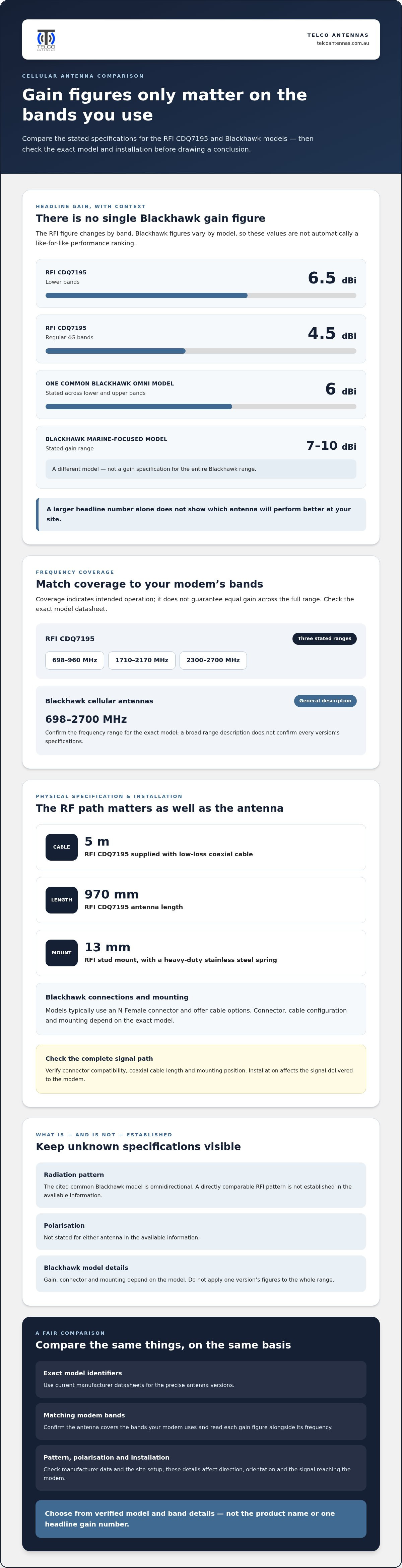
It’s easy to focus on gain, but the figures need context. The RFI CDQ7195 is specified at 6.5 dBi on lower bands and 4.5 dBi on regular 4G bands, while Blackhawk gain varies by model. The exact model, frequency range and installation matter more than the product name or one headline number. This comparison sets out the stated specifications and practical installation considerations to help you judge which design better suits your requirements.
We’ll compare frequency coverage, antenna characteristics, mounting and coaxial cable losses, including what to consider for an Australian cellular setup. You’ll also see where the specifications support a direct comparison and where site conditions or missing model details make the outcome less certain.
Key Takeaways
- The rfi cdq7195 vs blackhawk high gain cellular antenna comparison shows why model-specific gain figures must be matched to the cellular bands your modem uses.
- Identify your modem’s supported bands and the signal direction at your site before narrowing down your antenna options.
- Check the exact model datasheet for frequency range, polarisation and radiation pattern. Don’t assume every Blackhawk model has the same specifications.
- Assess the complete RF path, including connector compatibility, coaxial cable length and mounting position, because installation affects the result.
- If specifications don’t resolve the choice, a site-specific RF assessment can help relate antenna characteristics to local conditions.
RFI CDQ7195 vs Blackhawk High Gain: What Can the Available Specifications Tell You?
A useful comparison needs the exact Blackhawk model and the RFI CDQ7195 specifications matched to your modem and installation. “Blackhawk High Gain” covers different models, so figures for one version shouldn’t be applied to the whole range. The table separates stated specifications from details that depend on the model or can’t be compared directly.
| Specification | RFI CDQ7195 | Blackhawk High Gain |
|---|---|---|
| Frequency range | 698-960 / 1710-2170 / 2300-2700 MHz | Generally stated as 698-2700 MHz; confirm the exact model |
| Gain | 6.5 dBi on lower bands; 4.5 dBi on regular 4G bands | Varies by model. One common omni model is specified at 6 dBi across 698-960 and 1710-2700 MHz; a marine-focused model is stated at 7-10 dBi |
| Polarisation | Not stated in the available information | Not stated in the available information |
| Radiation pattern | Not stated in the available information | Omnidirectional for the cited common model; verify the exact model |
| Connector and cable | Supplied with 5 m of low-loss coaxial cable; connector details aren’t stated here | Typically N Female, with cable options; confirm the exact model and configuration |
| Dimensions and mounting | 970 mm long; 13 mm stud mount with a heavy-duty stainless steel spring | Not stated in the available information; mounting depends on model |
Which specifications belong in a fair comparison?
Use current manufacturer datasheets for the exact model identifiers, and record each figure alongside its frequency and stated conditions. The Blackhawk gain values in the table describe different models, not one antenna with a single comparable figure. Polarisation and some construction details also can’t be compared from the information shown. Mark those details as unknown rather than assuming a typical connector or range-wide frequency description applies to every version.
A like-for-like antenna comparison needs exact models, matching frequency bands and gain figures stated on the same basis. It should also account for pattern, polarisation and installation details.
What does “high gain” mean for cellular reception?
Gain describes how an antenna distributes received or transmitted radio energy relative to a reference. It doesn’t create a stronger signal. An omnidirectional antenna distributes coverage around its horizontal plane, while a directional pattern concentrates reception towards particular directions. The stated information identifies one common Blackhawk model as omnidirectional, but doesn’t establish a directly comparable pattern for the RFI CDQ7195.
Gain figures also need to be read with their frequency and measurement convention. The cited values use dBi, but the RFI’s gain differs between lower and regular 4G bands, while Blackhawk figures vary by model. A larger number alone can’t show which antenna will perform better at your site. That’s the central point of an rfi cdq7195 vs blackhawk high gain cellular antenna comparison: compare verified model and band details first, then consider pattern and mounting before choosing.
RFI CDQ7195 vs Blackhawk: How Design and RF Specifications Affect Performance
Frequency coverage is only the starting point. The RFI CDQ7195 is specified for 698-960, 1710-2170 and 2300-2700 MHz, while Blackhawk cellular antennas are generally described as covering 698-2700 MHz. That broad range doesn’t replace the exact model datasheet. Confirm the antenna covers the bands your modem uses, and note any gaps between the RFI’s listed ranges.
Gain also varies across bands and models. The RFI is specified at 6.5 dBi on lower bands and 4.5 dBi on regular 4G bands. One common Blackhawk omnidirectional model is stated at 6 dBi across lower and upper bands, but other models have different figures. These numbers don’t establish a direct performance ranking unless the measurement basis and model-specific conditions are comparable.
Antenna gain only has practical meaning when read alongside operating frequency and radiation pattern. Together, these determine where and how the antenna concentrates reception.
Frequency coverage, gain, and radiation pattern
Start with the modem’s supported bands, then compare them with the frequency response of the exact antenna model. Coverage of a band indicates intended operation there, but doesn’t guarantee equal gain across that range. Don’t assume a published gain at one frequency applies at another.
The stated information identifies a common Blackhawk model as omnidirectional. This type of antenna is designed to receive signals from a broad range of horizontal directions, rather than needing alignment towards one tower. The RFI pattern and both antennas’ polarisation aren’t established here, so don’t infer those characteristics from a product name or appearance. Use the manufacturer’s pattern and polarisation data to determine aiming and orientation requirements.
Connectors, mounting, and feed-line losses
Installation details affect the signal delivered to the modem. The RFI is specified with a 13 mm stud mount, a heavy-duty stainless steel spring and 5 m of low-loss coaxial cable. Blackhawk models typically use an N Female connector and offer cable options, but the connector and mounting arrangement depend on the model. Check the interfaces on both the antenna and modem, including any adaptor needed to join them.
Coaxial cable attenuates radio-frequency energy. The amount depends on cable type, frequency and run length, while connectors and adaptors add further points of loss. A longer run may simplify mounting, but it can also reduce the signal reaching the equipment. Keep the feed line as short as the installation allows and use a suitable low-loss cable. The RFI’s supplied 5 m cable is part of its RF path, not a measure of net system gain.
When planning an installation, compare the cable’s attenuation specifications at the operating bands as well as its connector fit. LMR-400 coaxial cable is one feed-line option to consider when assessing cable loss and run length as part of the complete antenna system.
Which Antenna Fits Your Site? Compare Direction, Coverage, and Installation
A suitable antenna depends on more than a signal reading at one point. Consider where the usable signal comes from, what may block its path, where the antenna can be mounted and which bands the modem supports. Rooflines, nearby buildings and dense vegetation can affect reception differently from one mounting position to another, so published gain alone can’t predict the result at your site.
The stated specifications support some installation comparisons, but they don’t identify a universal winner. The table separates documented features from details that depend on the exact model.
| Documented feature | RFI CDQ7195 | Blackhawk High Gain |
|---|---|---|
| Mounting or physical feature | 970 mm whip; 13 mm stud mount with heavy-duty stainless steel spring | Model-dependent; ruggedised versions use UV-stable PVC |
| Installation-related design | Q-Fit removable whip system | A common model is omnidirectional; confirm the pattern for the exact model |
| Comparison limit | Radiation pattern details aren’t available here | Specifications vary between models |
These details help frame installation, but don’t predict coverage. The RFI’s removable whip may matter where clearance is limited, while an omnidirectional Blackhawk model may suit a setup where signals can arrive from different directions. Neither feature establishes which antenna will deliver a stronger or more reliable connection.
When a directional antenna may suit the installation
If you can identify a usable signal source, a directional antenna may focus reception towards it. However, the specifications in this comparison don’t establish that either antenna has a directional pattern. Directional designs need accurate alignment and a stable mount. A small shift or an obstructed path can affect the result. For broader context, compare directional and omnidirectional antennas for mobile data, then check the exact model’s manufacturer pattern before applying that guidance.
When installation constraints matter more than headline gain
Plan the physical route before choosing a mounting point. Extra height may clear a nearby obstruction, but it can require a longer cable run and make access more difficult. Cable attenuation varies with type, length and operating frequency, so a potential advantage at the antenna may be reduced along the feed line. Mounting stability and exposure to wind and weather also matter, particularly when the installation needs to stay in position.
Performance can vary with terrain, buildings, vegetation and network conditions. A reading taken at one time or location may not represent another, and modem performance can change as network conditions change. If several possible signal directions, obstructions or mounting positions make a desk-based choice difficult, an RF site survey can help assess conditions on site.
In the rfi cdq7195 vs blackhawk high gain cellular antenna comparison, the practical decision is conditional: match supported bands first, then consider direction, clearance, mounting and the full cable route. A carefully planned installation gives you a stronger basis for choosing than the model name alone.
How to Choose Between the RFI CDQ7195 and Blackhawk High Gain
Start with your equipment and site, not the antenna name. Use this sequence to narrow your options, and treat any missing or non-comparable specification as an open question rather than assuming one model is superior.
A practical five-step comparison checklist
- Identify supported bands. Check the modem or booster specifications and establish which cellular bands matter for your connection. The antenna’s frequency range must include the bands the equipment uses.
- Describe the site. Note possible antenna mounting positions, nearby obstructions, likely signal direction and the route from antenna to modem. These details affect placement and cable requirements.
- Compare exact model datasheets. Record gain by frequency, radiation pattern, polarisation, connector type, dimensions and mounting method. Blackhawk specifications vary by model, so don’t apply one model’s figures to another.
- Check physical and electrical fit. Confirm the antenna can be mounted securely and that its connector matches the feed line or can be joined with a suitable adaptor. Check the cable connection at the modem or booster too.
- Assess the complete RF path. Account for cable type and length, connectors and adaptors before judging expected system performance. A longer cable run can introduce loss, so a higher antenna gain figure alone doesn’t establish the signal available at the equipment.
When an RF site assessment can resolve uncertainty
Datasheets describe antenna characteristics, but they can’t show how terrain, buildings, vegetation or available mounting positions affect reception at a particular site. If the signal direction is unclear, several locations look workable, or the cable route creates competing installation constraints, measured site conditions can help turn a desk-based comparison into a practical plan.
An RF site survey can inform antenna positioning and wider system configuration by relating observed conditions to equipment requirements. Telco Antennas provides RF site surveys and design and engineering services for telecommunications applications. Arrange an RF site survey to assess site-specific conditions when the specification sheets leave important questions unresolved.
The rfi cdq7195 vs blackhawk high gain cellular antenna comparison supports a model-level decision only when the exact specifications can be compared. If polarisation, radiation pattern, connector details or gain conditions are missing, identify the gap rather than making a definitive ranking. Select the antenna whose verified characteristics match the modem’s bands and the documented installation requirements. If neither model can be assessed on that basis, resolve the missing information before treating either as the better fit.
Make the Antenna Decision on Evidence, Then Plan the RF System
This comparison doesn’t establish a universal winner. The RFI CDQ7195 has a defined specification, while Blackhawk High Gain covers multiple models with differing characteristics. Choose the antenna whose verified frequency coverage, pattern and physical requirements suit your modem and site. Treat the antenna as one component in an RF path: cable, connectors, mounting position and connected equipment all affect the outcome.
Turn the comparison into an installation-ready specification
Before installation, keep a short record of the requirements and assumptions behind your choice. This makes it easier to identify a mismatch if the system doesn’t perform as expected.
- Record the equipment: note the modem or booster model and its supported frequency bands.
- Record the antenna evidence: save the exact model datasheet and note the verified operating bands, gain conditions, radiation pattern, polarisation, connector and mounting requirements.
- Map the installation: document the proposed antenna location, mounting arrangement and cable route, including the expected cable type and length.
- Check every interface: verify that connectors, adaptors and cables suit both the antenna and modem or booster. Account for feed-line losses before interpreting published antenna gain as system performance.
Keep assumptions visible. For example, distinguish a documented connector type from one inferred from a product family, and record any specification that remains unknown. If the antenna patterns or gain conditions can’t be compared on a like-for-like basis, don’t turn that gap into a performance claim. Resolve it using current manufacturer documentation or a site-specific assessment.
If a modem supports multiple antenna connections and the application calls for multiple-input, multiple-output operation, assess the antenna arrangement as a system rather than selecting one antenna in isolation. MIMO depends on the equipment’s requirements and the antenna configuration, so use the modem documentation to guide the design. A guide to MIMO antennas can help explain the role of multiple antenna elements in data applications.
Explore antenna and RF engineering support
When the signal environment or mounting constraints are difficult to assess from documentation alone, an RF site survey can provide site-specific information to inform antenna positioning and system planning. Telco Antennas supplies telecommunications hardware nationally and provides RF site surveys, design and engineering services, alongside antennas and RF components. This brings product selection together with the practical details of the complete RF path.
The rfi cdq7195 vs blackhawk high gain cellular antenna comparison is most useful when it leads to a documented, compatible installation rather than a decision based on a headline figure. Explore Telco Antennas’ antenna and RF solutions as you plan the equipment, feed line and mounting around your cellular requirements.
Turn Your Antenna Choice Into a Workable RF Plan
Turn the comparison into a practical installation plan, using your modem’s requirements and site conditions to guide the decision. In the rfi cdq7195 vs blackhawk high gain cellular antenna comparison, a responsible choice means following the evidence where it’s clear and identifying what still needs assessment, rather than forcing a winner from incomplete specifications.
Planning can extend beyond the antenna itself. Telco Antennas supplies specialised telecommunications hardware nationally and provides RF site surveys and design and engineering services to support system planning when site conditions need closer assessment. The goal is a considered setup in which the equipment and installation work together.
Explore Telco Antennas’ antenna and RF solutions to plan your cellular system, including its equipment, feed line and mounting. An evidence-led approach gives you a sound basis for moving forward.
Frequently Asked Questions
Is the RFI CDQ7195 compatible with every 4G or 5G modem?
No. Compatibility depends on whether the antenna’s supported frequency bands match the modem’s operating bands, and whether the connectors and antenna ports suit the equipment. The RFI CDQ7195’s stated ranges are 698-960, 1710-2170 and 2300-2700 MHz, so it won’t cover every possible cellular frequency. For this rfi cdq7195 vs blackhawk high gain cellular antenna comparison, check the modem’s band list and current antenna datasheet before treating either model as compatible.
Can a high-gain cellular antenna improve reception in every location?
No. An antenna can’t create a cellular signal where there’s no usable signal to receive, and a higher gain rating doesn’t guarantee better service at every site. Terrain, buildings, vegetation and the direction of available signals can affect results. If reception is weak, compare readings at different potential mounting positions and times. Then consider whether the signal path or installation is the limiting factor instead of assuming a higher-gain antenna will solve it.
How do I compare antenna gain figures when they are listed differently?
Compare figures only after checking the units, frequency and measurement conditions stated by the manufacturer. Don’t assume a gain figure for one band applies across the antenna’s whole frequency range. Also check the radiation pattern: an antenna that concentrates reception in a particular direction isn’t directly equivalent in use to an omnidirectional design. If either datasheet leaves these conditions unclear, mark the figures as not directly comparable rather than ranking the antennas by the largest number.
Does coaxial cable length affect cellular antenna performance?
Yes. Signal is attenuated as it travels through coaxial cable, and the loss depends on cable type, operating frequency and length. Connectors and adaptors can add further losses. For example, a mounting position that requires a much longer feed line may reduce the signal reaching the modem compared with a shorter route. Use the cable’s attenuation data at the bands you need, and include connectors and adaptors in your assessment.
Can I use either antenna on a vehicle or mobile installation?
Suitability depends on the exact model and how it will be mounted. The RFI CDQ7195 has a removable whip system and a stud mount with a spring, features relevant to some vehicle installations and clearance constraints. Blackhawk models differ, so don’t assume every version has the same mounting or mobile-use characteristics. Check the manufacturer’s installation guidance for the specific model, including its mounting method and suitability for movement and exposure.
What information do I need before choosing between these two antennas?
Gather the modem or booster’s supported bands, the exact antenna model and its datasheet, and the planned mounting position. Note likely signal direction, nearby obstructions, connector types, cable type and approximate cable route. If the system has multiple antenna ports, include the equipment’s antenna configuration requirements. This information helps expose mismatches early, such as a band the modem needs but the antenna doesn’t cover, or a connector that requires an adaptor.
When is an RF site survey useful for selecting a cellular antenna?
An RF site survey is useful when specifications alone can’t show which mounting point or signal direction is likely to work. It can help assess complex conditions, including multiple obstructions, uncertain signal sources or competing installation locations. The findings can inform antenna positioning and broader system planning. It’s particularly useful before committing to a difficult cable route or mount, when an incorrect assumption could make the installation harder to revise.


