

What if the real cost of a farm internet outage isn’t the lost connection, but the work, monitoring and communication that stop with it? During planting or harvest, even a short interruption can have a different operational impact than one in a quieter period. A well-planned farm internet backup antenna setup starts with understanding what an outage affects on your property, not simply choosing the strongest-looking antenna.
It’s understandable if the options feel difficult to compare. Cellular coverage can vary between the farmhouse, a shed and a paddock, while satellite and point-to-point wireless address different connectivity needs. An antenna also won’t provide internet on its own. It needs to work with compatible equipment and an active service.
This guide explains how to assess outage impacts using farm-specific evidence, compare cellular, satellite and wireless backup options, and plan antenna placement around your site. You’ll also learn what to check before buying, including network band compatibility, router antenna ports, cable requirements and failover. If signal conditions or terrain make the right setup uncertain, an RF site survey can help clarify site requirements before you select equipment.
Key Takeaways
- Build a farm-specific downtime estimate that accounts for delayed work, labour, spoilage and recovery, not just missed sales.
- A farm internet backup antenna setup needs a compatible antenna, modem or router, local network and internet service. The antenna alone can’t create coverage.
- Compare cellular, satellite and point-to-point wireless against your site’s coverage, power supply and critical systems. Don’t assume one option suits every farm.
- Check signal conditions, carrier band support, router antenna ports and cable requirements before buying or mounting equipment.
- Map critical systems and test failover to identify gaps. An RF site survey can help when terrain, signal or infrastructure conditions are uncertain.
How to calculate the cost of farm internet downtime before choosing a backup
Before selecting equipment, identify what an outage would interrupt and when. Losing access to an online system during harvest may have different consequences from an interruption during a quieter period. Use your farm’s own operations and records rather than a generic business downtime figure.
Which farm activities depend on a reliable internet connection?
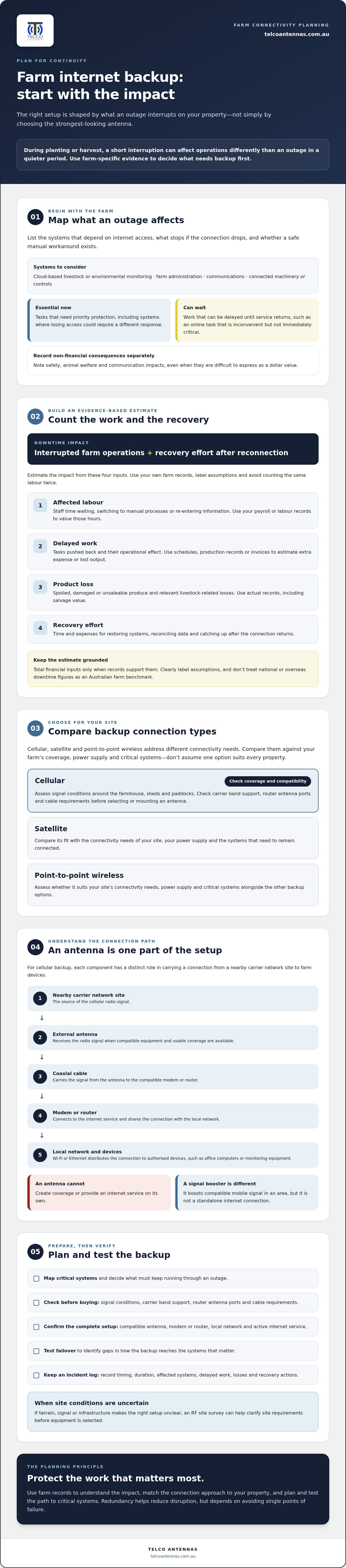
List the systems that rely on internet access, such as cloud-based livestock or environmental monitoring, farm administration, communications, and connected machinery or controls. For each one, note what stops working if the connection drops and whether there’s a safe manual workaround.
Separate essential tasks from work that can wait until service returns. A delayed online invoice may be inconvenient, while losing access to a monitoring system could call for a different response. Record safety, animal welfare and communication consequences separately from financial impacts. They matter when choosing a backup, even if they’re difficult to express as a dollar value.
Start an incident log when an outage occurs. Record its timing and duration, the systems affected, work delayed, losses and recovery actions. Over time, these records can show which periods and systems need priority protection.
A practical formula for estimating outage impact
Downtime cost combines the impact of interrupted farm operations with the effort needed to recover once service returns. Estimate it using four inputs:
- Affected labour: Record staff time spent waiting, switching to manual processes or re-entering information. Use your own payroll or labour records to value those hours.
- Delayed work: Identify tasks pushed back and the operational effect. Use farm schedules, production records or invoices to estimate additional expense or lost output. Avoid counting labour already included above a second time.
- Product loss: Record spoiled, damaged or unsaleable produce and livestock-related losses where applicable. Use actual farm records, including salvage value, rather than assuming every affected item is a total loss.
- Recovery effort: Add the time and expenses involved in restoring systems, reconciling data and catching up on work after reconnection.
For each outage, total the financial inputs only when you can support them with records. Label estimates and assumptions clearly, such as work that might have been delayed but wasn’t confirmed as lost. Avoid treating a national or overseas downtime statistic as an Australian farm benchmark. The result depends on your operation, the timing and the systems affected.
This calculation helps shape a farm internet backup antenna setup around actual priorities. Redundancy is intended to reduce disruption, but it also depends on avoiding single points of failure. The general principle behind a high-availability cluster is to use redundant components and failover so an interruption to one part doesn’t necessarily stop the whole system. Apply the same practical thinking to farm connectivity: identify what must keep running, then plan and test how it will stay connected.
How a farm internet backup antenna setup carries a connection to critical systems
For cellular backup, the connection starts at a nearby carrier network site. An external antenna receives the radio signal and passes it through coaxial cable to a compatible modem or router. The router then shares the internet connection across the farm’s local network, over Wi-Fi or Ethernet, so authorised devices such as office computers or monitoring equipment can connect.
Each part has a distinct role. An antenna can improve reception when it’s compatible with the modem and usable network coverage is available, but it can’t create coverage or provide an internet service. The modem or router connects to the service, and the local network distributes that connection to devices. A signal booster is different: it boosts compatible mobile signal in an area, but it isn’t a standalone internet connection.
Cellular backup: match the antenna to the modem and signal
Before choosing an antenna, check the modem or router’s supported carrier bands, external antenna ports and MIMO configuration. A MIMO antenna is relevant only if the connected equipment supports the required antenna arrangement. For more on antenna principles, see this MIMO antenna technical guide.
Test signal at potential mounting locations rather than relying on reception at the farmhouse door. Trees, buildings, terrain and other obstructions can affect the result. Compare readings at practical positions and orientations, then factor in cable routing and the modem’s location. Longer cable runs can add signal loss, so plan the antenna and equipment positions together. Check current carrier band support and equipment specifications before buying or mounting components.
Satellite and point-to-point links as alternative paths
If a usable cellular path isn’t available, assess satellite as an alternative. Check whether the terminal has a suitable view of the sky, how the equipment will be powered and whether the service conditions suit the farm’s needs. The dish or terminal still needs compatible networking equipment to distribute the connection to local devices.
A point-to-point wireless bridge may address a different problem: extending an existing connection from a connected building to a shed or another location. It links sites across the property, but doesn’t independently supply internet. The path between bridge units and the placement of each endpoint matter. Read the long-range wireless bridge guide for more on site-to-site link considerations.
If signal conditions or equipment placement are unclear, an RF site survey can help assess site requirements before you settle on an antenna arrangement.
Cellular, satellite or wireless bridge: compare farm backup options against outage costs
Use your downtime estimate to decide which systems need to stay online and what kind of connection can support them. A backup for office administration may have different requirements from one supporting monitoring or time-sensitive farm operations. Compare the full connection path, including internet service, equipment, power and failover, rather than just the antenna or link.
| Option | May suit when | Key requirements and dependencies |
|---|---|---|
| Cellular with an external antenna | Testing confirms a usable carrier signal at a practical antenna location. | Compatible modem or router, supported network bands, suitable antenna ports and configuration, reliable power, and a mobile service. Confirm that the router can switch connections as required. |
| Satellite | Terrestrial coverage is inadequate and satellite service can meet the farm’s needs. | Suitable sky visibility, compatible terminal and networking equipment, power, active service and a workable installation location. |
| Point-to-point wireless bridge | A connected building or site can be linked to the area where connectivity is needed. | Suitable line of sight, compatible bridge equipment at each end, power at both locations and a working internet connection at the source. |
When cellular with an external MIMO antenna may fit
If a field test finds usable cellular service, an external MIMO antenna may suit a compatible modem or router. Check supported carrier bands, the modem’s ports and its MIMO configuration before choosing equipment. Antenna position and orientation affect reception, and cable length and type matter because cable can contribute signal loss. Test likely mounting locations first, then plan the antenna, cable route and router position together.
A signal booster has a different role from a data antenna and modem. It can improve compatible mobile signal in an area, but it doesn’t provide an internet service or replace a cellular router. The Cel-Fi GO professional guide explains booster use cases and system boundaries.
When satellite or a wireless bridge may be more suitable
Consider satellite if cellular coverage can’t support the critical systems identified in your downtime assessment. Check the service conditions, power needs and installation requirements for the particular site. A bridge may be appropriate if another connected point on the property can be reached with a suitable line of sight. It extends a connection rather than supplying an independent internet service.
Finally, check whether the options provide genuine path diversity. Cellular and satellite may still share a router, power supply or local network. A bridge can also depend on the same upstream service that has failed. For a farm internet backup antenna setup, the most useful option is the one that reduces the outage risks that matter on your farm and can be tested as a complete failover path.
How to plan and test a farm internet backup antenna setup
A backup connection is useful only if it reaches the systems that need it and takes over as intended. Use this workflow to check the site and equipment before buying or mounting components, then test the complete connection under controlled conditions.
- Map critical systems and locations. Mark the buildings, sheds or work areas that need connectivity, along with the devices they contain. Note where the primary router and proposed backup equipment could sit, and which systems need to reconnect first after an outage.
- Survey the site and candidate signal paths. Map buildings, terrain, trees and other obstructions between likely antenna positions and the cellular network. Test candidate locations with compatible equipment and record signal readings, orientation and conditions. Reception can vary across a large property, so don’t assume a result at the farmhouse applies to a shed or elevated mounting point.
- Verify equipment compatibility before purchase. Check the router or modem’s supported network bands, external antenna ports and MIMO configuration against the proposed antenna. Confirm that the router supports the intended backup connection and failover behaviour. Plan the cable route and equipment location together, allowing for cable entry and the practical distance between the antenna and router.
- Plan a safe, maintainable installation. Consider mast stability, exposure to wind and weather, secure mounting and protection of cable entry points. Plan an electrical supply for the antenna system, router and any network equipment. Check applicable Australian installation and safety requirements against current authoritative guidance. If mounting at height, electrical work or structural design is involved, use appropriately qualified professionals rather than improvising.
- Configure and test failover. Once the system is installed, simulate loss of the primary connection in a controlled test. Confirm that the router switches as configured and that critical devices reconnect, not just that a computer can browse the internet. Check monitoring access, communications and essential cloud-connected equipment individually. Record any delays, manual steps and devices that fail to recover.
- Keep a change and test log. Record test dates, equipment changes, signal conditions, outages and outcomes. Include recovery steps and the people responsible for manual actions. Repeat tests after moving equipment, changing a service or modifying the network, since a change to one part can affect the full backup path.
If signal results or mounting requirements remain uncertain, an RF site survey can help assess conditions before installation. Find out more about RF site surveys to help inform the antenna and infrastructure plan.
Turn the downtime calculation into a reliable farm connectivity plan
Outage records help translate operational priorities into technical requirements. If an interruption mainly delays office administration, the backup may not need to support every device on the property. If it affects monitoring or other time-sensitive systems, identify which locations must remain connected, how much capacity those systems need together, and how quickly service needs to recover.
Build requirements from farm priorities, not equipment labels
Rank connected systems by the consequences of interruption, acceptable outage duration and recovery steps. Then check whether the proposed service is available at the required location, the modem or router is compatible, and power and installation conditions support reliable operation. Include the local network in your assessment. A working backup link won’t help a device that can’t connect to the router.
Choose backup capacity and connection diversity according to the farm’s critical tasks, not the labels on the equipment. Diversity matters only if the backup avoids likely failure points in the primary connection. For example, two links may still share a router or power supply, so consider how the whole system behaves during an outage.
Choose components only when they fit the assessed need. A MIMO antenna may suit a compatible cellular router where testing confirms a usable signal. LMR-400 coaxial cable may be appropriate for a planned antenna connection, subject to equipment compatibility and the cable route. A point-to-point wireless bridge may extend connectivity to another building if there’s a suitable link path and a working connection at its source. None is a default upgrade for every farm.
When to seek specialist assessment
If terrain, buildings or variable reception make cellular coverage uncertain, an RF site survey can help assess signal conditions and infrastructure requirements. The findings can inform antenna position, cable path and broader system design before you select equipment. This can be useful when a weak signal at one building may call for a different solution from a site with a usable signal nearby.
Before settling on a plan, check:
- Which systems need priority access, and where are they located?
- Can the backup service reach those locations, and does the equipment support it?
- Are power, cable routing, mounting and the local network accounted for?
- Has failover been tested with the farm’s critical devices?
Telco Antennas offers RF site surveys, MIMO antennas, LMR-400 coaxial cables and point-to-point wireless bridges. Internet service must be arranged separately. To discuss the technical requirements identified in your assessment, contact Telco Antennas about your farm connectivity requirements.
Build a backup plan around your farm’s priorities
A dependable backup starts with evidence from your own operation. Track which systems outages affect, estimate the labour, delays, losses and recovery work involved, then use those priorities to assess coverage, capacity, power and failover. The right farm internet backup antenna setup depends on the site. Cellular, satellite and wireless bridges each have different requirements, and equipment needs to be compatible and tested as a complete connection.
Where signal, terrain or infrastructure conditions are uncertain, an RF site survey can help inform the plan. Telco Antennas supplies telecommunications and RF infrastructure equipment, including MIMO antennas, LMR-400 coaxial cables and point-to-point wireless bridges, and offers RF site surveys and communication tower design services.
To discuss the technical requirements for your site, contact Telco Antennas about your farm connectivity requirements. With a clear picture of what needs to stay connected and a tested recovery path, you can plan your next steps with greater confidence.
Frequently Asked Questions
How do I calculate the cost of internet downtime on a farm?
Estimate the impact by listing the farm activities affected, then calculating the labour time, delayed work, recovery effort and measurable losses associated with each. Use payroll, production, inventory and incident records where possible, and label assumptions clearly. For example, separate time spent entering data again from work already counted as delayed labour. Record non-financial consequences, such as interrupted monitoring or communications, separately rather than assigning them unsupported dollar values.
Will an external antenna give my farm internet if there is no mobile coverage?
No. An external antenna can improve reception for compatible equipment when a usable mobile network signal is available, but it can’t create coverage or provide an internet service. Check signal conditions at the proposed antenna location and confirm that the modem or router supports the antenna before selecting equipment. If cellular isn’t viable, assess alternatives such as satellite internet or a suitable wireless link, including their service and installation requirements.
What antenna setup do I need for farm internet backup?
The right farm internet backup antenna setup depends on available networks, your modem or router, the systems that need connectivity and the layout of the property. For cellular, check supported network bands, external antenna ports and MIMO requirements before choosing an antenna. Also consider mounting position, cable routing, power and how the router will handle failover. If signal conditions are unclear, a site assessment can help inform equipment selection and placement.
Is a MIMO antenna suitable for a farm internet backup connection?
It may suit your setup if the cellular modem or router supports MIMO and the antenna matches its configuration and available network bands. Results also depend on reception at the mounting point, antenna orientation, obstructions and cable losses. Check equipment specifications before purchase, then test the proposed position with compatible equipment. A MIMO antenna isn’t a universal solution, and it won’t provide internet without a usable network signal and an appropriate service.
Can Starlink be used as backup internet on a farm?
Satellite internet, including Starlink, may be an option where cellular coverage isn’t suitable. Check service availability and conditions, equipment and installation requirements, power needs, and whether the connection suits the farm’s intended use. Also check whether the satellite link is genuinely independent of the primary connection, rather than relying on shared equipment or power. Test failover using the farm’s router and critical systems, since a working satellite link alone doesn’t confirm that the full setup will switch correctly.
How often should I test farm internet backup and failover?
Test the backup after installation and after significant changes to equipment, network configuration or site layout. During each test, check that the backup link connects, priority devices regain access and staff understand any manual recovery steps. Record the date, results and issues, and add real outages to the same log. Set a review schedule that reflects your farm’s operational risks, then adjust it if tests or outage records reveal problems.


