

Theoretical throughput is often the least reliable metric when deploying high-capacity links between commercial facilities. When evaluating the mikrotik wireless wire vs ubiquiti building to building bridge, sustained link resilience hinges far more on rain fade mitigation and ecosystem architecture than top-line laboratory data rates.
Trenching optical fibre across carparks and paved hardstands is disruptive and costly, making 60 GHz millimetre-wave hardware an ideal path to gigabit wire speeds. Even so, you can't afford inter-facility trunks that drop out during sudden torrential downpours, nor the operational headaches of tedious mast alignment and steep management software learning curves.
To resolve that uncertainty, this engineering comparison evaluates both platforms across RF link budgets, atmospheric attenuation resilience, software maintenance demands, and physical installation requirements. Here is how each system performs under demanding operating conditions so you can deploy the right bridge with minimal lifecycle maintenance.
Key Takeaways
- Assess core management trade-offs in the mikrotik wireless wire vs ubiquiti building to building bridge comparison, weighing UniFi's centralised controller adoption against RouterOS's granular Layer 2 and Layer 3 traffic control.
- Understand the RF mechanics of 60 GHz oxygen absorption and why automated 5 GHz failover is essential to survive severe rain fade during intense storm events.
- Compare physical installation demands, contrasting visual LED alignment rings and phased-array beamforming tolerances against narrow-beam dish mounting requirements.
- Identify hardware bottlenecks early by distinguishing raw over-the-air millimetre-wave modulation limits from physical Gigabit RJ45 and 10G SFP+ interface constraints.
- Apply professional link planning best practices to calculate precise link budgets, verify clear Fresnel zones, and minimise operational maintenance over the hardware lifecycle.
Architectural Overview: 60 GHz mmWave Bridging and Ecosystem Philosophies
Connecting two structures separated by roadways or established concrete infrastructure often makes physical trenching impractical. Point-to-point wireless bridges solve this by establishing licence-free, carrier-grade connections across the 60 GHz V-band spectrum. Unlike standard Wi-Fi, which saturates shared sub-6 GHz frequencies, 60 GHz millimetre-wave (mmWave) links transmit across wide channel bandwidths governed by the IEEE 802.11ad standard and newer 802.11ay extensions. This architecture delivers deterministic, wire-speed full-duplex traffic with low single-digit latency, bypassing civil engineering disruption entirely.
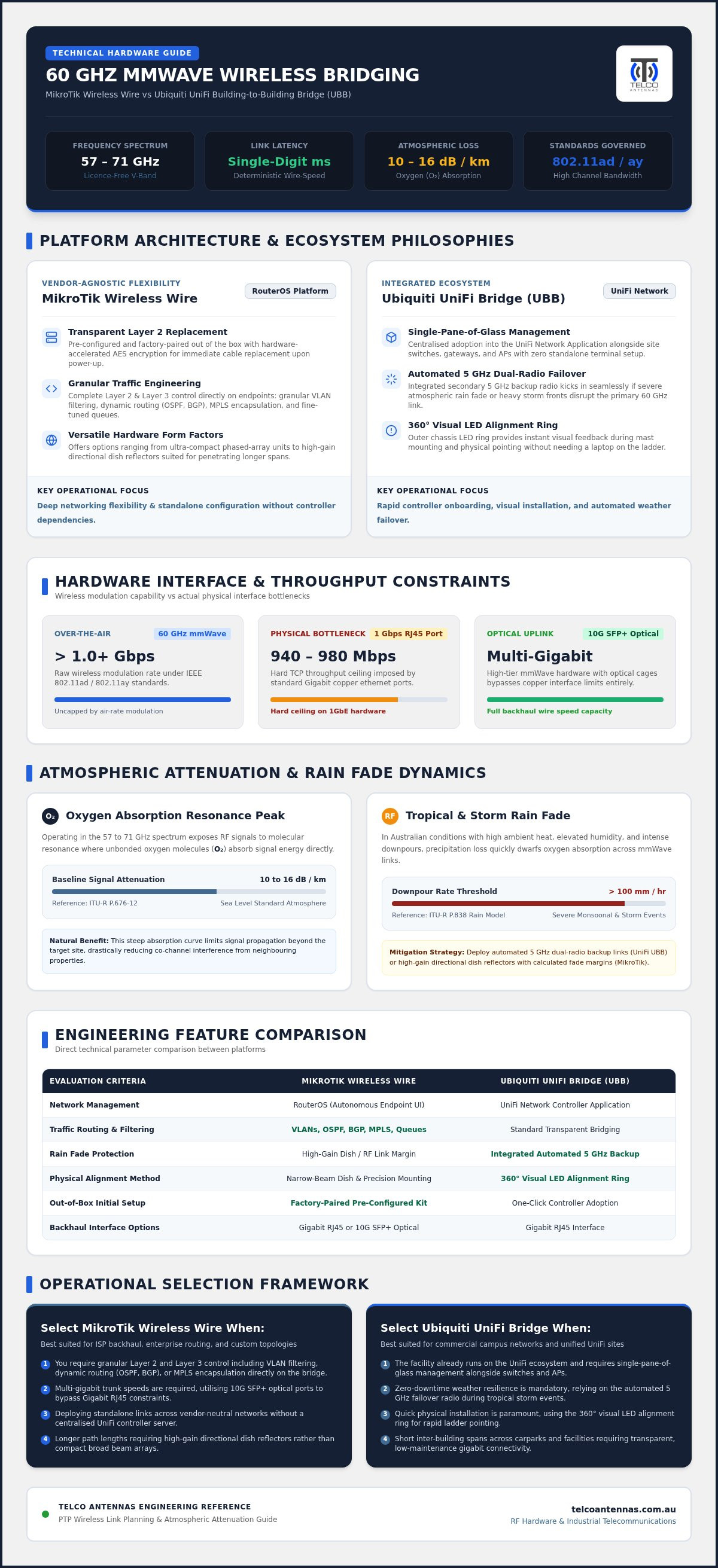
When assessing the mikrotik wireless wire vs ubiquiti building to building bridge, your choice comes down to fundamental networking architecture and ecosystem dependency. Raw wireless modulation speeds often exceed 1 Gbps, but total aggregate throughput remains bounded by the physical hardware interface. Standard Gigabit Ethernet RJ45 ports hit a hard ceiling around 940 to 980 Mbps TCP throughput. By comparison, high-tier mmWave hardware with 10G SFP+ optical cages can push multi-gigabit transfers across short spans without bottlenecking backhaul trunks.
MikroTik Wireless Wire: RouterOS and Dedicated mmWave Architecture
MikroTik approaches short-range bridging by providing pre-configured, factory-paired hardware right out of the box. Using hardware-accelerated AES encryption, these kits act as a transparent Layer 2 ethernet cable replacement immediately upon power-up.
The core advantage lies in MikroTik's underlying RouterOS platform. It allows engineers to apply granular VLAN filtering, dynamic routing (such as OSPF and BGP), MPLS encapsulation, and fine-tuned bandwidth queues directly on the bridge endpoints. Form factors range from ultra-compact phased-array units suited for rapid mounting to high-gain directional dish reflectors designed to penetrate longer path lengths.
Ubiquiti UniFi Building-to-Building Bridge: Ecosystem Integration and Dual-Radio Failover
Ubiquiti designs its UniFi Building-to-Building Bridge (UBB) series as an integrated extension of the centralised UniFi Network Application. The bridge appears alongside site switches, gateways, and access points, enabling single-pane-of-glass adoption without standalone terminal configuration.
To address mmWave attenuation challenges, Ubiquiti integrates an automated 5 GHz secondary backup radio directly into the chassis. If extreme atmospheric conditions disrupt the primary 60 GHz beam, traffic switches over seamlessly to maintain uptime. Furthermore, an exterior 360-degree LED alignment ring provides real-time visual feedback, streamlining mechanical pointing without relying on a dedicated management laptop on the ladder.
Ultimately, deciding between the mikrotik wireless wire vs ubiquiti building to building bridge requires balancing UniFi's rapid controller onboarding against RouterOS's versatile, vendor-agnostic network stack.
RF Performance, Range, and Rain Fade Resilience in Australian Climates
Millimetre-wave links face unique physical hurdles in the field. When comparing the mikrotik wireless wire vs ubiquiti building to building bridge, link survival depends on atmospheric absorption rates and local precipitation intensity rather than lab-tested RF parameters. Australia’s extreme climate conditions, ranging from blistering heat and high humidity to monsoonal downpours, mean you can't rely on simplistic distance figures alone.
Atmospheric Attenuation and Oxygen Absorption at 60 GHz
Operating inside the unlicensed 57 to 71 GHz spectrum exposes signals to a pronounced molecular resonance peak. Unbonded oxygen molecules ($O_2$) absorb RF energy directly at 60 GHz, introducing a baseline signal loss of roughly 10 to 16 dB per kilometre at sea level under standard atmospheric conditions (ITU-R P.676-12). This natural attenuation curve prevents self-interference across neighbouring properties, but it fundamentally restricts 60 GHz links to short physical spans.
High ambient temperatures and elevated relative humidity further compress operational link margins. In heavy storm conditions, rain attenuation quickly dwarfs oxygen absorption. According to the ITU-R P.838 rain attenuation model, severe downpours exceeding 100 mm/hr impose an additional 30 to 40 dB/km of attenuation at 60 GHz. By contrast, a standard 5 GHz signal loses less than 2 dB/km under that same deluge.
Failover Mechanisms: Dedicated 60 GHz vs Integrated 5 GHz Backup
Surviving heavy convective storm cells requires understanding each platform's failover architecture:
- Ubiquiti UniFi UBB Series: Integrates a 5 GHz 802.11ac backup radio out of the box. When mmWave Received Signal Strength Indicator (RSSI) drops below operational margins, traffic switches automatically to 5 GHz. Throughput drops from gigabit rates to roughly 200–300 Mbps, but the carrier bridge remains up.
- MikroTik Portfolio: Base kits (like the original wAP 60G and high-gain nRAY) operate exclusively at 60 GHz. When rain fade breaches the link budget, the carrier drops entirely. To secure automated fallback, you must deploy hybrid hardware like the Cube 60Pro ac, which pairs an 802.11ay core with a 5 GHz backup radio.
Real-World Latency, Jitter, and Throughput Benchmarks
Under clear conditions, both systems deliver true wire-speed performance. Symmetrical Layer-2 transport exhibits sub-millisecond round-trip times, zero packet loss, and undetectable jitter. This level of responsiveness is ideal for mission-critical services like real-time VoIP trunks, high-resolution CCTV camera streams, and low-latency storage replication.
Achieving 99.99% carrier-grade availability requires accurate link budget calculations tailored to your local rain zone. Engaging Telco Antennas for an RF site survey helps assess local path clearance, multi-path risks, and rain fade thresholds before hardware goes up on the mast.
Hardware Engineering, Alignment, and Management Overhead
Mechanical rigidity dictates whether a millimetre-wave link survives severe storm cycles or drifts out of tolerance. When evaluating the mikrotik wireless wire vs ubiquiti building to building bridge, structural design, thermal dissipation, and alignment procedures prove just as critical as raw RF throughput. A millimeter-level shift at the mast head can disrupt an ultra-narrow 60 GHz pencil beam, making physical installation integrity vital.
Beamwidth and Mechanical Alignment Precision
Antenna geometry determines physical pointing tolerance. Ubiquiti's UBB features an integrated 360-degree LED alignment ring on its outer perimeter. This bezel shifts from red to green to indicate optimal signal lock, allowing a rigger on a ladder or elevated work platform to aim the unit visually without balancing a laptop. In contrast, MikroTik handles alignment based on form factor:
- Phased-Array Units (wAP 60G, Cube Pro): Incorporate electronic beamforming across a wide azimuth sweep (up to 60 degrees), making rough optical alignment forgiving over short distances.
- High-Gain Reflectors (nRAY): Feature narrow pencil beams that require precision micrometer adjustment. Installers use the heavy-duty
solidMOUNTbracket alongside RouterOS command-line RSSI readouts or acoustic beeper prompts to locate the main signal lobe.
Chassis Build Quality, Thermal Dissipation, and Wind Loading
Harsh Australian sun and sudden wind gusts test outdoor chassis enclosures. Both manufacturers use UV-stabilised outdoor plastics with sealed gland entries to guard against moisture ingress and fine dust. The low surface area of compact disc and cube designs presents minimal wind loading, reducing mast flex during convective storm cells. However, long-term stability requires heavy-gauge galvanized brackets; lightweight consumer mounts flex under thermal expansion cycles, throwing narrow beams off target.
Deployments must also comply with national RF standards. In Australia, transmitters must adhere to the ACMA LIPD class licence, which dictates maximum equivalent isotropically radiated power (EIRP) limits and mandates certified equipment labels. For electrical protection, standard Power-over-Ethernet runs require shielded, outdoor-rated UV cable grounded via dedicated in-line surge arrestors to protect internal switch stacks from induced transient strikes.
Management Workflow: RouterOS Precision vs UniFi Controller Simplicity
Ongoing operational overhead presents another distinct fork in the road:
- Ubiquiti UniFi Ecosystem: Adopts natively into the UniFi Network Application. Telemetry, link uptime, and automatic firmware orchestrations sit inside a unified dashboard alongside site switches and cameras. It delivers clean monitoring but lacks standalone web interfaces or granular protocol tuning.
- MikroTik RouterOS Platform: Provides deep diagnostic metrics, advanced spectrum scanning, dynamic routing (OSPF, BGP), and granular traffic shaping per endpoint. It avoids vendor lock-in completely, though firmware lifecycle maintenance requires experienced network engineering oversight.
Deciding between the mikrotik wireless wire vs ubiquiti building to building bridge ultimately hinges on whether your team values rapid controller-driven maintenance or unfettered Layer 2 and Layer 3 packet control.
Selection Framework: Matching Hardware to Operational Scenarios
Selecting the right hardware architecture requires balancing site physical constraints against your existing operational network stack. For organisations working with a dependable business voip provider australia wide to link multi-facility communications, maintaining deterministic throughput and zero jitter across wireless trunks is critical for clear SIP traffic. Rather than viewing the mikrotik wireless wire vs ubiquiti building to building bridge decision purely through raw equipment costs, network teams must evaluate administrative overhead, software dependencies, and atmospheric demands over the entire operational lifecycle.
When to Deploy Ubiquiti Building-to-Building Bridges
The UniFi UBB platform delivers the lowest engineering friction for sites already standardised on Ubiquiti hardware. Consider this path under the following operational conditions:
- Unified Network Architecture: Facilities already running UniFi switches, access points, and UniFi Protect security cameras benefit from centralised monitoring and automated configuration pushes.
- High Precipitation Risk Zones: Sites subject to intense downpours where an integrated 5 GHz failover radio is required to prevent bridge dropouts.
- Rapid Deployment Schedules: Workplaces where field technicians need the visual feedback of external LED alignment rings to lock in links swiftly without terminal consoles.
When to Deploy MikroTik Wireless Wire Systems
MikroTik hardware suits modular environments where network engineers demand granular routing control and absolute platform neutrality. This solution fits best when:
- Controller-Independent Networking: Environments requiring transparent Layer-2 ethernet bridges that operate independently of any proprietary management system or external software daemon.
- Advanced Packet Handling: Scenarios requiring custom MTU path tuning, EoIP tunnelling, QinQ VLAN tagging, dynamic BGP or OSPF peering, and scriptable failover logic at the radio edge.
- Optimised Hardware Economics: Commercial deployments seeking high-capacity full-duplex wire speeds while keeping baseline capital outlays lean.
Total Cost of Ownership and Spare Parts Management
Evaluating long-term costs requires looking past initial procurement. Proprietary ecosystems simplify day-to-day oversight but require matching controller hardware and vendor-specific spare units. Conversely, MikroTik bridges function entirely standalone; keeping an identical pre-configured cold spare on site allows immediate swap-out restoration regardless of underlying server states.
Physical path obstacles present separate infrastructure challenges. When roof profiles or tree canopies breach clearance zones, standard fascia wall mounts prove inadequate. In these scenarios, dedicated mast structures or certified communication tower design become mandatory to elevate radios above path obstructions.
If you're evaluating alternative options or designing custom commercial point-to-point wireless bridges across complex multi-facility footprints, consult with Telco Antennas to engineer an optimised, resilient RF backhaul link.
Engineering Your Wireless Link: Deployment Best Practices and Professional Services
High-frequency RF performance depends heavily on the physical execution of your installation. Even after resolving the mikrotik wireless wire vs ubiquiti building to building bridge architectural debate, poor physical placement or neglected weatherproofing will undermine link availability. Achieving carrier-grade uptime requires a systematic approach to line-of-sight clearance, outdoor cable grounding, and mechanical stability.
Line-of-Sight and Fresnel Zone Verification
Millimetre-wave transmissions cannot penetrate solid obstacles. Unlike lower frequencies, 60 GHz signals suffer catastrophic attenuation when passing through foliage, brickwork, or modern Low-E architectural glass, which often introduces over 20 to 30 dB of insertion loss. Direct, unimpeded visual line-of-sight is non-negotiable.
Because 60 GHz wavelengths are roughly 5 millimetres long, the required Fresnel zone radius is exceptionally slender, measuring under one metre at typical deployment distances. Even so, clearance paths must account for dynamic site variables:
- Vegetation Growth: Fast-growing tree canopies can obstruct path margins over seasonal cycles.
- Industrial Yard Traffic: High-clearance machinery, shipping containers, and heavy transport vehicles moving through the path will break connectivity.
- Reflective Multi-Path Surfaces: Large metal cladding or pooling water on flat roofs can introduce phase cancellation.
Cabling, Surge Arrestors, and Weatherproofing Standards
Outdoor network cabling takes the brunt of harsh solar radiation and electrostatic buildup. Always run solid-copper, UV-stabilised Cat6 shielded twisted pair (STP) cable to prevent outer jacket degradation. Terminate runs with shielded RJ45 connectors bonded to the drain wire to divert transient charges.
Mount inline gas-discharge tube (GDT) surge arrestors at building entry points, tying them directly to your master electrical earth. For moisture exclusion, do not rely on rubber cable glands alone; wrap all outdoor barrel connectors and gland threads in self-amalgamating silicone tape or cold-shrink sleeves to prevent capillary water ingress.
Leveraging Professional RF Engineering and Infrastructure
Complex paths require verified link calculations before equipment selection. Calculating rain fade statistical availability against national ITU precipitation zones ensures link margins accommodate seasonal deluge events rather than failing unexpectedly.
Mounting stability is equally vital. Narrow pencil beams demand rigid, high-gauge aluminium tripods or structural mounting brackets that resist sway in high winds. For challenging layouts requiring elevated mounting elevations, link path modelling, or hardware staging, connect with Telco Antennas to tailor your installation with verified RF engineering support.
Applying these installation standards protects your capital investment, ensuring your chosen mikrotik wireless wire vs ubiquiti building to building bridge hardware delivers seamless, multi-year gigabit connectivity.
Securing Resilient Millimetre-Wave Connectivity for Your Facility
Resolving the mikrotik wireless wire vs ubiquiti building to building bridge debate ultimately depends on your administrative preferences and atmospheric exposure. Ubiquiti delivers rapid controller onboarding, simplified visual alignment telemetry, and immediate 5 GHz rain fade protection. In contrast, MikroTik provides unmatched Layer 2 and Layer 3 granular routing control, standalone operation without software lock-in, and exceptional hardware economics across its 60 GHz range.
Success on the mast head requires more than selecting capable radios. Sustained uptime depends on rigid mounting fixtures, precise line-of-sight clearance, and realistic link budget calculations tailored to regional precipitation rates. When engineered correctly, 60 GHz millimetre-wave bridges provide dependable, wire-speed connectivity that easily bypasses the disruption and cost of civil trenching.
Backed by decades of combined Australian RF engineering experience, an extensive stock of carrier-grade wireless bridging hardware, and comprehensive path design assistance, our team is ready to support your deployment. Explore professional point-to-point wireless bridges at Telco Antennas to engineer an uncompromising inter-building trunk tailored to your site's operational demands.
Frequently Asked Questions
How significantly does heavy rain affect 60 GHz wireless bridge links?
Torrential rainfall can severely degrade or sever an unprotected 60 GHz link within seconds. Intense downpours produce 30 to 40 dB/km of signal attenuation as raindrops scatter and absorb millimetre-wave transmissions. By comparison, sub-6 GHz frequencies lose less than 2 dB/km under identical conditions. That makes conservative link distance planning and automated 5 GHz failover essential for maintaining uptime during sudden storm bursts.
Can the MikroTik Wireless Wire communicate directly with a Ubiquiti Building-to-Building Bridge?
No, MikroTik and Ubiquiti 60 GHz bridges cannot communicate with each other. While both leverage underlying IEEE 802.11ad or 802.11ay physical standards, each vendor uses proprietary framing protocols, differing encryption pairing methods, and incompatible software management stacks. In a mikrotik wireless wire vs ubiquiti building to building bridge evaluation, you must deploy matched hardware pairs from the same manufacturer across the link.
Is optical line of sight strictly required for 60 GHz point-to-point connections?
Yes, absolute optical line of sight is mandatory for any 60 GHz link. Millimetre-wave signals operate with microscopic wavelengths that cannot diffract around solid obstacles or pass through dense materials. Even partial obstructions, such as tree branches, dense foliage, or temporary machinery parked inside the narrow Fresnel zone, will break connectivity. Clear, unobstructed spatial clearance between both antennas is essential to prevent dropouts.
Can 60 GHz wireless signals penetrate standard building glass or tinted windows?
No, deploying 60 GHz hardware behind modern building glass is not recommended and usually fails entirely. While untreated single-pane clear glass introduces moderate loss, modern commercial glazing features metallic Low-E coatings, solar tints, or double-glazed argon cavities. These coatings attenuate millimetre-wave signals by 20 to 30 dB or more, depleting your operating link margin. Radios should always be mounted outdoors.
What is the maximum practical range for a stable 60 GHz inter-building bridge?
For year-round commercial availability, practical spans typically sit between 100 and 500 metres. While high-gain directional reflectors can link several kilometres in clear air, oxygen absorption and severe convective downpours introduce steep signal loss over extended distances. When assessing the mikrotik wireless wire vs ubiquiti building to building bridge for business connectivity, conservative distance planning avoids weather-related packet loss and link collapse.
Do I need an active ACMA licence to operate 60 GHz wireless bridges in Australia?
No, you do not need an individual spectrum licence to operate 60 GHz links in Australia. Point-to-point transmitters operating between 57 GHz and 71 GHz fall under the ACMA Radiocommunications (Low Interference Potential Devices) Class Licence. Provided your hardware complies with certified emission standards and carries the Regulatory Compliance Mark (RCM), operation is licence-free nationwide, excluding small designated radio quiet protection zones.
How does the integrated 5 GHz failover work on the Ubiquiti Building-to-Building Bridge?
The secondary 5 GHz radio acts as an automated hot-standby connection that engages during severe signal degradation. When heavy rainfall drops the primary 60 GHz signal strength below operational thresholds, the unit routes traffic through the 5 GHz link within milliseconds. This prevents link drops and preserves Layer-2 network connectivity, temporarily throttling throughput down to 5 GHz Wi-Fi limits until the weather clears.


