

What if the communication device selected for a remote worksite fails when a worker needs help? Mobile coverage can vary with location, terrain and site layout, so a phone that works at the base may not work across the work area. Planning remote site communications equipment Australia-wide starts with assessing how workers will communicate in the conditions they’ll actually face.
Start by identifying the coverage and equipment available at the worksite. Choosing a device alone doesn’t make a work plan safe or establish WHS compliance. The communication method needs to suit the tasks, distances, environment and response procedures, and workers need to know how and when to use it.
This practical checklist will help you document communication needs, compare mobile, satellite and site-network approaches, and identify equipment, testing and review actions for your site plan. It also explains how RF site surveys, antennas, cabling and wireless links can inform a wider communications design, so you can make decisions based on site conditions rather than assumptions.
Key Takeaways
- Use a documented needs assessment to connect work tasks, hazards and communication requirements before selecting equipment.
- Compare mobile, satellite and site-network options against coverage, site conditions and the work workers need to do.
- Plan testing, maintenance and clear ownership for equipment checks, power, faults and escalation.
- Choosing remote site communications equipment Australia requires more than selecting devices: communication arrangements should support, not replace, broader risk controls.
- See how RF site surveys, infrastructure design and suitable hardware can inform a communications plan tailored to site conditions.
Why remote site communications equipment matters to Australian WHS planning
Remote-site communications equipment includes the devices and infrastructure workers use to send voice messages, data or alerts for work. It might include mobile equipment, satellite links or a site network, depending on the location and task. The aim isn’t simply to provide a signal. The system should support the communication steps identified in the site’s risk assessment.
That distinction matters. A connection that makes email or general internet access convenient may not meet the need to report an incident, request assistance or coordinate work in a particular area. Conversely, a system designed for operational communication may not provide broadband access. Set requirements by asking who needs to communicate, with whom, for what purpose and under which site conditions.
Remote work can also involve separation from colleagues and social isolation, as outlined in this broad overview of remote work practices. For Australian worksites, WHS duties and guidance can vary by state or territory. Check current requirements for the relevant jurisdiction and consider how they apply to the work being planned.
Which communication risks should a remote-site plan address?
Assess where communication could fail, not just whether a device works at the site entrance. Mobile coverage may vary across terrain or between work areas. Distance from colleagues and populated areas can make a delayed report harder to manage. Include lone or isolated work, changing work locations and situations where workers can’t reach the usual contact point.
Consider failure conditions as well as normal operation. Loss of power, weather exposure, damaged equipment and network outages can interrupt contact. Identify how each risk affects the planned work and what the communication procedure requires if the primary method is unavailable.
What does communications equipment contribute to a WHS system?
Where procedures require it, equipment can support scheduled check-ins, escalation of concerns and coordination between workers or a nominated contact. It’s useful only when the system is available, understood and usable in the conditions identified by the assessment. Choose equipment after completing the assessment, rather than using it as a substitute.
Communications equipment is one part of a site’s risk controls: it enables workers to exchange work-related information or alerts using a method suited to assessed hazards and conditions. It isn’t, by itself, an emergency response capability. A communication link can carry a request for help, but the work plan must also address the response process, responsibilities and trained response personnel. A device alone doesn’t establish WHS compliance or guarantee worker safety.
Assess remote-site communication requirements before choosing equipment
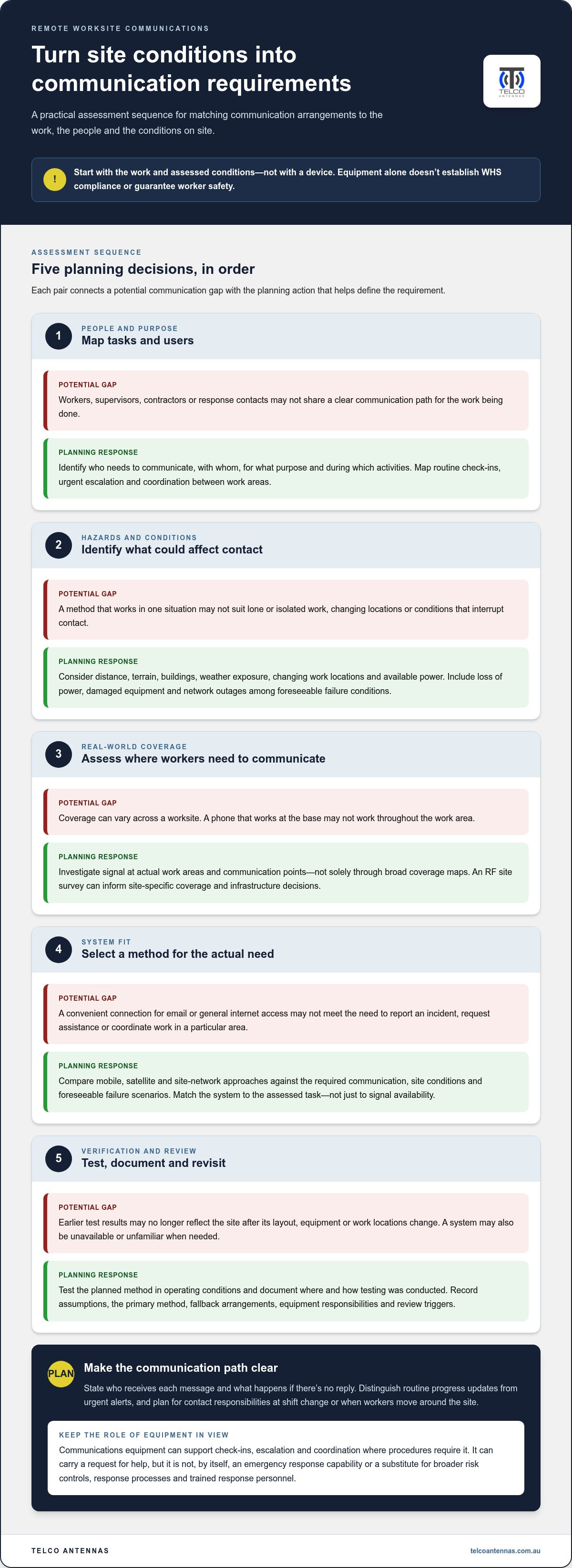
Start with the work, not the hardware. A repeatable assessment turns site conditions and communication tasks into equipment requirements, and gives the work plan a clear basis for testing and review. Safe Work Australia’s guidance on WHS duties for remote work includes effective communication as a consideration for remote and isolated work. Check current requirements for the relevant state or territory as part of planning.
Work through the steps in order:
- Map tasks and users: identify who needs to communicate, with whom, for what purpose and during which work activities.
- Identify hazards and conditions: consider lone work, distance, changing work locations, terrain, buildings, weather exposure and available power.
- Assess coverage: investigate signal at actual work areas and communication points, rather than relying solely on broad coverage maps.
- Select a suitable system: match the connection method to the required communication, site conditions and foreseeable failure scenarios.
- Test and review: verify that the planned method works in operating conditions, then revisit the assessment when work or site conditions change.
Map users, work tasks and communication paths
Include workers, supervisors, contractors and relevant response contacts in the plan. Map routine check-ins, urgent escalation and coordination between work areas. State who receives each message and what happens if there’s no reply. A shift change may require a clear handover of contact responsibilities. Lone workers or moving crews may need arrangements that follow them as their location changes.
Record the expected communication path for each task. For example, distinguish a routine progress update from an urgent alert that must reach a nominated contact. This helps identify gaps in coverage, responsibility or procedure before work begins.
Test coverage and operating conditions on site
Coverage can vary across a worksite. Buildings, terrain, distance and equipment placement may affect whether a connection is usable where workers need it. An RF site survey can inform site-specific coverage and infrastructure decisions, but it doesn’t replace testing the selected system for its intended use.
Document where and how tests were conducted, including the work areas and operating conditions assessed. Retest when the site layout, equipment or work locations change, since earlier results may no longer reflect how the site operates. Keep a written record of assumptions, the primary method, fallback arrangements, equipment responsibilities and review triggers. For site-specific planning, RF site survey and communications infrastructure planning can help inform coverage and equipment decisions.
Compare mobile, satellite and site-network equipment for remote work
Each connection method solves a different problem. The right choice depends on where workers operate, what they need to communicate and what infrastructure is available. When comparing remote site communications equipment Australia-wide, assess each system’s role and limitations against the work plan rather than treating connectivity types as interchangeable.
| Option | Connection method | Site dependency | Suitable tasks | Key limitations |
|---|---|---|---|---|
| Mobile signal booster and antenna | Uses an available external mobile signal and distributes improved coverage within the intended area. | Requires usable signal outside the coverage area and a suitable installation. | Mobile voice and data where network service reaches the site. | Can’t create a mobile connection where no external signal is available; deployment must meet applicable requirements. |
| Satellite connection | Connects compatible equipment to a satellite service for voice or data, depending on the system. | Depends on suitable operating conditions, equipment placement and reliable power. | Wide-area communications where terrestrial network coverage is limited. | Performance and availability depend on the service, conditions and equipment; power loss can interrupt use. |
| Point-to-point wireless bridge | Links network endpoints across a site using a wireless connection. | Requires suitable endpoint locations, link design, power and typically a clear path between radios. | Extending a local network between buildings or work areas. | Connects network segments, but doesn’t itself provide wide-area service or voice communications. |
When can mobile boosters and antennas support site communications?
A mobile booster can improve usable coverage only when an external mobile signal is available to receive. It won’t substitute for a satellite or site network in a true coverage gap. MIMO antennas can support data performance in compatible systems, but they aren’t a universal remedy for weak or absent signal. For deployment considerations, see the guide to Cel-Fi GO signal boosters.
Where do satellite links and wireless bridges fit?
Satellite connectivity can provide a wide-area link, while a point-to-point bridge connects suitable network endpoints on or near a site. A bridge’s suitability depends on line of sight, mounting, power and network design. Neither option automatically supplies the voice procedure workers need. Review the link design considerations for a long-range wireless bridge. For satellite equipment and services, consult the ACMA’s satellite and space systems information and verify requirements for the intended deployment.
Use this remote communications equipment checklist to plan and verify a system
A communication plan needs to work beyond the equipment selection stage. For remote site communications equipment Australia, document how the system will be installed, used, tested and maintained, then assign people to each ongoing task. A checklist makes responsibilities visible and gives workers a clear fallback if the primary method fails.
- Plan: Record the communication purpose, users, work areas, primary method and known limitations. Identify a backup method and specify what workers should do if they can’t make contact.
- Install: Document the equipment location, power arrangements and any operating limits. Make sure the setup reflects the intended work areas and conditions.
- Instruct: Show workers how to operate the equipment, use the relevant channels, follow check-in procedures and escalate a missed check-in or urgent concern.
- Assign ownership: Name who checks equipment condition, manages charging or power, records faults and follows escalation procedures. Avoid relying on an informal assumption that someone else is responsible.
- Test: Check communication from relevant work areas, vehicles and expected operating positions. Record results, limitations, responsible people and follow-up actions.
- Maintain and review: Set inspection and maintenance intervals that suit the equipment and operating conditions. Review the plan after incidents, communication failures, changes to coverage or site layout, and changes to work tasks.
What should be checked before workers rely on the system?
Test the complete communication path, not just whether a device powers on. Confirm that workers can reach the intended contact from their work locations and that the contact knows how to respond. Ask workers to demonstrate the check-in and escalation steps, including what to do if the primary system is unavailable. Record the test date, conditions, outcome, known limitations and any corrective action still required.
Keep the instructions practical and accessible. If workers use different equipment or move between work areas, make clear which method applies and who is responsible for each check. Legal duties and guidance can vary across Australia, so check current official information for the relevant state or territory rather than treating this checklist as a compliance determination.
How should equipment be maintained and reviewed?
Set review intervals according to the equipment, its exposure to weather or physical damage, and the demands of the work. Include checks of power arrangements, connections and operation in the planned maintenance process. After a fault or site change, record what happened, whether the fallback worked and what needs to change before the system is relied on again.
An RF site survey planning guide can help inform coverage and infrastructure decisions. For site-specific communications planning, explore RF site survey and communications solutions.
How Telco Antennas supports remote-site communications planning in Australia
A documented assessment gives equipment and infrastructure decisions a practical starting point. Telco Antennas supplies communications hardware and RF engineering services for remote and industrial applications across Australia, including RF site surveys, communication tower design, mobile signal boosters, antennas, coaxial cable and point-to-point wireless bridges. These components and services can inform a site-specific design, but they don’t guarantee WHS compliance or worker safety.
What can an RF site survey and infrastructure design address?
An RF site survey can provide information about site conditions and radio-frequency requirements before equipment is selected. Its findings can help inform where coverage may be needed and what infrastructure could support the intended system. Communication tower design can support planned antenna placement and infrastructure decisions based on project requirements and physical site conditions. For further technical context, see this guide to communication tower design.
Connect the survey and design process to the work plan: identify the locations workers need to reach, the communication tasks involved and any constraints such as terrain, structures or power. A survey is one input to planning. It doesn’t replace operational testing, user instruction or the wider risk controls required for the work.
How can equipment choices be matched to the site plan?
Each component has a role within a compatible system. A Cel-Fi GO mobile signal booster may suit a design where usable external mobile signal is available. MIMO antennas can be relevant to compatible data systems, while LMR-400 coaxial cable can form part of an RF connection between equipment. Point-to-point wireless bridges may link network endpoints where the site layout and link design support that approach. Antenna support infrastructure, such as a tower or mast, may also be considered where the planned placement requires it.
Choose equipment to suit the assessed purpose and conditions, using product compatibility and current technical documentation to inform the design. A local network link, for example, shouldn’t be treated as a voice or emergency communication method unless the site plan specifically accounts for how it will be used and tested.
Before planning, gather the site layout, work areas, communication tasks, user groups, coverage findings, power conditions, operating environment, fallback arrangements and testing responsibilities. This information connects the risk assessment to practical engineering and hardware decisions without confusing equipment selection with compliance.
Explore remote communications equipment and RF engineering support for project-focused hardware and infrastructure options.
Turn your site assessment into a practical communications plan
A reliable remote-site communications plan starts with the work and its risks, not a device shortlist. Document who needs to communicate, where and for what purpose, then compare mobile, satellite and site-network options against actual site conditions. Test the selected system in expected work areas, assign responsibility for checks and faults, and review the plan when equipment or conditions change.
Equipment supports a wider WHS plan; it doesn’t guarantee compliance or replace other controls. For remote site communications equipment Australia-wide, Telco Antennas supplies communications hardware for remote and industrial applications, with RF site surveys and communication tower design to help inform site-specific coverage and infrastructure decisions.
Bring your site layout, work tasks, coverage findings, power conditions and fallback requirements together before finalising your approach. Explore remote communications equipment and RF engineering support to consider suitable hardware and engineering options for your project. A clear, tested plan gives your team a practical foundation for keeping communication arrangements aligned with the work.
Frequently Asked Questions
What communications equipment does a remote worksite need in Australia?
There’s no single equipment set that suits every remote worksite. Choose systems based on the tasks, hazards, work areas and communication procedures identified in the site assessment. Options may include mobile devices where usable coverage exists, satellite equipment for wider-area connectivity, or a site network for linking work areas. Consider power, environmental exposure, user training and a backup method. The right remote site communications equipment Australia-wide depends on site conditions, not just the equipment category.
Does a mobile signal booster work where there is no mobile signal?
No. A mobile signal booster needs a usable external mobile signal to receive and redistribute coverage; it can’t create a connection where no signal is available. Coverage may also differ between parts of a site, so assess the intended installation location and work areas. Select and deploy a booster appropriately for the system and applicable requirements. MIMO antennas may support data performance in compatible systems, but they aren’t a universal fix for a coverage gap.
Can satellite internet be used for remote-site worker communications?
Yes, satellite internet can support data-based worker communications where the service, equipment, power and operating conditions suit the site. Workers may use supported messaging or calling tools, but don’t assume an internet connection provides every voice or emergency communication function required by the work plan. Test the intended communication method, including how workers will reach the right contact and what they’ll do if the satellite link or power is unavailable.
How do you assess mobile coverage at a remote worksite?
Use coverage maps as an initial guide, then test at actual work locations, vehicle positions and expected operating points. Record where tests were made, the equipment and network used, conditions at the time, and any areas where communication wasn’t reliable. An RF site survey can help inform site-specific coverage and infrastructure decisions. Repeat testing if the site layout, equipment or work locations change, as earlier results may no longer reflect operating conditions.
What should a remote-site communications checklist include?
Include the communication tasks, users, contact paths, primary and backup methods, and known limitations. Document installation and power arrangements, user instruction, check-in and escalation procedures, test results, maintenance actions and review triggers. Assign responsibility for equipment checks, charging or power, fault reporting and follow-up. Make the failure procedure clear: workers should know how to respond if the primary system is unavailable or a check-in receives no reply.
Does communications equipment alone make a remote workplace WHS compliant?
No. Communications equipment is one part of work health and safety planning, not proof of compliance or a guarantee of worker safety. The system should support the controls and procedures identified through the site risk assessment, while other risks and response arrangements are addressed separately. WHS laws and guidance can vary by Australian jurisdiction, so check current official requirements relevant to the work and location before finalising the plan.
When should a remote-site communications plan be reviewed?
Review the plan when work tasks, site layout, coverage, equipment or operating conditions change. Revisit it after an incident, communication failure or test that identifies a gap, and check it as part of the maintenance process at intervals appropriate to the equipment and environment. Confirm that contact responsibilities, fallback methods and user instructions remain current. Record the review and any follow-up actions so workers know which arrangements apply.


