

A Telstra-approved repeater won’t necessarily work with an Optus service. That’s the key distinction in telstra approved mobile booster vs optus repeater compatibility: carrier approval relates to use on a particular network, while cross-network operation depends on the exact device, its configuration and its supported bands.
It’s easy to assume approval follows the hardware, or that swapping the SIM is all that’s needed. In Australia, mobile signal repeaters require carrier permission, so don’t assume a device intended for one network is suitable for another. The terminology can also cause confusion: an Optus Wi-Fi booster extends a home Wi-Fi network, not the mobile signal reaching your phone.
This article explains how carrier authorisation differs from technical compatibility, which model and network details to check, and why a repeater can only improve an existing mobile signal. It also covers how configuration and site conditions affect equipment selection, including where a Cel-Fi GO repeater or RF site survey may fit. Use the checks below to compare a device with the service and installation you have in mind.
Key Takeaways
- telstra approved mobile booster vs optus repeater compatibility depends on the exact device, its carrier configuration and network support, not just the label.
- Check the repeater’s authorisation and supported bands against current carrier information before using it with a mobile service.
- A compatible handset doesn’t prove a repeater will work on the same network. Assess each device separately.
- Before changing carriers or buying equipment, identify the service you want to improve and assess the signal available at the installation site.
- Cel-Fi GO repeaters may suit some requirements, while an RF site survey can help assess site conditions and equipment needs.
Telstra-approved mobile booster vs Optus repeater: what does compatibility mean?
Compatibility depends on the exact device, its configuration and the network it’s intended to support. A mobile signal booster, more precisely called a cellular mobile repeater in Australian regulatory guidance, receives an existing cellular signal and retransmits it within an authorised system to improve reception. It can’t create a mobile signal where none is available.
The distinction matters because “booster” and “repeater” are often used interchangeably in product descriptions, while the Australian Communications and Media Authority (ACMA) distinguishes between prohibited mobile phone boosters and authorised cellular mobile repeaters. For a technical overview of the components and signal path, see Understanding Cellular Repeaters. The wording in a product listing alone doesn’t establish whether the equipment is suitable or authorised for a particular network.
What does “Telstra-approved” mean for a mobile booster?
“Telstra-approved” should refer to a specific repeater model and its documented configuration for use on Telstra’s network. It isn’t a blanket endorsement of every device described as a booster, and it doesn’t automatically cover another carrier. A Telstra SIM identifies the mobile service you subscribe to; it doesn’t, by itself, establish that the repeater connected to that service is authorised.
Approval is carrier permission for a documented repeater and configuration to operate on that carrier’s network. Frequency-band compatibility is a separate technical requirement. Both checks matter. A unit may support a frequency used by a carrier but still lack the required carrier authorisation or configuration. Likewise, approval for a particular use doesn’t mean the unit supports every frequency or service offered by that carrier.
Is an Optus repeater a different type of device?
Not necessarily. “Repeater” describes how cellular signal is received and retransmitted, while “Optus” indicates the network service a device is intended or configured to support. An “Optus repeater” isn’t automatically a different class of hardware from a Telstra repeater, and the carrier name doesn’t prove it will work across networks.
Keep the service you want to improve clear, too. An Optus Wi-Fi booster extends a Wi-Fi network from a compatible modem; it doesn’t repeat Optus cellular signal to a mobile phone. These devices solve different coverage problems, even though both may be marketed using the word “booster”.
For telstra approved mobile booster vs optus repeater compatibility, check approval, supported frequencies, configuration and the target mobile service separately. A phone’s ability to connect to Telstra or Optus is a separate check: handset compatibility doesn’t establish repeater compatibility.
Carrier requirements and supported configurations can change as networks and equipment documentation are updated. Before buying or changing a service, check current Telstra or Optus information for the exact repeater model, alongside current ACMA guidance. An old product description or a carrier name printed on the casing isn’t proof of current compatibility.
How approval, network bands and configuration determine compatibility
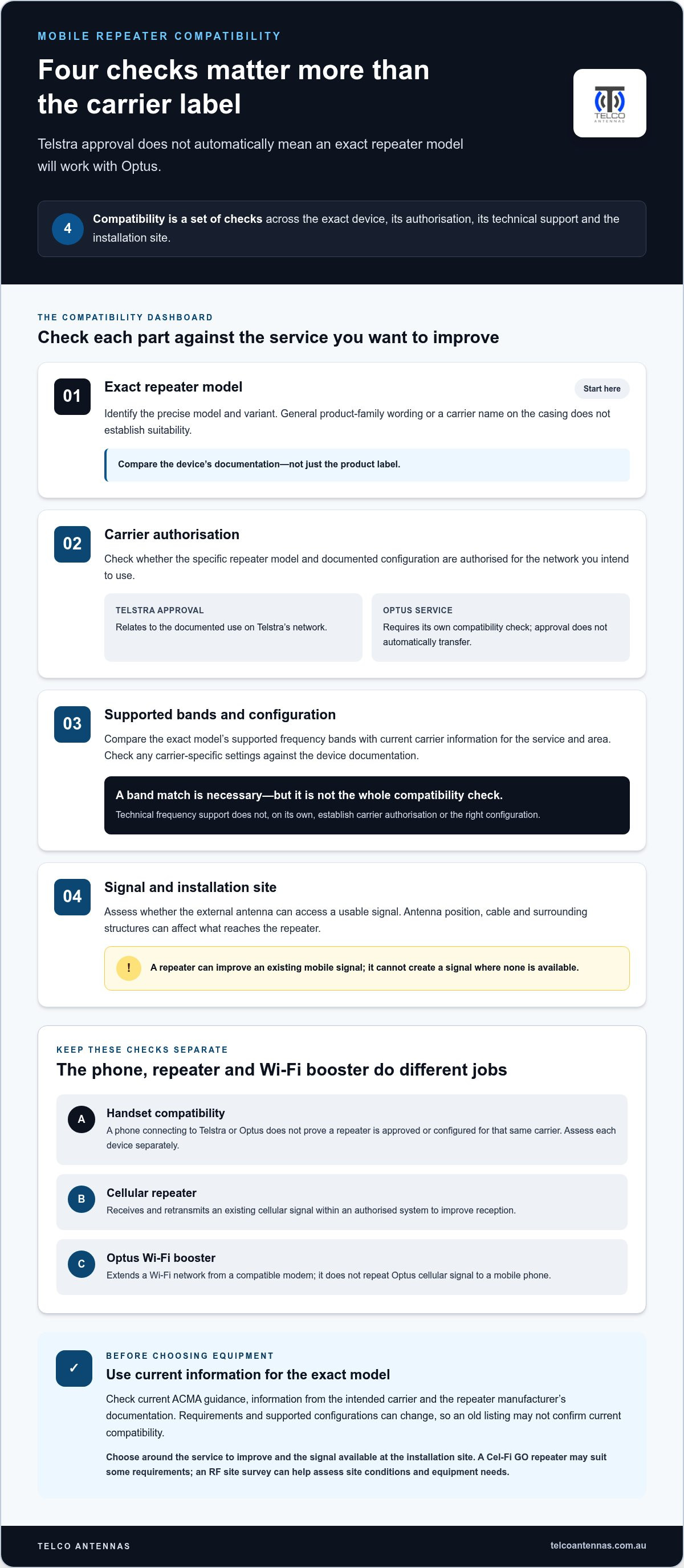
Compatibility involves several checks, not a single label. Start with the exact repeater model, then establish whether its supported bands and carrier configuration match the mobile service you intend to improve. The installation matters as well: the external antenna needs access to a usable signal, and cable, antenna position and surrounding structures can affect what reaches the repeater. A technically suitable device can’t compensate for a signal that isn’t available at the antenna location.
Check the handset and repeater separately. Your phone must support the relevant network technology and bands, but that doesn’t establish whether a repeater is approved or configured for the same carrier. For example, a handset connecting to Optus doesn’t mean a repeater set up for Telstra can amplify Optus service. The devices have different roles and specifications.
Why supported frequency bands matter
Mobile networks use radio frequencies to carry service, and a repeater must support the relevant bands used by the carrier in the area. Compare the exact model’s technical documentation with current carrier information. Don’t rely on a general product-family description, as variants may differ. A band match is a necessary technical check, but it’s only one part of the compatibility assessment.
Why approval and configuration are not interchangeable
Approval concerns permitted use of a specific device or configuration on a network. Frequency support describes the signals its hardware can technically handle. Firmware or carrier-specific settings may also affect operation, so check them against the documentation for the exact model. A repeater’s support for a carrier’s frequency band does not, on its own, establish that the device is approved or configured for that carrier.
Carrier requirements, equipment documentation and regulatory guidance can change. Check current, dated sources rather than relying on an old listing or advice written for a different model. The ACMA’s guidance on cellular mobile repeaters is the relevant Australian regulatory reference. Compare it with current information from the intended carrier and the repeater manufacturer. If terminology or status is unclear, follow the regulator’s current wording rather than assuming “booster” and “repeater” describe the same regulatory category.
Include the installation site in your assessment. Signal strength and quality at the external antenna position can differ from reception indoors or beside a vehicle. Obstructions and antenna placement may also affect the input signal. A repeater can only work with the signal it receives. An RF site survey can help clarify site conditions where coverage varies or equipment selection is uncertain.
For practical telstra approved mobile booster vs optus repeater compatibility checks, record the carrier, exact model, supported bands, configuration requirements and signal conditions before deciding. Telco Antennas’ RF site survey and equipment planning can help relate those technical details to the deployment environment.
Telstra vs Optus booster compatibility: compare the checks, not the labels
A carrier name on a repeater isn’t enough to establish compatibility. Don’t treat Telstra approval as automatic Optus approval, or vice versa. Use the checks below to compare the intended network with the exact device and its current documentation. Requirements can differ by model and configuration, so the table is a guide to what to verify, not a universal approval list.
| Check | Telstra service | Optus service |
|---|---|---|
| Carrier approval | Look for current documentation that covers the exact repeater and its intended Telstra configuration. | Check separately for documentation covering the exact repeater and intended Optus configuration. |
| Supported bands | Compare the model’s specified bands with current Telstra network information for the service you need. | Compare the model’s specified bands with current Optus network information for the service you need. |
| Configuration | Check any carrier-specific settings, firmware or operating requirements in the model documentation. | Check whether the same model supports the required Optus configuration; don’t assume settings transfer. |
| SIM service | A Telstra SIM identifies the mobile service, but doesn’t establish repeater approval or band support. | An Optus SIM identifies the mobile service, but doesn’t establish repeater approval or band support. |
| Verification source | Use current Telstra information and the manufacturer’s documentation for the exact model. | Use current Optus information and the manufacturer’s documentation for the exact model. |
| Carrier change | Reassess the device, configuration, supported bands and approval for the new carrier before relying on the existing setup. | |
What to compare for Telstra service
Record the repeater’s exact model identifier, then check the documentation for its Telstra configuration and supported bands. Compare those details with current Telstra information for the service you intend to improve. Note the publication or update date of each source. Older claims may describe a previous device version, configuration or network arrangement, rather than your current setup.
What to compare for Optus service
Repeat the checks using Optus as the intended network. Don’t infer Optus suitability from Telstra approval, shared hardware, a matching frequency or a phone that connects to Optus. Each fact answers a different compatibility question. For more context on equipment selection and deployment, see this Cel-Fi GO signal booster professional guide.
This side-by-side approach is the practical core of telstra approved mobile booster vs optus repeater compatibility: assess authorisation, band support and configuration for the network you’ll actually use. If you change carriers, reassess the existing installation rather than assuming it will continue to operate appropriately. Record the model and source dates so you can repeat the checks against current information.
A practical checklist before buying or changing mobile carriers
Use this sequence before purchasing a repeater or moving an existing setup to a different carrier. It separates network compatibility from installation conditions and helps you identify what’s known and what still needs technical assessment.
- Identify the mobile service. Record the carrier you want to improve and the service type in use. If the site also has Wi-Fi, fixed wireless or satellite internet, clarify that the goal is to improve cellular reception for a mobile service, not extend those other connections.
- Record the exact repeater model. Note the model name and variant from its label or documentation. Similar-looking devices can have different supported configurations, so don’t rely on a family name alone.
- Check carrier approval. Find current documentation for that model and the intended network. Keep the source and its publication or update date with your equipment records.
- Confirm supported bands and configuration. Compare the model’s specifications with current carrier information for the service you need. Check any stated firmware or configuration requirements, particularly if the device was previously used on another network.
- Assess the signal at the antenna site. Note where the external antenna could be positioned and what reception is available there. A repeater depends on the signal it receives at that point, so indoor phone reception alone may not describe the installation conditions.
This process turns telstra approved mobile booster vs optus repeater compatibility into a set of verifiable checks, rather than a guess based on the carrier label. If model details, network information or site conditions are unclear, don’t assume the existing equipment will suit a new service.
Information to collect about the phone service and booster
Keep a short record of the intended carrier, service type, exact repeater model and any existing device configuration. Add the source and date of approval information, along with the planned external antenna location and the signal observed there. This gives an installer or RF specialist a practical starting point and helps distinguish missing documentation from a site limitation.
How to assess antenna and installation requirements
Antenna direction and separation between components can affect how a system operates. Cable choice and length matter too, because cable introduces signal loss. The effect depends on the equipment and installation, so don’t assume any cable or placement will perform equally well. Where antenna design is relevant, the MIMO antenna technical guide provides further context on antenna configuration and data throughput.
An RF site assessment can help evaluate available signal, potential antenna positions and installation constraints. It informs equipment planning, but can’t guarantee a particular coverage result. To get help interpreting site or equipment requirements, arrange an RF site survey.
Choosing a compatible booster solution with Telco Antennas
Once you’ve identified the mobile network and checked its requirements, choose equipment as part of a complete system. Telco Antennas supplies Cel-Fi GO Mobile Signal Boosters. Match the exact model’s current documentation, carrier configuration and technical requirements to the service and site where it will be used.
This is particularly important when replacing equipment or changing mobile providers. A familiar product name doesn’t establish that a different variant supports the same network. And a suitable specification on paper doesn’t describe the signal conditions or antenna arrangement at your site.
When a Cel-Fi GO booster may suit the requirement
A Cel-Fi GO booster may suit a requirement to improve cellular reception when the exact model is documented for the intended carrier and its required configuration. Check the model documentation alongside current carrier information, then consider whether the external antenna can receive a usable signal at the installation location. The model, configuration and site conditions all matter; the product category alone isn’t enough to decide whether it’s a fit.
If you’re comparing options for Telstra and Optus, assess the requirements for each network separately. Don’t infer cross-carrier operation from shared hardware, a similar model name or a phone that works on both services. A carrier change may require reassessing the configuration and installation as well as the network information.
What a technical assessment can clarify
An RF site survey can help assess the practical conditions behind the specifications. It can inform where an external antenna may be positioned, what signal is available there and which physical features of the site may affect deployment. A survey is an assessment tool, not a promise of a particular coverage result. Its value is in grounding equipment decisions in site conditions rather than assumptions about indoor reception.
For a more complex site, useful information to bring into the assessment includes:
- The intended mobile carrier and service to improve.
- The exact repeater model and available technical documentation.
- Existing antenna locations, cable routes and installation constraints.
- Areas where reception is weak and where usable signal is currently available.
This context connects device selection with the way the system will be deployed. Telco Antennas’ RF survey and engineering services can support planning where coverage conditions, infrastructure or model requirements are difficult to interpret. The focus is on assessing the site and intended service, rather than assuming one setup will suit every location.
For telstra approved mobile booster vs optus repeater compatibility, match the carrier, model documentation and site conditions before choosing equipment. Explore Telco Antennas’ mobile signal booster solutions and consider which technical details apply to your installation.
Make your next coverage decision with confidence
Before buying equipment or switching networks, make a simple record of the intended carrier, exact repeater model, current documentation and planned installation conditions. This gives you a clear starting point for assessing the system as a whole, rather than making a decision based on a carrier label or familiar product name. It also helps identify whether you need to confirm equipment details or assess the site.
For telstra approved mobile booster vs optus repeater compatibility, match the documented configuration to the service you need and the environment where the equipment will operate. Telco Antennas supplies Cel-Fi GO Mobile Signal Boosters and provides RF site surveys and communications infrastructure engineering to inform equipment planning where requirements are complex.
Explore Cel-Fi GO mobile signal boosters and Telco Antennas’ technical services to plan your next step. Start with the exact model, intended carrier and site conditions to make a more informed coverage decision.
Frequently Asked Questions
Can a Telstra-approved mobile booster work with an Optus SIM?
It may, but inserting an Optus SIM won’t change what the repeater is designed or authorised to support. For telstra approved mobile booster vs optus repeater compatibility, compare the exact model and variant with its manufacturer documentation, then check current Optus and ACMA information for that setup. Check for carrier-specific settings as well as band support. Don’t infer compatibility from the SIM or phone connection alone.
Is a Telstra-approved booster automatically approved for Optus?
No. Don’t assume Telstra approval transfers to Optus. Approval and supported operation can depend on the exact equipment and its configuration, and requirements may change. A repeater’s ability to receive a frequency used by Optus doesn’t establish that it’s approved for Optus service. Check current information from the relevant carrier and ACMA for the specific model, rather than relying on a general product description or a label naming one carrier.
Can one mobile booster support both Telstra and Optus?
Some equipment may support more than one carrier configuration, but that depends on the particular model and installation. Check approval status, supported bands and configuration separately for Telstra and Optus. Support for one network doesn’t confirm support for the other. If the documentation describes selectable carrier settings, check whether they apply to your exact variant and how network selection is managed before planning to use it with different services.
How do I check whether my repeater is compatible with my carrier?
Start with the model and variant printed on the unit, then find the manufacturer’s current documentation for that exact equipment. Compare its supported bands and configuration with information from your intended carrier, and check applicable ACMA guidance. Record the dates of the sources you use so you can tell whether they’re current. A phone connecting successfully to the carrier is useful context, but it doesn’t verify the repeater’s compatibility.
Does changing from Telstra to Optus mean I need a new booster?
Not necessarily, but reassess the existing repeater before using it with the new service. A new SIM doesn’t alter the device’s supported bands or configuration, and existing approval information may not cover the new carrier. If a unit has been configured for Telstra, check the exact model documentation and current Optus information before relying on the installation. The result depends on the equipment and its documented use.
Will a booster improve coverage if there is no mobile signal outside?
A repeater needs usable cellular signal at its external antenna; it can’t create a carrier signal where none is available. Reception at a proposed antenna location may differ from what you experience indoors, so assess the signal where the antenna could actually be installed. Antenna position, cable and system configuration also affect operation. An RF site assessment can help establish the available signal and relevant site constraints, but it can’t guarantee a coverage result.
Are mobile signal boosters regulated in Australia?
Yes. Mobile repeaters and boosters are subject to Australian regulatory and carrier requirements, but the applicable requirements can depend on the equipment and configuration. Don’t rely on an old product listing or a general claim of approval. Before installation or operation, consult current ACMA guidance and the relevant carrier’s information for your exact model. This helps distinguish the rules applying to the equipment from its technical ability to support particular network frequencies.


