

Why would a cutting-edge satellite system rely on a wireless connection that fails the moment you step inside a corrugated iron shed? If you're operating in remote Australia, you've likely realised that the standard Starlink setup often falls short of professional requirements. The proprietary SPX connectors on the Gen 2 hardware make traditional networking a challenge, leaving many users stuck with high latency and inconsistent WiFi coverage. To move beyond these limitations, the starlink ethernet adapter is an essential piece of hardware that converts a consumer-grade satellite link into a robust, hardwired backbone.
We understand that for industrial monitoring or VoIP applications, "good enough" WiFi isn't an option. This guide will help you master the technical specifications needed to achieve superior network control and stability. We'll examine the critical differences between hardware generations, explain how to correctly implement bypass mode, and show you how to integrate your Starlink system with professional RF hardware like MIMO antennas or point-to-point wireless bridges. By the end of this article, you'll have a clear roadmap for building a resilient, low-latency network that performs reliably in the most demanding environments.
Key Takeaways
- Identify the specific hardware requirements for the Gen 2 Standard Actuated system to overcome the inherent limitations and latency of a wireless-only network.
- Learn how the starlink ethernet adapter functions as a critical bridge for enabling bypass mode and integrating high-performance third-party routers for advanced traffic management.
- Understand the mechanical properties of proprietary SPX connectors and the necessity of cable shielding to maintain signal integrity in high-interference industrial environments.
- Discover how a hardwired backbone provides the essential foundation for deploying advanced RF infrastructure, including high-gain MIMO antennas and telescopic masts for remote sites.
Understanding the Starlink Ethernet Adapter and Hardware Compatibility
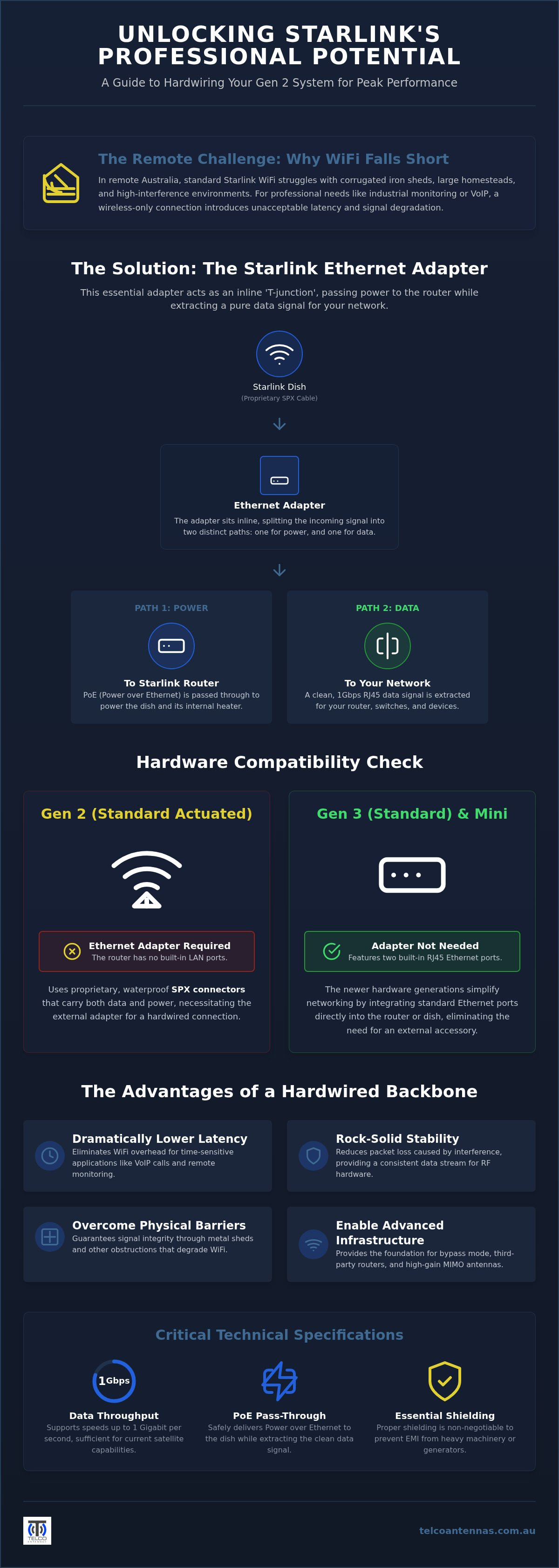
The starlink ethernet adapter serves as a proprietary bridge designed specifically for the Gen 2 Standard Actuated hardware. While the Starlink satellite constellation provides the high-speed data link from orbit, the Gen 2 router famously lacks a physical LAN port. This design choice forces users to rely entirely on wireless connectivity, which is often insufficient for professional or industrial applications. For those managing complex networks, this "missing port" represents a significant hurdle in achieving a stable, hardwired backbone.
In rural Australia, many properties rely on metal-clad sheds or large homesteads where WiFi signals struggle to penetrate. Standard wireless links are prone to interference from other electronics and environmental factors common on remote stations. For operators in these environments, a physical connection is the only way to ensure data reaches its destination without the signal degradation caused by physical obstructions. Hardwiring your system isn't just about speed; it's about making sure your connection remains consistent when the environment is working against you.
Gen 2 vs Gen 3: Which System Needs an Adapter?
Compatibility is the first hurdle in any installation. The Gen 2 (Standard Actuated) dish uses a proprietary SPX connector that requires the separate starlink ethernet adapter to output a standard RJ45 signal. Conversely, the newer Gen 3 (Standard) router includes two native Ethernet ports, removing the need for an external accessory. The Starlink Mini also simplifies the setup by integrating the port directly into the dish housing, which is ideal for mobile deployments. You should verify your hardware version by checking the connector type or looking for the mechanical kickstand base found on Gen 3 models before purchasing accessories to ensure correct fitment.
The Role of Ethernet in Reducing Latency
Wireless protocols like WiFi 5 and 6 introduce inherent latency overhead due to the way they manage packet transmission through the air. A direct copper connection eliminates this variable, providing a stable path for time-sensitive data. This stability is critical for VoIP calls, video conferencing, and remote site monitoring where every millisecond counts. In these contexts, packet loss is defined as the failure of one or more transmitted data packets to reach their destination across the network link. By hardwiring your system, you reduce the risk of these dropouts and ensure your professional RF hardware receives a clean, reliable data stream.
Technical Specifications: SPX Connectors and Signal Integrity
The mechanical architecture of the starlink ethernet adapter is defined by the proprietary SPX connector system. Unlike standard RJ45 networking gear, the SPX interface is a ruggedised, waterproof design that handles both high-speed data and Power over Ethernet (PoE) within a single housing. This adapter functions as an inline "T-junction" that sits between the satellite dish and the router. It acts as a PoE pass-through, ensuring the dish receives the necessary wattage for operation and internal heating while extracting a copper-based data signal for your local network. This technical complexity is a result of the FCC authorization for Starlink and its subsequent hardware iterations, which shifted away from standard interfaces to prioritise weather resistance and power delivery.
Shielding is a non-negotiable requirement in the Starlink ecosystem. Because the cables carry significant DC power alongside high-frequency data, they are susceptible to electromagnetic interference (EMI). This is particularly relevant on remote Australian work sites where large generators, heavy machinery, or high-powered radio equipment are in constant operation. Using low-quality third-party adapters in these environments introduces significant risks. Inferior shielding or poor thermal management can lead to signal degradation or hardware failure when ambient temperatures exceed 40 degrees Celsius during a typical Australian summer. If you require a setup that survives the elements, ensuring your components meet professional standards is the first step toward reliability.
Data Throughput and Cable Standards
The official adapter supports data speeds up to 1Gbps, which is more than sufficient for current satellite throughput. However, the integrity of this speed depends heavily on the cabling used downstream. While you might use high-quality LMR-400 coaxial cables for the RF components of a signal booster system, your Ethernet runs require shielded Cat6 or better to maintain performance over distance. Signal attenuation becomes a factor if you attempt to extend Ethernet runs beyond 100 metres from the adapter without active switching. For complex installations, it's often better to consult with a technician to ensure your cable topology doesn't bottleneck your satellite link.
Weatherproofing and Durability in the Outback
Dust ingress is the primary silent killer of electronics in the outback. While the SPX connectors themselves feature rubber gaskets to prevent moisture and grit from entering the pins, the RJ45 port on the adapter remains a point of vulnerability. It's essential to house the adapter in a UV-stabilised, weather-rated enclosure if it isn't located inside a climate-controlled building. Physical strain is another common cause of failure. The SPX ports are precision-engineered and don't tolerate heavy cable weight or sharp bends. Best practices involve using p-clips or cable ties to secure the cabling, ensuring the weight of the run isn't pulling directly on the adapter's internal connections.
Configuring Your Network: Bypass Mode and Third-Party Routers
Once the starlink ethernet adapter is physically integrated into your setup, the focus shifts to software configuration. For professional environments, the standard Starlink WiFi is typically insufficient for managing high-density traffic or complex security protocols. Enabling Bypass Mode is the primary mechanical step to handing over network control to a more capable third-party gateway, such as a Ubiquiti Dream Machine or a Mikrotik router.
To initiate this change, open the Starlink app, navigate to the 'Settings' menu, and locate the 'Bypass Mode' toggle. Once confirmed, the internal router functions and WiFi radios are disabled, and the system passes the connection directly to your secondary hardware. It's vital to remember that if your third-party router experiences a configuration failure, you'll lose all network access. In this scenario, a manual factory reset of the Starlink router, achieved by power-cycling the unit six times in rapid succession, is the only way to restore the default wireless interface.
A common hurdle during this transition is the occurrence of IP conflicts. The Starlink system often defaults to the 192.168.1.x subnet, which is the same range used by many consumer and professional routers. To prevent a gateway clash, you should configure your secondary router to operate on a different subnet, such as 10.0.0.x or 192.168.2.x. Maintaining visibility of your dish telemetry is also a priority; you must ensure your firewall rules allow traffic to reach 192.168.100.1, the static IP used for dish statistics and alignment data.
Setting Up a Mesh Network for Large Properties
For large Australian stations or industrial yards, a single access point cannot provide adequate coverage across multiple metal buildings. Using the adapter to create a wired backhaul for a mesh system is the most effective way to ensure performance doesn't degrade as you move away from the primary dish. A wired backhaul eliminates the 50% bandwidth penalty inherent in wireless mesh repeating, providing a stable, high-speed link across the entire property. This setup allows for seamless roaming and ensures that remote monitoring cameras or VoIP handsets remain connected without the latency spikes associated with wireless hops.
Advanced Networking: VLANs and Fixed Wireless
Professional users often need to distribute their satellite link to remote pumps or secondary dwellings via a point-to-point wireless bridge. With the recent approval for 7,500 additional Starlink satellites, the increased network capacity makes Starlink a viable primary link for multi-WAN failover strategies. You can configure your router to use Starlink for high-bandwidth tasks while keeping a 4G or 5G connection active for critical low-latency redundancy. To keep the Starlink app functional in this environment, you'll need to set a static route in your router's table, directing all traffic for 192.168.100.1 through the specific WAN port connected to the Starlink adapter.
Beyond the Home: Industrial and Off-Grid Ethernet Deployments
In industrial contexts such as remote mining operations and large-scale agricultural stations, the requirement for connectivity extends far beyond simple web browsing. These sites rely on the starlink ethernet adapter to facilitate the integration of Programmable Logic Controllers (PLC) and SCADA systems. Because these controllers often lack wireless radios and require the deterministic timing of a wired link, the adapter becomes the mandatory interface for monitoring bore pumps, tank levels, or autonomous machinery. In these environments, a failure in the wireless link isn't just an inconvenience; it's a potential operational shutdown.
For rapid site setup, the adapter is frequently integrated into portable communication towers and telescopic mast trailers. This allows exploration teams and emergency services to deploy a fully functional communications hub in areas where traditional backhaul is non-existent. By mounting the dish on a mast and running a shielded Ethernet cable back to a hardened gateway, operators can provide a stable WiFi bubble and hardwired ports for site offices simultaneously.
Starlink for Mobile and Marine Applications
Maintaining a stable Ethernet connection on a moving vessel or a 4WD vehicle introduces significant mechanical challenges. Vibration is the primary enemy of the SPX connector, which can work loose over corrugated tracks or in heavy seas. Professional installers utilise the adapter in conjunction with specialised Starlink accessories Australia to ensure secure mounting and strain relief. Cable management must be vibration-resistant, often involving conduit and automotive-grade fasteners to prevent the adapter's proprietary pins from fatiguing over time.
Off-Grid Power Efficiency
Off-grid reliability depends on minimising the "vampire" power draw of your networking stack. The standard Starlink setup requires an AC inverter to power the router, which typically results in a 15% to 20% energy loss through heat. To solve this, industrial users often bypass the stock router entirely, using the starlink ethernet adapter alongside a dedicated 12V or 24V DC power conversion kit. This approach allows the system to run directly from a battery bank, significantly extending the runtime of solar-powered sites. For sites requiring custom engineering, you can consult our team for a professional RF site survey to ensure your off-grid deployment is optimised for long-term performance.
Optimising Your Starlink Setup with Professional Grade Hardware
The starlink ethernet adapter is more than a simple port expansion; it serves as the mechanical foundation for a comprehensive high-performance network. By extracting a stable copper signal from the proprietary satellite link, you create the necessary interface to implement a sophisticated MIMO antenna strategy. While the Starlink dish provides the primary data path, integrating high-gain external antennas ensures that your system maintains maximum throughput even when environmental factors or satellite density are less than ideal. This hardware-first approach transforms a standard consumer kit into a resilient communication node capable of meeting industrial standards.
In many Australian black spots, relying on a single backhaul method introduces operational risk. A professional-grade setup often combines Starlink with cellular signal boosters, such as the Cel-Fi GO, to achieve 100% uptime. By using the Ethernet adapter to link into a multi-WAN router, you can configure automatic failover between satellite and 4G or 5G networks. This redundancy is essential for remote businesses where a loss of connectivity translates to a loss of safety or revenue. For retail or hospitality operators, this also means ensuring that point-of-sale systems remain active; you can learn more about specialised payment processing solutions that benefit from this level of network stability. Before committing to permanent infrastructure, conducting a professional RF site survey is a critical step to identify the optimal placement for towers and antennas, ensuring that local topography doesn't interfere with your signal paths.
For businesses that leverage this network stability to manage their retail or logistics operations, online provider DuraFast Label Company Canada offers professional label printing solutions that ensure inventory and shipping processes remain efficient and well-organised.
At Telco Antennas, we provide a consultative approach that goes beyond simply supplying hardware. Since our founding in 2008, we've specialised in the specific challenges of the Australian landscape, from extreme thermal loads to the logistical difficulties of remote site deployments. We design custom cabling solutions and mounting hardware, such as aluminium tri-pods and telescopic mast trailers, specifically to withstand local conditions. Our expertise in Starlink aftermarket power conversion allows us to build systems that are as efficient as they are robust, supporting national infrastructure with gear that has been field-tested in the harshest environments.
Next Steps for Your Network
The path to a professional-grade installation begins with an audit of your current network performance to identify where WiFi interference or cable attenuation is causing bottlenecks. Once you understand your site's specific requirements, you can select the right combination of Starlink accessories, signal boosters, and high-quality coaxial cabling to build a cohesive system. If your project involves complex site design, communication tower requirements, or bespoke off-grid power solutions, we encourage you to contact our engineering team for a technical consultation. We're here to ensure your hardware operates with the reliability that professional applications demand.
Securing Your Remote Network Infrastructure
Achieving a reliable data link in the Australian outback requires moving beyond the limitations of standard consumer WiFi. By integrating a starlink ethernet adapter, you establish the physical foundation necessary for low-latency communication, advanced traffic management, and industrial SCADA integration. This hardwired backbone is the first step toward a more resilient system that can incorporate high-gain MIMO antennas or cellular failover for critical redundancy. Transitioning to a professional-grade network ensures your connectivity survives the extreme thermal loads and physical demands of remote industrial sites.
Since 2008, our Australian-owned and operated team has provided specialist RF engineering support to help operators navigate complex connectivity challenges. We offer national shipping on all Starlink-compatible hardware, ensuring your equipment arrives ready for deployment. Explore Professional Starlink Accessories and Power Solutions at Telco Antennas to optimise your network today. With the right hardware and engineering expertise, your remote station can achieve the same performance and reliability as a metropolitan head office.
Frequently Asked Questions
Do I need an Ethernet adapter for the Starlink Gen 3 (Standard) kit?
No, the Gen 3 (Standard) kit doesn't require an external adapter because the router includes two native RJ45 Ethernet ports. This is a significant mechanical improvement over the Gen 2 hardware, which relied on the proprietary SPX connector for all data and power. If you're deploying a Gen 3 system, you can connect your third-party router or hardware directly to the back of the Starlink router without needing any additional accessories.
Can I use a third-party USB-to-Ethernet adapter with the Starlink router?
You can't use standard USB-to-Ethernet adapters because the Gen 2 Starlink router does not feature a USB port. The starlink ethernet adapter is a specific proprietary bridge that interfaces with the unique SPX connector system. Attempting to use non-genuine or incompatible converters will likely result in hardware failure or signal loss. For a reliable connection, you must use the official adapter designed to handle the specific voltage and data requirements of the Starlink ecosystem.
What happens to the WiFi signal when I enable Bypass Mode?
Enabling Bypass Mode completely disables the Starlink router's internal WiFi radios and routing functions. This means you'll no longer see the Starlink network in your device's WiFi list, and the unit functions solely as a power supply and data bridge. You must have your own third-party router connected to the ethernet adapter to manage your local network. If you haven't configured your secondary router correctly, you'll lose all local internet access until the system is reset.
Is the Starlink Ethernet adapter waterproof for outdoor installation?
While the SPX connectors on the cable ends feature rubber gaskets for weather resistance, the RJ45 port on the starlink ethernet adapter itself is not waterproof. If you're installing the adapter in an outdoor environment, it must be placed inside a UV-stabilised, weather-rated enclosure to prevent dust ingress and moisture damage. For remote Australian sites, exposure to high humidity or heavy rain will quickly corrode the pins if the adapter is not properly protected from the elements.
How long can I extend the Ethernet cable from the adapter?
You can extend the Ethernet cable up to 100 metres from the adapter before you encounter significant signal attenuation or data loss. This follows standard Cat6 networking specifications. If your installation requires distances beyond 100 metres, such as connecting a remote shed or monitoring station, you'll need to integrate an active network switch or a point-to-point wireless bridge to maintain signal integrity across the longer run. Always use shielded cabling to prevent electromagnetic interference.
Does the Starlink Ethernet adapter support Power over Ethernet (PoE) for my own devices?
The adapter doesn't provide Power over Ethernet (PoE) output for your own devices like IP cameras or access points. While the adapter passes high-wattage PoE from the router to the dish, the RJ45 port is for data only. If you need to power secondary hardware, you must install a separate PoE injector or a PoE-enabled switch downstream from the adapter. Attempting to draw power directly from the Starlink link can damage your third-party equipment.
Will using an Ethernet adapter improve my Starlink speeds in Australia?
Using an adapter won't increase the raw bandwidth provided by the satellite constellation, but it often results in higher effective speeds by eliminating WiFi overhead and interference. In Australian environments where metal roofing or thick walls are common, a hardwired connection provides a more stable data path with lower latency. This is particularly noticeable during peak usage times or when running high-bandwidth applications that require consistent throughput without the packet loss associated with wireless links.
How do I factory reset my Starlink router if I lose access after enabling Bypass Mode?
To factory reset the router and disable Bypass Mode, you must power-cycle the unit six times in rapid succession. Unplug the power cable from the wall or the base of the router, wait two or three seconds, and plug it back in. Repeat this process six times without interruption. Once successful, the router will reboot with its original factory settings, re-enabling the internal WiFi radios so you can access the system via the Starlink app again.


