

At a distance of three kilometres, the difference between a functional wireless link and a frustratingly intermittent one isn't just the price tag, it's the link margin you've engineered into the system. Many property owners find themselves caught in a cycle of signal dropouts and degraded speeds because they've underestimated how the Australian climate impacts radio frequency propagation. You're likely looking for a solution that doesn't just work in theory, but survives the relentless heat and high winds that define rural life.
This technical comparison settles the ubiquiti nanostation vs powerbeam for 3km farm wireless bridge debate by focusing on the physical properties of the hardware and the environment. We understand the frustration of trying to decipher complex dBi ratings and Fresnel zone requirements when all you need is a reliable 100Mbps+ connection to your remote shed. You'll discover why the compact form factor of a NanoStation might struggle where the high-gain dish of a PowerBeam excels, and vice versa. By the end of this analysis, you'll have a clear understanding of the mounting requirements and hardware specifications needed to establish a stable, high-speed link across your paddocks that won't fail when the weather turns foul.
Key Takeaways
- Understand why 3km represents a critical tipping point where environmental factors like thermal noise and atmospheric interference begin to significantly impact wireless link reliability.
- Evaluate the technical trade-offs between the ubiquiti nanostation vs powerbeam for 3km farm wireless bridge to ensure your hardware selection provides sufficient link margin for Australian conditions.
- Learn how to calculate essential Fresnel zone clearances and mounting heights to prevent ground reflections and scrub from causing intermittent signal dropouts across your paddocks.
- Discover why prioritising signal gain over a compact form factor is essential for maintaining stable 100Mbps+ throughput for demanding applications like VoIP and high-definition security monitoring.
- See how utilising professional RF site surveys and pre-configured bridge kits can streamline the deployment of your communication infrastructure while avoiding common technical installation errors.
Bridging the Paddock: Rural Connectivity Challenges at 3km
Establishing a reliable connection across three kilometres of open Australian paddock involves more than just pointing two radios at each other. At this range, you've reached what RF engineers consider a "tipping point" where the margins for error become razor thin. While a short 500-metre link might survive poor alignment or slight obstructions, a 3km span requires precise engineering to maintain a stable 100Mbps+ throughput. Physics dictates the result. Choosing between the ubiquiti nanostation vs powerbeam for 3km farm wireless bridge deployments often comes down to how much "link margin" you're willing to sacrifice for a smaller form factor.
In rural environments, thermal noise and atmospheric interference play a larger role than many realise. As the ground heats up during a typical Australian summer, the air density changes, which can cause signal refraction. If your hardware doesn't have enough "gain" to punch through these variables, you'll experience frustrating dropouts exactly when you need the connection most. Validating your requirements is the first step; a link intended for basic internet sharing has different stability needs than one used for high-definition CCTV backhaul or low-latency VoIP calls. The hidden cost of selecting underpowered hardware isn't the purchase price, it's the hours of paddock-side troubleshooting and the eventual need to replace the units when they fail to perform in heavy weather.
Understanding Point-to-Point (PtP) Basics
A Point-to-Point (PtP) wireless bridge functions as a virtual fibre optic cable, using highly directional antennas to focus microwave energy between two fixed locations. For modern farm applications, we almost exclusively use 5GHz AirMAX technology because the 2.4GHz band is frequently congested and lacks the bandwidth required for modern data demands. However, this frequency demands a strict Line of Sight (LoS). It isn't enough to simply see the other building; you must also account for Fresnel zone clearance requirements to ensure the signal doesn't reflect off the ground or clip the tops of scrub and trees. Without this clearance, the radio waves arrive out of phase, effectively cancelling each other out.
The 3km Distance Factor
The physics of radio propagation are governed by the inverse square law. This means that as you double the distance, you receive only one quarter of the power. At 3km, the signal has dissipated significantly compared to a short-range link. This is why "signal bars" on a consumer device are a poor metric for bridge performance. A link might show connectivity but suffer from high packet loss during a dust storm or heavy rain. Engineering a successful ubiquiti nanostation vs powerbeam for 3km farm wireless bridge requires calculating a sufficient link margin. This is the "buffer" of signal strength that keeps your data flowing at high speeds even when environmental conditions deteriorate. Without a healthy margin, your 100Mbps link can quickly degrade to unusable speeds.
Ubiquiti NanoStation vs PowerBeam: Hardware and Performance Metrics
Comparing the ubiquiti nanostation vs powerbeam for 3km farm wireless bridge applications requires looking beyond the spec sheet and into the mechanical reality of the hardware. While both units operate on the Ubiquiti AirMAX AC platform, they're engineered for vastly different deployment scenarios. The NanoStation is a compact, integrated panel antenna, whereas the PowerBeam utilises a parabolic dish to achieve significantly higher gain and a narrower beamwidth. Choosing between them involves balancing visual impact against the raw physics of signal propagation.
The NanoStation Advantage: Size and Simplicity
The NanoStation 5AC is often favoured for short-range links under 1km or wide-angle Point-to-MultiPoint (PtMP) setups due to its 45-degree beamwidth. Its small footprint offers minimal wind loading, which makes it suitable for mounting on lighter structures or telescopic masts where a large dish might cause excessive vibration. However, the NanoStation's gain is limited to 16dBi, which is generally insufficient for maintaining a high-performance 100Mbps+ link over 3km in anything but perfect conditions. While it's easier to align because of the wider beam, this same characteristic makes it more susceptible to picking up background noise from other nearby radios or electronic equipment on the farm.
The PowerBeam Advantage: Precision and Gain
For a 3km span, the PowerBeam 5AC Gen2 is the superior choice because of its 25dBi gain and highly focused 8-degree beamwidth. This narrow beam acts like a spotlight, concentrating the signal on the remote end while ignoring interference from the sides. The PowerBeam also features "InnerFeed" technology, which integrates the radio directly into the antenna's feedhorn. This design eliminates the need for coaxial cables between the radio and antenna, preventing the signal loss typically associated with external cabling. This efficiency is vital when trying to maintain a stable connection across several paddocks.
In the harsh Australian sun, the material composition of your hardware matters. The PowerBeam's powder-coated steel dish and UV-stabilised plastics are designed to withstand extreme heat without warping, which is critical for maintaining the precise focal point of the microwave beam. While the larger dish creates more wind resistance than a NanoStation, its heavy-duty bracketry allows for finer alignment adjustments. For those planning a professional-grade installation, selecting pre-configured bridge kits ensures that all components, from the mounting brackets to the shielded cabling, are matched for the distance.
Mounting logistics also differ significantly. The NanoStation uses a simple integrated pole mount for quick attachment, but it lacks the precision required for long distances. Conversely, the PowerBeam includes a dedicated rear bracket with elevation and azimuth adjustments. At 3km, a one-degree misalignment can result in a significant drop in throughput, making the PowerBeam's mechanical precision a necessity rather than a luxury for ensuring your remote shed or house stays connected.
Throughput and Stability: Why Signal Gain Dictates Your Result
Achieving high data rates across a 3km span depends entirely on the Receive Signal Level (RSL) at each radio. When comparing the ubiquiti nanostation vs powerbeam for 3km farm wireless bridge, the primary metric is how much usable signal reaches the receiver after accounting for free space path loss. A higher RSL allows the radios to negotiate higher modulation rates, which directly translates to faster throughput. For a deeper technical dive, Understanding Receive Signal Level (RSL) for Better Gain provides essential context on how these levels impact overall connectivity.
At 3km, a NanoStation link often operates on the edge of its performance envelope. You might see a "connected" status in the software, but the actual experience is often marred by high latency and jitter. This instability is particularly noticeable during VoIP calls or gaming, where consistent packet delivery is more important than raw speed. The lower gain of the NanoStation means it has less headroom to overcome the background electromagnetic noise present even in remote rural areas. When the signal is weak, the radio must frequently retransmit packets, which tanks your actual throughput.
Signal-to-Noise Ratio (SNR) at 3km
The Signal-to-Noise Ratio (SNR) determines the clarity of the data link. Think of the PowerBeam's dish as a high-powered flashlight that focuses its beam into a tight point, whereas the NanoStation acts more like a floodlight. By focusing the energy, the PowerBeam significantly increases the SNR. This is critical during the peak of an Australian summer. Extreme heat increases thermal noise within the radio hardware itself, which can desensitise the receiver. A higher gain antenna provides the necessary signal strength to stay well above this rising noise floor, ensuring the link remains performing rather than just connected.
Weather Resilience and Rain Fade
Rain fade is a significant factor for 5GHz links over longer distances. While 5GHz is more resilient than higher frequencies like 60GHz, heavy tropical downpours or intense storm cells can still attenuate the signal across a 3km path. To ensure year-round reliability, we design links with a 10-15dB "fade margin." This is an extra buffer of signal strength that allows the link to stay active during adverse weather. The PowerBeam's 25dBi gain provides this margin comfortably. Additionally, the parabolic shape of the dish naturally rejects interference from side-lobes, preventing local signals from other farm equipment or nearby Wi-Fi networks from interfering with your primary data path.
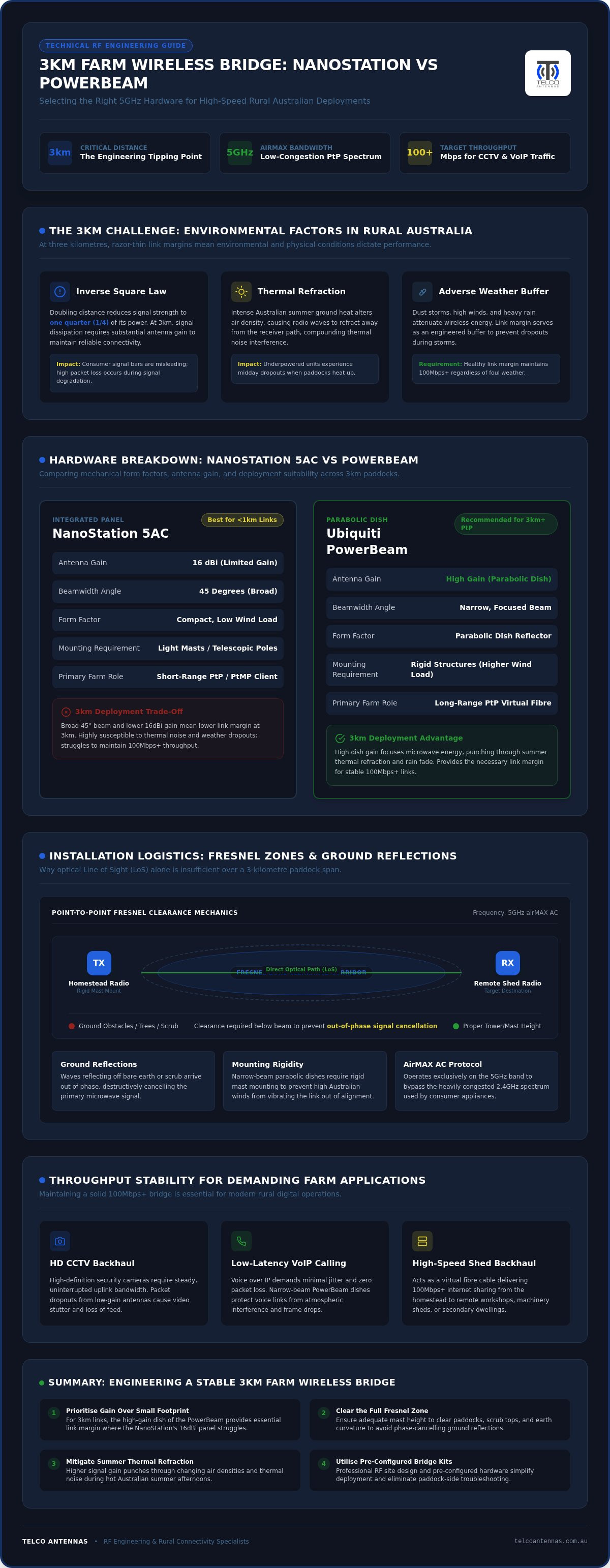
Installation Logistics: Fresnel Zones, Alignment, and Australian Conditions
Success with a 3km wireless link depends as much on the physical mounting as it does on the internal radio specifications. When you're deciding between the ubiquiti nanostation vs powerbeam for 3km farm wireless bridge, you have to account for the mechanical precision required at this range. While the NanoStation's 45-degree beamwidth is forgiving during the initial setup, its lack of fine-tuning hardware makes it difficult to lock in a perfect signal. Conversely, the PowerBeam's 8-degree beam requires a steady hand and a rock-solid mounting point, as even a few millimetres of movement at the bracket can result in a massive signal drop three kilometres away.
Clearing the Paddock: Fresnel Zone Explained
A common mistake in rural installations is assuming that a visual line of sight is sufficient. Radio waves don't travel in a straight line like a laser; they occupy a football-shaped area known as the Fresnel zone. At a distance of 3km on the 5GHz band, this zone reaches its maximum width at the 1.5km midpoint. You need roughly 6 to 7 metres of vertical and horizontal clearance around the centre of the beam to prevent signal degradation. If the bottom of this "football" clips a shed roof, a treeline, or even the rising slope of a paddock, the reflected waves will interfere with the primary signal, causing erratic throughput and high latency.
In flat Australian landscapes, the curvature of the earth also begins to play a role at 3km. To ensure you clear the Fresnel zone and avoid ground reflections, mounting height is your most valuable asset. If your existing buildings don't provide the necessary elevation, utilizing telescopic mast trailers can provide the rapid height needed to punch the signal over obstacles without permanent tower construction.
Mounting and Cabling Best Practices
The Australian environment is notoriously hard on networking hardware. High UV levels and intense storm activity mean that standard indoor cabling will fail within months. We always recommend using shielded Cat6 (STP) cabling with an internal drain wire. This shielding is critical for preventing Electrostatic Discharge (ESD) damage, which is common during dry, windy conditions or lightning storms. Proper earthing of the mounting bracket to the building's electrical ground is equally vital to protect your internal network switches and routers from surges originating at the antenna.
While the NanoStation and PowerBeam feature integrated antennas, professional-grade builds often involve secondary equipment. In scenarios where you're integrating external antennas into your site design, using LMR-400 coaxial cables ensures maximum signal retention between the radio and the antenna. For the most reliable results, you should source a pre-configured bridge kit that includes all necessary UV-rated cabling and heavy-duty mounts designed for the Australian climate.
Engineering a Reliable Farm Bridge: Professional Kits and Site Design
Selecting the right hardware is only the first step in establishing a robust link. The real challenge lies in the engineering and configuration that ensures the system survives the practical realities of a rural environment. For many property owners, the ubiquiti nanostation vs powerbeam for 3km farm wireless bridge decision is simplified by opting for a pre-configured bridge kit. These kits from Telco Antennas are pre-staged and tested before dispatch, which eliminates the technical hurdles of firmware updates and IP addressing while standing in a dusty paddock. When you're managing a 3km span, having a system that is "plug-and-play" saves hours of frustration and ensures the link is optimised for maximum throughput from the moment it's powered on.
For properties with complex topography or significant vegetation, a professional RF site survey is essential. This process uses terrain mapping software to identify potential obstructions and calculate the exact mounting heights required to clear the Fresnel zone. If your house and shed don't have a clear line-of-sight, we can provide custom communication tower design to bypass obstacles. This infrastructure often becomes the backbone of a property-wide network, especially when integrated with Starlink. By using our after-market power conversion and professional bridges, you can distribute high-speed satellite internet from your main residence to every corner of the farm.
When to Call in the Experts
Identifying "non-line-of-sight" (NLOS) issues is where professional expertise becomes invaluable. If hardware alone can't punch through a hill or a dense stand of gums, we may need to design a relay station or move to a Point-to-MultiPoint (PtMP) system to cover multiple locations across the property. Telco Antennas supports these rural deployments with remote engineering services, ensuring that even the most isolated properties have access to expert RF advice. This consultative approach prevents the "trial and error" method that often leads to wasted investment in unsuitable hardware.
Final Recommendation: NanoStation or PowerBeam?
The technical verdict for a 3km span is clear. For 90% of deployments at this distance, we recommend the PowerBeam 5AC Gen2. Its superior gain and narrow beamwidth provide the necessary link margin to handle Australian weather extremes and maintain a stable 100Mbps+ connection. Settling the ubiquiti nanostation vs powerbeam for 3km farm wireless bridge debate comes down to reliability; while the NanoStation has its place as a client unit in a wide-angle PtMP setup, it lacks the precision needed for a primary 3km backbone. If you're ready to secure your property's connectivity, contact Telco Antennas for a customised 3km wireless bridge solution tailored to your specific terrain.
Securing Your Rural Digital Infrastructure
Establishing a stable link across three kilometres requires moving beyond theoretical speeds and addressing the physical challenges of the Australian landscape. We've established that the choice between the ubiquiti nanostation vs powerbeam for 3km farm wireless bridge depends on engineering a sufficient link margin to withstand extreme heat and rain fade. While the NanoStation offers a compact profile, the PowerBeam's 25dBi gain provides the necessary buffer for a consistent 100Mbps+ throughput. Success ultimately hinges on precise alignment and clearing the Fresnel zone to avoid ground reflections that degrade performance.
As Australian owned RF engineering specialists, Telco Antennas provides the technical depth needed to solve complex connectivity issues. Our custom pre-configured wireless kits take the guesswork out of the installation, ensuring proven reliability in remote agricultural environments. If you're ready to eliminate signal dropouts and unify your property's network, Design your 3km wireless bridge with Telco Antennas experts today. You can build a communication backbone that stands up to the harshest conditions and keeps your farm connected for years to come.
Frequently Asked Questions
Will trees or scrub block my 3km wireless bridge link?
Yes, dense trees and scrub will significantly degrade or entirely block a 5GHz wireless link. While microwave signals can occasionally punch through very light foliage, any dense scrub or treeline within the signal path causes diffraction and absorption. At 3km, even a single large gum tree can drop your throughput from 100Mbps to nearly zero. You must ensure the entire Fresnel zone is clear of obstacles to maintain a stable connection.
Do I need an ACMA license to run a Ubiquiti bridge on my farm?
You don't need an individual ACMA license to operate these devices on your property. Ubiquiti hardware typically operates within the 5GHz band under the Low Interference Potential Devices (LIPD) Class License. This allows anyone to use the equipment provided it complies with specific power output limits. However, you must ensure your hardware is configured to Australian region settings to remain compliant with local EIRP regulations and frequency allocations.
Can the NanoStation actually reach 3km in Australian weather?
A NanoStation can technically establish a connection at 3km, but it's rarely the best choice for this distance in Australian conditions. The 16dBi gain leaves very little fade margin for surviving intense summer heat or heavy rain. When evaluating the ubiquiti nanostation vs powerbeam for 3km farm wireless bridge deployments, the NanoStation often struggles to maintain high-speed modulation. You'll likely see frequent speed drops during atmospheric disturbances.
How much speed (throughput) can I expect from a PowerBeam at 3km?
With a clear line of sight and precise alignment, a PowerBeam 5AC Gen2 can typically deliver between 150Mbps and 330Mbps of actual TCP/IP throughput at 3km. This assumes you're using a 40MHz or 80MHz channel width and have a low noise floor. Because the PowerBeam has high antenna gain, it maintains higher modulation rates than smaller units, ensuring that your data speeds remain consistent even when environmental conditions are less than ideal.
What happens to the wireless link during a heavy Australian dust storm?
Dust storms cause signal attenuation and scattering, which can lead to increased latency and reduced throughput. Fine dust particles absorb microwave energy, effectively shrinking your link margin. This is why we recommend the PowerBeam for 3km links; its high 25dBi gain provides a significant buffer. A link with a healthy fade margin will usually stay connected through a dust storm, whereas an underpowered link may drop out entirely until the air clears.
Can I use a wireless bridge to share my Starlink connection to another shed?
Sharing a Starlink connection is one of the most common applications for a point-to-point bridge. By connecting the bridge to your Starlink router, you can project high-speed internet to a remote shed, workshop, or secondary dwelling. This eliminates the need for multiple ISP subscriptions. For sites without mains electricity, high-efficiency solar solutions from Nippon Energy offer a reliable way to power your remote networking hardware. When using the ubiquiti nanostation vs powerbeam for 3km farm wireless bridge to share Starlink, the PowerBeam ensures you don't bottleneck the high speeds provided by the satellite terminal.
Your required mast height depends on the terrain profile between your two points, but you generally need enough height to clear the 6.5-metre Fresnel zone radius at the midpoint. On perfectly flat ground, mounting antennas at least 8 to 10 metres high is often necessary to avoid ground reflections. If there are trees or rises in the landscape, you'll need additional height. We often use telescopic mast trailers to achieve this elevation.
Is the PowerBeam Gen2 better than the original PowerBeam?
The PowerBeam 5AC Gen2 offers several critical improvements over the original model, including a dedicated 2.4GHz management radio for easier mobile setup. It also features a redesigned mounting bracket that allows for more precise alignment, which is essential at 3km distances. The Gen2 hardware includes improved surge protection and a more robust radio design that handles interference more effectively, making it a much more reliable choice for long-term deployments in harsh environments.


